
Real estate teams have added more tools in the past three years than in the previous decade. The coordination load didn't go with them, because tools generate output and stop; AI agents monitor workflows, act when conditions are met, check the result, and keep going until the work is done.
That distinction drives what's actually changing in brokerage operations, property management, and transaction teams. Customer relationship management (CRM) systems log leads, eSignature tools move documents, and AI writing tools draft listing descriptions. Between every one of those tools, a human still decides what happens next. Who follows up with the 9pm inquiry, when the contract gets sent, which maintenance request is actually urgent. AI agents are the layer that owns those handoffs instead of leaving them to chance.
According to Morgan Stanley Research, AI could lead to $34 billion in efficiency gains for the real estate industry by 2030, with 37% of tasks performed by real estate investment trust (REIT) and commercial real estate (CRE) firms automatable, particularly in management, sales support, and administrative functions. Real estate firms that have deployed agents aren't waiting for that future; they're running it now across lead qualification, listing distribution, transaction coordination, and property management. Agent platforms like Pazi are built for this work, connecting these tools into a single workflow the agent owns end-to-end.
TL;DR
- AI agents handle full real estate workflows end-to-end, from lead qualification to closing.
- AI tools generate output on demand; AI agents own the workflow and keep it moving.
- Teams moving beyond AI tools deploy agents on platforms like Pazi, built for real-world ops.
Table of Contents
- Why AI Tools Don't Solve the Coordination Problem
- Four Real Estate Workflows Where Agents Replace Human Coordination
- A Lead-to-Showing in Six Steps, No Human Required
- The Real Estate Stack Your AI Agent Needs to Work
- What Separates Agent Platforms from Automation Tools
- Why Lead Follow-Up Is the Right First Agent to Build
- The Metrics That Confirm Your Agent Is Working
Why AI Tools Don't Solve the Coordination Problem
The NAR 2025 REALTOR® Technology Survey found that 66% of real estate professionals adopt new technology primarily to save time, and 46% are already using AI-generated content for listing descriptions. The tools are in use, and the coordination problem is still there.
Teams scaling past AI tools are moving to dedicated agent platforms built for ops work that requires judgment and sequencing rather than just task execution.
The gap AI tools don't close
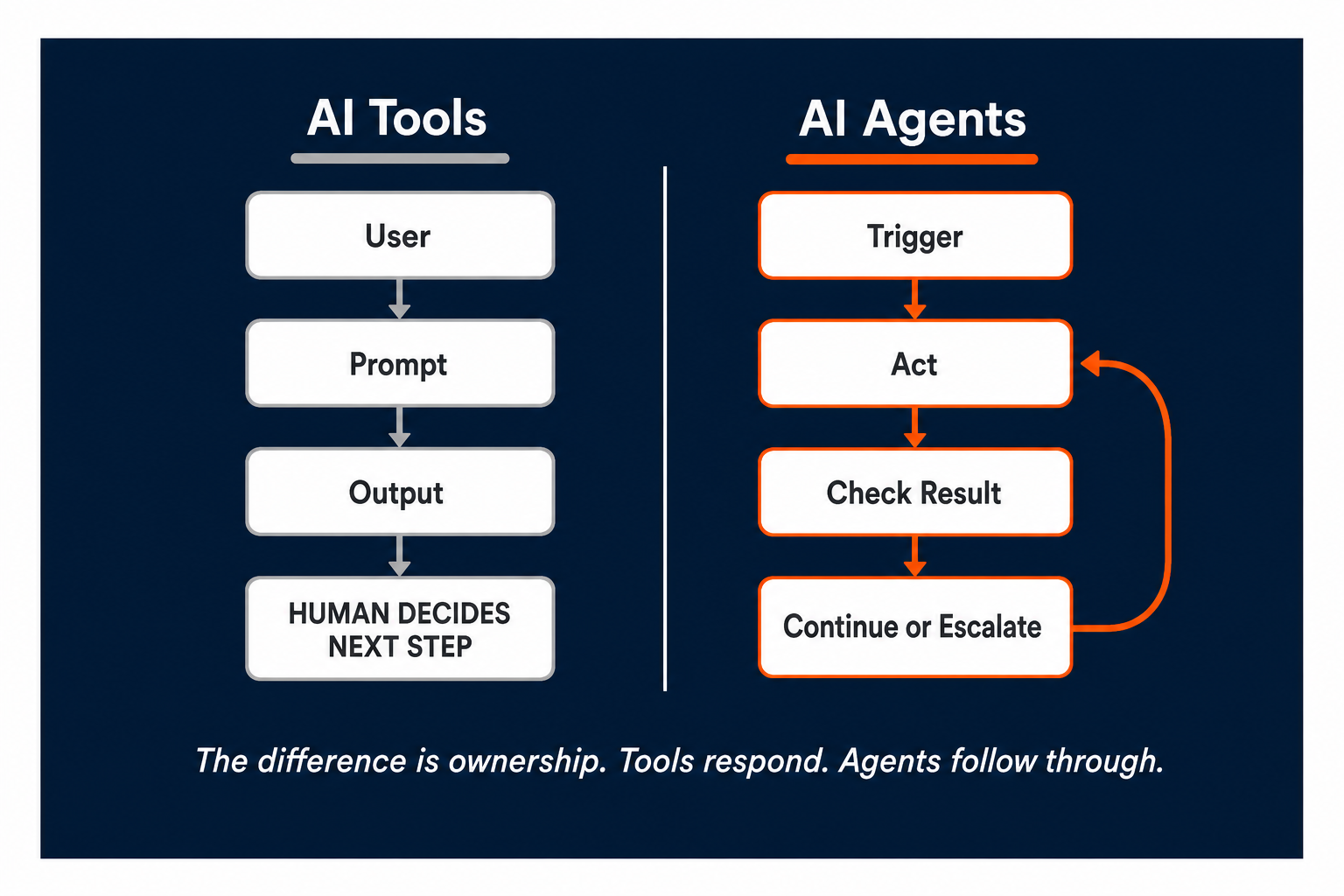
AI writing tools handle specific tasks well, such as drafting the listing description, generating the follow-up email, and summarizing the meeting notes. Each tool waits for input, produces output, and stops. The human on the other end decides what to do next and when to move to the following step.
That handoff gap is the coordination problem; it doesn't shrink because the output is better, and it persists because the tool isn't tracking anything. It doesn't know whether the email was opened, whether the lead replied, or whether the contract is waiting on a signature. Tools produce output; agents follow it through to completion.
What changes when agents own the workflow
Ownership is the operational word; an agent assigned to lead follow-up doesn't just draft the first email. It monitors whether the email was opened, waits a defined interval, sends the next touchpoint via a different channel if needed, scores the lead based on response behavior, and logs every interaction to the CRM without prompting.
The enabling mechanism is the agentic loop, which acts, checks the result, decides the next step, and continues without prompting. Tools reduce effort per task; agents reduce the number of tasks a human needs to initiate.
"An AI agent doesn't just help write the email. It decides when to send it, tracks whether it was read, and follows up if it wasn't."
Four Real Estate Workflows Where Agents Replace Human Coordination
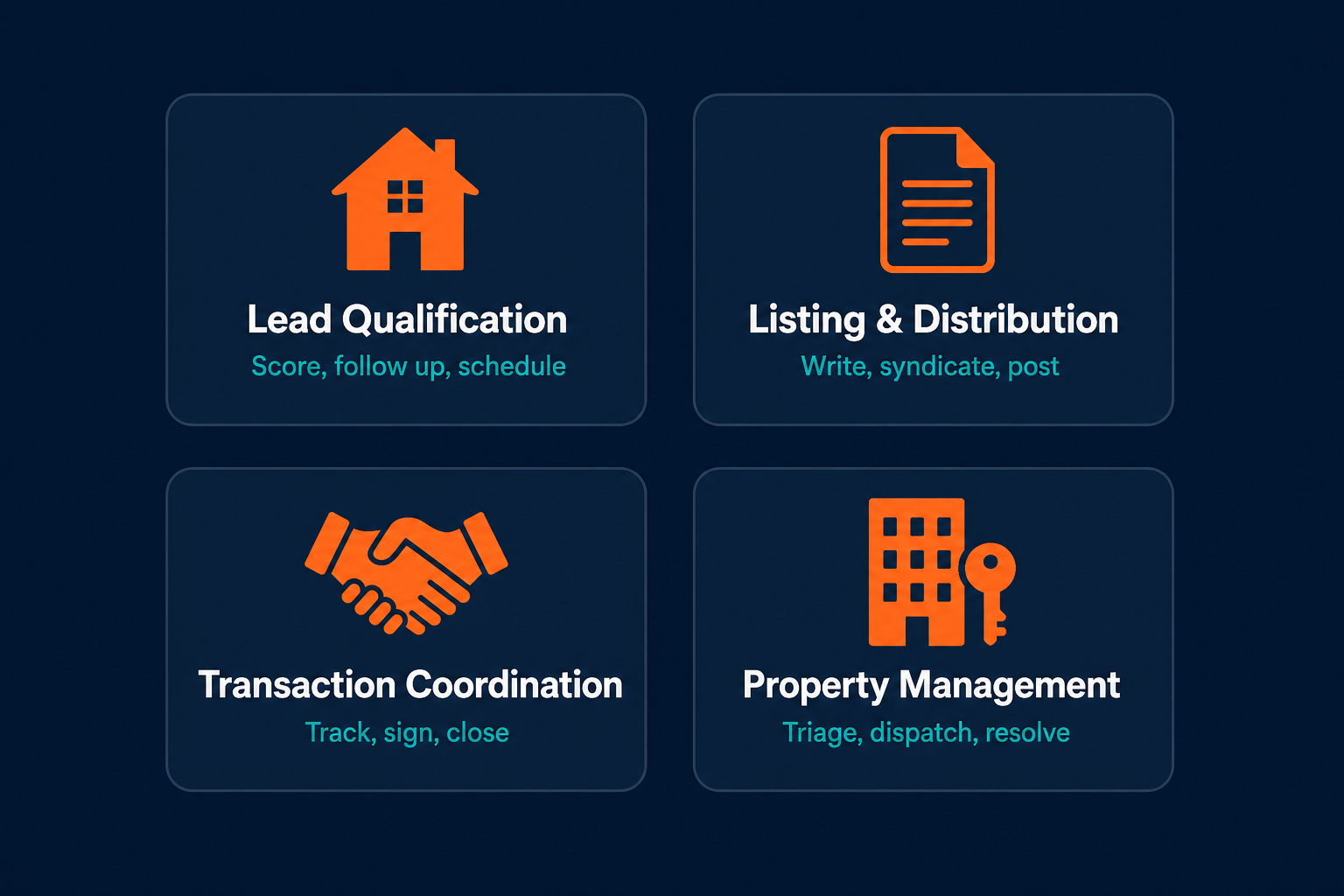
Across brokerage, property management, and transaction coordination, four workflow categories consistently produce the highest return when agents take ownership. Each represents decisions that follow predictable rules and happen frequently enough to justify building around.
Lead Qualification and Follow-Up
Response speed determines whether a lead converts. Teams that close more deals aren't necessarily generating more inquiries; they respond faster and follow up more consistently than teams that rely on agents to check their inbox between showings.
An AI agent changes that arithmetic. When a lead inquiry arrives through Zillow, Realtor.com, or a direct website form, the agent pulls available profile data, scores the lead against predefined criteria (budget range, purchase timeline, geographic preference, pre-approval status), and sends a personalized intro email within minutes. No reply after 24 hours triggers a short message service (SMS) text via Twilio; a reply triggers a calendar link sent automatically. The showing gets booked in Calendly and the CRM stage updates in Follow Up Boss or HubSpot, all without manual input.
The qualification logic is yours; the agent executes it without gaps, including at 9pm on a Tuesday.
AI agents for small business operations often start with lead qualification too. Boutique brokerages with one or two agents get the most leverage from automating this workflow since every hour spent chasing unqualified leads is an hour away from active clients.
Listing Creation and Distribution
An agent takes Multiple Listing Service (MLS) data and property photos, generates the listing description, formats it to platform specs, and syndicates it to Zillow, Realtor.com, and Trulia simultaneously. It then creates social captions for Instagram and Facebook in different formats with different character limits, and schedules them to go live when the listing publishes. The agent does this for every new listing without being asked; it just needs a connection to the MLS feed.
Listing creation is where teams typically start with AI tools; distribution and scheduling is where agents extend that into a real operational gain.
Transaction Coordination and Document Management
Transaction coordination has more surface area for errors than any other part of the real estate workflow. Signed contract, inspection window, title order, mortgage commitment deadline, closing disclosure, funding confirmation. Every step has a deadline, every deadline has a stakeholder, and every stakeholder needs a different communication.
An agent handles this the way a transaction coordinator does, except it runs in parallel for every deal without dropping tasks. A signed contract in Dotloop triggers the agent to create a task checklist, send the inspection window notice to both parties, dispatch the DocuSign packet to buyer, seller, and lender, and ping the title company with the relevant closing details. Every task gets logged. Deadlines within 48 hours trigger escalation alerts to the responsible party and to the listing agent via Slack.
This pattern extends into AI agents in finance contexts as well, including mortgage processing, escrow coordination, and investment deal flow, which all share the same structure of rules-based multi-stakeholder workflows where agents prevent things from falling through.
The agent doesn't just coordinate; it executes the coordination protocol without gaps.
Property Management and Tenant Communication
Property management agents deal with a constant stream of maintenance requests, lease renewals, rent reminders, and vendor dispatches. The workload is predictable but volume-heavy, and most of it follows rules that can be encoded.
A maintenance request submitted through AppFolio triggers an agent to classify the request by urgency (emergency, routine, cosmetic), contact the appropriate vendor with the request details and unit access info, schedule a service window, confirm the window with the tenant, and close the ticket once the vendor marks it complete. The property manager gets a daily summary instead of 40 individual interruptions.
The operational pattern is the same across property management as in other ops-heavy functions. Volume-based tasks that follow defined rules are the first candidates for agent ownership.
"Real estate lead follow-up doesn't fail because teams don't know what to say. It fails because nobody sends the third message."
A Lead-to-Showing in Six Steps, No Human Required
Abstract use case descriptions are useful for planning; a concrete walkthrough is more useful for deciding whether to build.
Here is a lead-to-showing workflow running on AI agents, using real tools, with no human steps between the inquiry and the confirmed appointment.
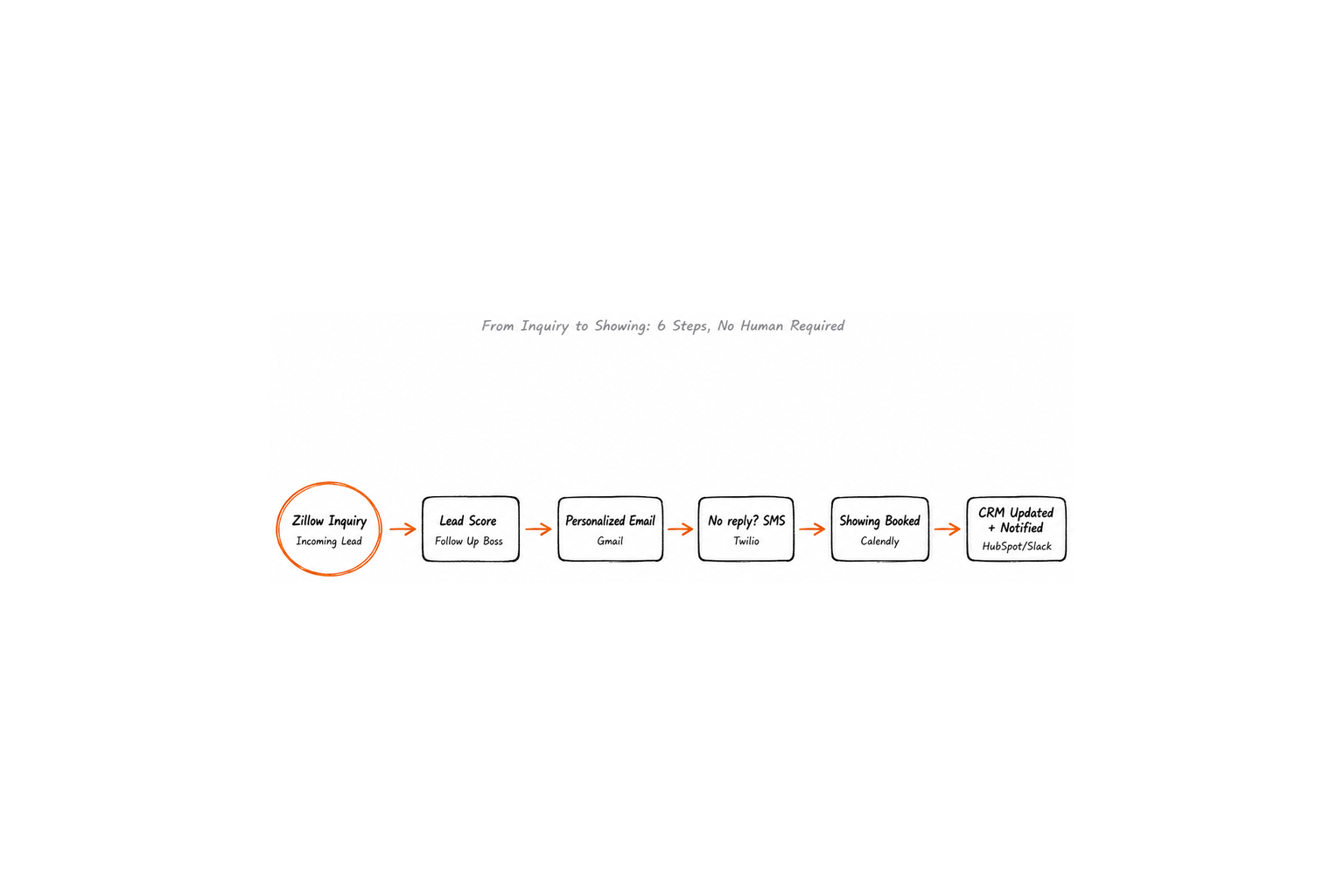
Trigger: A lead inquiry arrives on Zillow at 9:47pm.
-
Lead intake. The Zillow webhook fires and the agent pulls the lead profile from Follow Up Boss, including any prior inquiry history, budget range if captured, and geographic preference.
-
Lead scoring. The agent matches the lead profile against active inventory, identifies three properties within the stated price range, and ranks them by match quality.
-
Personalized outreach. Within four minutes of the inquiry, a personalized email goes out via Gmail with the three matching property cards and a calendar link for a showing.
-
Follow-up routing. If there is no reply after 24 hours, the agent sends an SMS via Twilio with a shorter message and a direct link to the best-matching property.
-
Booking confirmation. When the lead replies, they receive a calendar link in Calendly; once they book, the agent sends a confirmation email and adds the appointment to Google Calendar.
-
CRM update. The CRM stage in HubSpot moves to "Showing Scheduled" and the listing agent receives a Slack notification with the lead name, showing time, and property address.
The workflow requires no human steps; the agent handled the complete sequence from inquiry to confirmed showing. That's not a future capability; it's running on real estate teams today.
"The agent didn't wait for the agent. That's the operational difference."
The Real Estate Stack Your AI Agent Needs to Work
Agents work by connecting to the tools already in the stack and executing actions across them. The integration layer is where agent functionality lives.
| Function | Tools | What the Agent Does |
|---|---|---|
| Lead and CRM | Follow Up Boss, HubSpot, kvCORE, Salesforce | Scores leads, logs interactions, updates stages, sends alerts |
| Listings and MLS | Zillow API, Realtor.com API, Spark API | Pulls data, syndicates listings, schedules social posts |
| Transaction management | Dotloop, SkySlope, DocuSign | Creates checklists, sends signature packets, tracks deadlines |
| Communication | Twilio, Gmail, Slack | Sends SMS and email, routes notifications to the right person |
| Property management | AppFolio, Buildium, Rentec Direct | Triages requests, dispatches vendors, updates ticket status |
| Scheduling | Calendly | Sends booking links, confirms appointments, updates calendars |
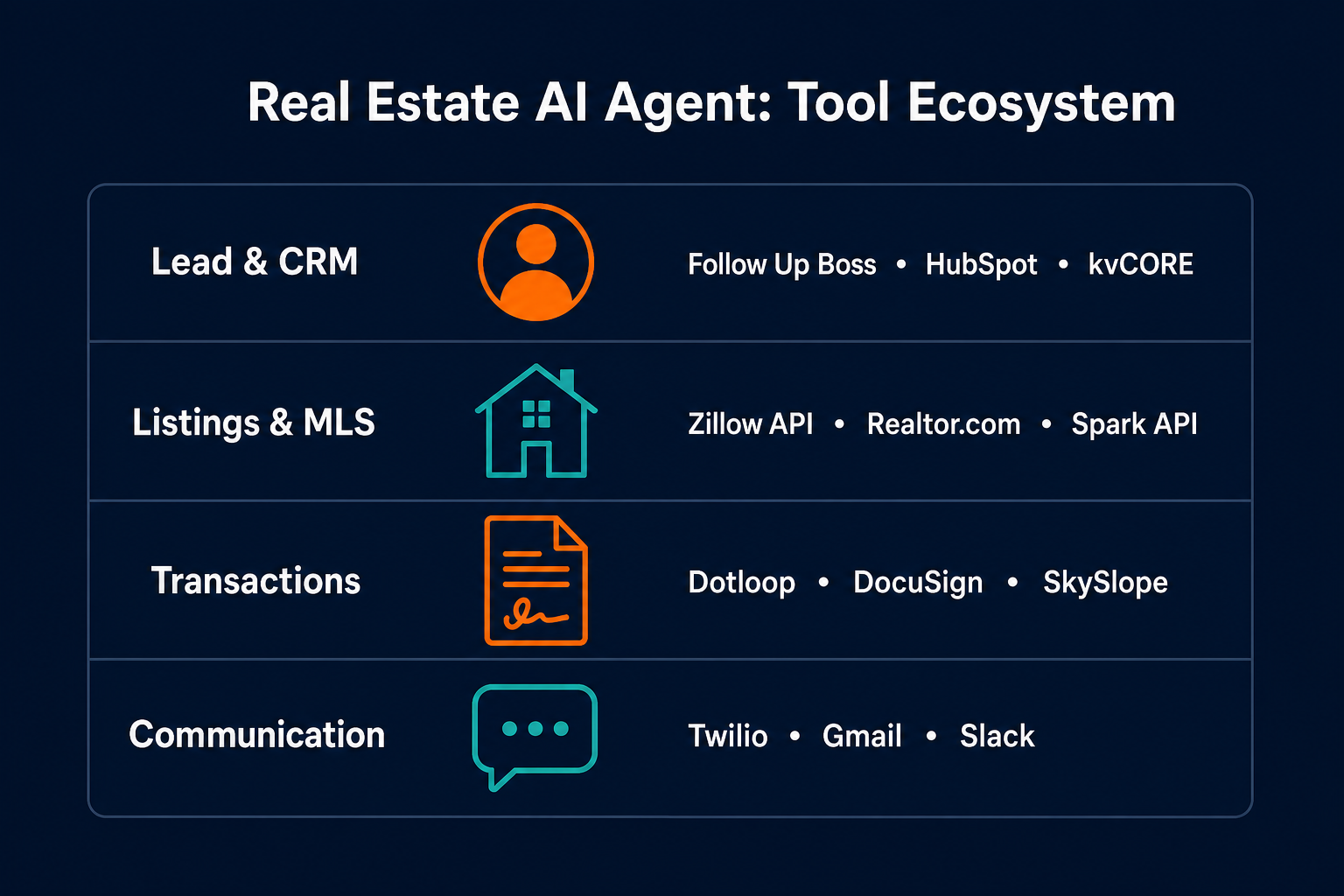
Integration depth determines what the agent can actually do; an agent connected only at the email layer can send messages, while an agent connected to the CRM, the transaction platform, and the communication stack can own an end-to-end workflow. The scope of what you build into the agent is determined by the scope of the integrations you bring in.
What Separates Agent Platforms from Automation Tools
Choosing an agent platform is a workflow decision, not a software purchase. The Deloitte 2026 Commercial Real Estate Outlook, which surveyed over 850 global CRE chief executives, asked whether CRE organizations are "investing in AI progress, or just paying for promise." The answer depends heavily on which platform they chose.
| Criteria | Why It Matters | Red Flag |
|---|---|---|
| Integration depth | Agents only do what they can access across tools | Supports email only, no CRM or transaction platform APIs |
| Multi-step orchestration | Lead-to-close workflows cross five or more steps and multiple tools | Platform supports single-action triggers only |
| Human-in-the-loop controls | Some decisions need a human checkpoint before proceeding | No ability to pause, escalate, or require approval |
| Setup complexity | Real estate teams are not developer teams | Requires engineering resources to build basic workflows |
| Audit trail | Transaction workflows need a record of every action taken | No logging of agent actions or decision history |
Understanding what genuine agent autonomy looks like matters during evaluation. A platform that describes itself as AI agents but only supports predefined automation steps with no dynamic decision-making is a workflow tool with better marketing.
Agent platforms like Pazi are built for team-wide ops workflows that cross tools and require judgment at each step, not just execution. The distinction shows up in production, not in demos.
"The question isn't whether the platform has AI. The question is whether the AI can own a step, not just assist with it."
Why Lead Follow-Up Is the Right First Agent to Build
Starting with the most complex workflow is the most common mistake; starting with lead follow-up is the right move.
Lead follow-up has four properties that make it the right first deployment:
- High-frequency, happening with every inquiry
- Time-sensitive, where response speed measurably affects conversion
- Rule-based enough that the decision tree can be encoded and handed to an agent
- Visible enough in failure that the cost shows up clearly in the data, as leads that went cold or showings that never got booked
Step 1. Pick one trigger. For lead follow-up, the trigger is a new inquiry landing in your CRM or inbox. Define exactly what event starts the workflow before configuring anything else.
Step 2. Map the decision chain. List every decision the current process requires:
- Does the lead qualify against your criteria?
- Which properties in active inventory match their stated needs?
- How long do you wait before sending the next touchpoint?
- What channel do you use if email doesn't get a reply?
Map this before building.
Step 3. Connect your CRM first. Follow Up Boss and HubSpot both offer APIs that most agent platforms support. The CRM is the hub of the workflow; the agent reads lead data from it and writes interaction history back to it.
Step 4. Run in parallel. For the first two weeks, have the agent run its workflow while your existing process continues. Compare response rates, time-to-contact, and showing booking rates between agent-handled leads and manually handled ones. Let the data make the case for expanding the agent's scope.
For teams that want a zero-code path to the first deployment, getting started with AI agents without a developer covers the practical setup steps that don't require engineering resources.
The Metrics That Confirm Your Agent Is Working
Agents don't improve workflows on their own; they make the gaps visible because every step is logged, and the table below shows what to track once an agent is running.
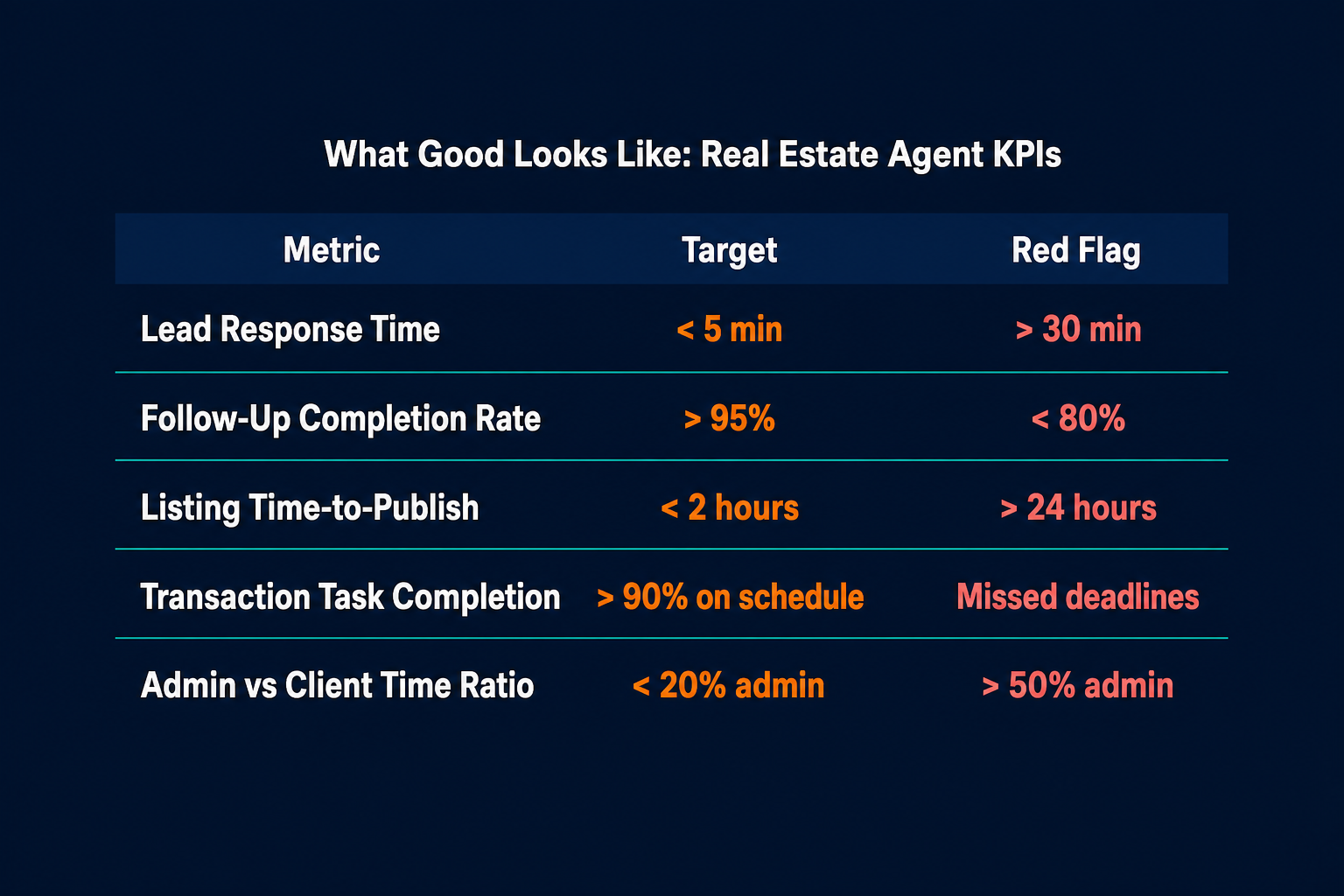
| Metric | What It Measures | Target | Red Flag |
|---|---|---|---|
| Lead response time | How quickly the first outreach fires after inquiry | Under 5 minutes | Over 30 minutes |
| Follow-up completion rate | Percentage of leads receiving all defined touchpoints | Above 95% | Below 80% |
| Listing time-to-publish | Time from listing creation to live across all platforms | Under 2 hours | Over 24 hours |
| Transaction task completion | Percentage of transaction milestones completed on schedule | Above 90% | Missed deadlines with no alert |
| Admin-to-client time ratio | Proportion of agent hours on administrative tasks vs client work | Below 20% admin | Above 50% admin |
The most useful early signal isn't efficiency; visibility comes first, and when agents run the workflow, every drop-off point becomes identifiable. A follow-up completion rate of 70% tells you exactly where leads are falling out. A listing time-to-publish of 6 hours tells you where the bottleneck is in the distribution chain. Agents surface the problems, and that's where the first operational gain sits.
AI Agents for Real Estate at a Glance
| Use Case | What the agent does | Who benefits | Impact |
|---|---|---|---|
| Lead qualification | Scores inquiries, sends personalized outreach, follows up via email and SMS automatically | Sales agents, team leads | Faster first response, fewer cold leads |
| Listing distribution | Generates listing copy, syndicates to Zillow, Realtor.com, and Trulia, schedules social posts | Listing agents, marketing | Consistent multi-platform distribution, hours saved per listing |
| Transaction coordination | Creates task checklists, routes DocuSign packets, tracks deadlines, sends escalation alerts | Transaction coordinators, agents | Fewer missed milestones, faster time to close |
| Property management | Triages maintenance requests, dispatches vendors, confirms with tenants, closes tickets in AppFolio | Property managers, landlords | Reduced admin interruptions, higher tenant satisfaction |
Pazi is a platform that real estate teams use to run lead qualification, transaction coordination, and property management agents. Agents live where your team already works, in Slack, email, and your CRM, without requiring a developer to set them up. If your team is spending more time managing handoffs than managing clients, that's the problem agents are built for. Start at pazi.ai.
Related Reading



