
If your operations team still manually triages every alert, routes every approval, and assembles every status report, that's not a staffing problem. It's a missing-automation problem.
75% of global knowledge workers now use AI at work, and 90% say it helps them save time (Microsoft & LinkedIn, Work Trend Index 2024). The operations teams pulling ahead aren't just using AI as a smarter search. They're running AI agent workflows for operations teams on platforms like Pazi that own complete workflows end-to-end, from signal detection to resolution, without a human in the loop for every routine step. Understanding what makes an agent truly autonomous is the baseline for all 30 use cases below, each ranked by ROI proximity.
The ranking follows ROI proximity, with use cases at the top combining high incident frequency with a direct cost-or-revenue impact. Incident management sits at #1 because a missed P1 costs tens of thousands of dollars in downtime per hour. Compliance monitoring lands near #30 not because it's less important, but because the payback cycle is slower and harder to attribute to a single deploy.
"Operations teams that replace coordination work with agent-owned workflows don't just get faster. They change the ceiling on what a lean team can actually manage."
TL;DR
- IT and RevOps agents deliver the fastest payback. Most hit measurable impact within 30 days.
- The highest-ROI agents replace recurring coordination work, not one-time tasks
- Every use case below pairs with tools your team already uses (Jira, Slack, Salesforce, PagerDuty)
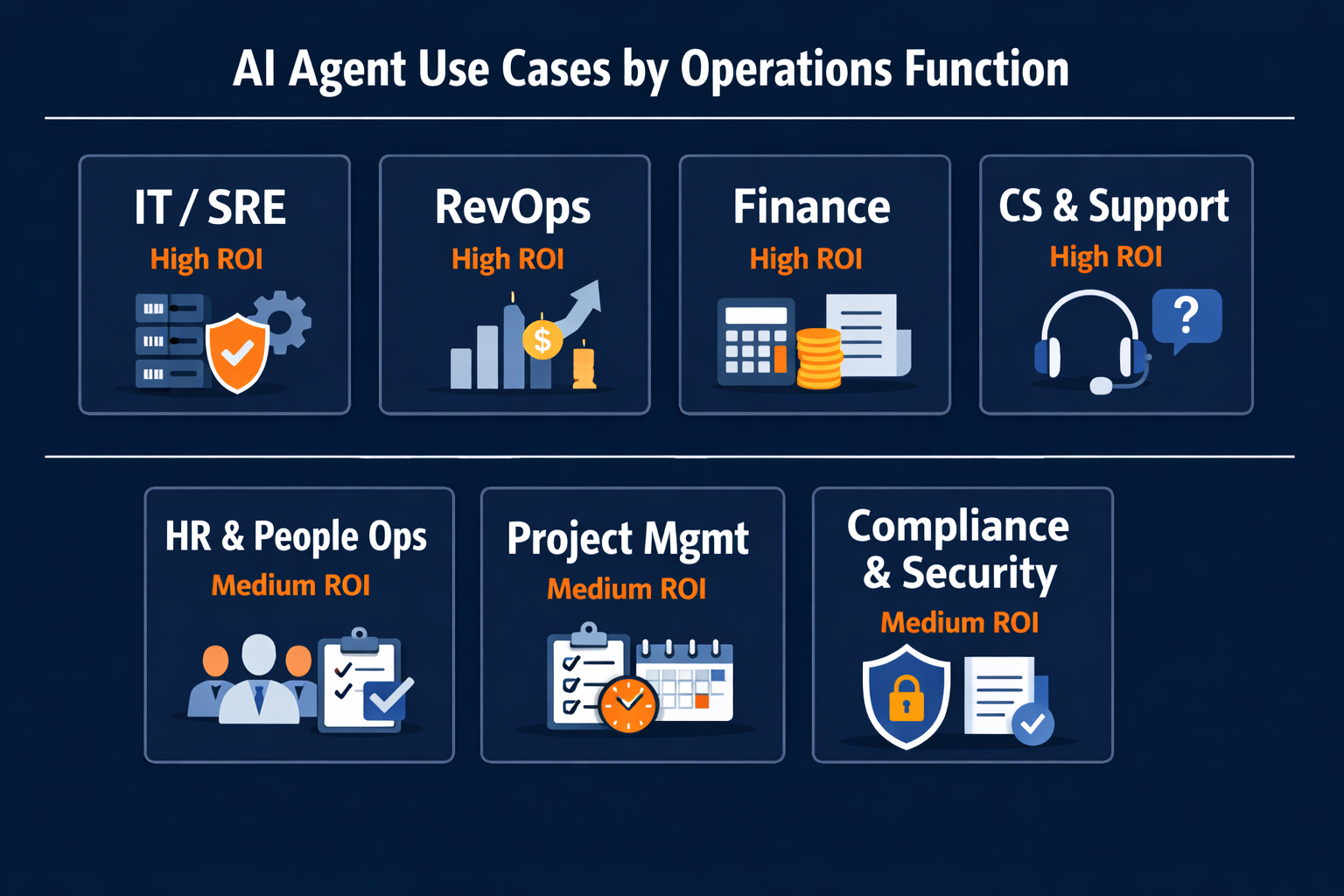
Table of Contents
- IT Operations, DevOps & SRE
- Revenue Operations & Sales Ops
- Finance & Procurement Operations
- Customer Success & Support Ops
- HR & People Operations
- Project & Program Management
- Compliance, Security & Audit
- Which Platform Fits Your Operations Team?
- Quick-Reference Summary Table
IT Operations, DevOps & SRE
IT and DevOps operations produce the clearest AI agent ROI. Incidents are expensive, runbooks are repetitive, and the feedback loop between detection and resolution is tight enough to measure to the minute. A P1 incident that takes four hours to resolve manually (versus 20 minutes with an agent running the triage) produces a calculable number. That precision is rare in other functions.
1. Incident triage and priority routing
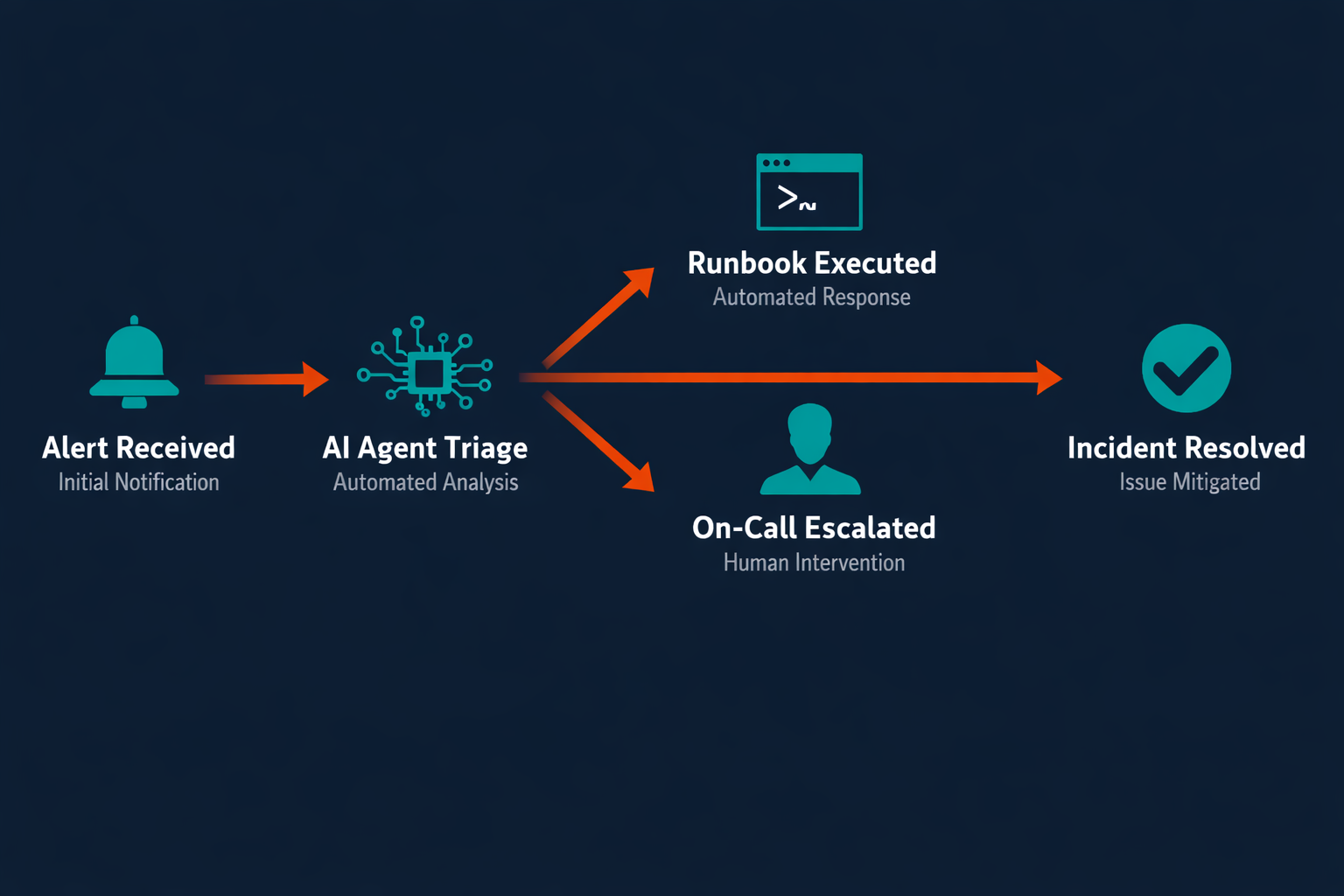
An AI agent monitors your alerting stack (PagerDuty, OpsGenie, Datadog) and classifies every incoming alert by severity, affected system, and historical resolution pattern. It deduplicates correlated alerts, determines whether the signal warrants P1/P2/P3 escalation, and routes to the right on-call engineer or resolves directly via runbook if the pattern matches a known failure. Teams running this report 40–60% fewer false escalations within the first two weeks, which means fewer sleep interruptions for on-call engineers and faster human attention on real incidents.
2. Runbook execution for known failure patterns
For failure modes with a defined resolution path (disk space exhaustion, pod crashes, SSL certificate expiry), an agent executes the runbook automatically. It pulls the playbook from Confluence or Notion, runs the resolution steps, verifies the outcome, and posts a summary to Slack. Human sign-off is required only when the action falls outside the defined runbook scope, which means Tier-1 incidents resolve without paging anyone.
3. Deployment monitoring and automatic rollback triggering
After every production deployment, an agent watches error rates, p95 latency, and health-check metrics for 10–15 minutes. If a metric crosses a threshold, the agent triggers a rollback via your CI/CD pipeline (GitHub Actions, ArgoCD) and notifies the deploying engineer with a root-cause summary. Developers stop manually watching dashboards post-deploy, with the agent doing the watching and only paging when a rollback needs human override.
4. On-call escalation and alert deduplication
Alert fatigue degrades on-call quality faster than headcount issues do. An agent running on top of your alerting stack groups correlated alerts by root-cause hypothesis, suppresses duplicate notifications, and escalates only when the composite signal exceeds a defined noise threshold. Teams that deploy this against PagerDuty and Slack typically report 50–70% alert volume reduction, and engineers stop ignoring alerts because they're no longer conditioned to expect noise.
5. Capacity forecasting and pre-emptive scaling alerts
A resource agent monitors CPU, memory, and storage utilization trends across your infrastructure (AWS CloudWatch, Datadog, Prometheus), projects headroom forward based on usage curves, and triggers a Slack alert, or auto-scales via Terraform, before capacity becomes a problem. SRE teams avoid both the cost of over-provisioning and the revenue impact of capacity-driven outages. Capacity surprises stop.
Language alone does not page the right person. Routing logic does.
Revenue Operations & Sales Ops
RevOps is where agents protect revenue, not just save time. The highest-value use cases connect CRM data to real-time sales activity, flag risk while there's still time to act, and automate the coordination work that slows reps down between conversations.
6. Lead scoring and intelligent rep routing
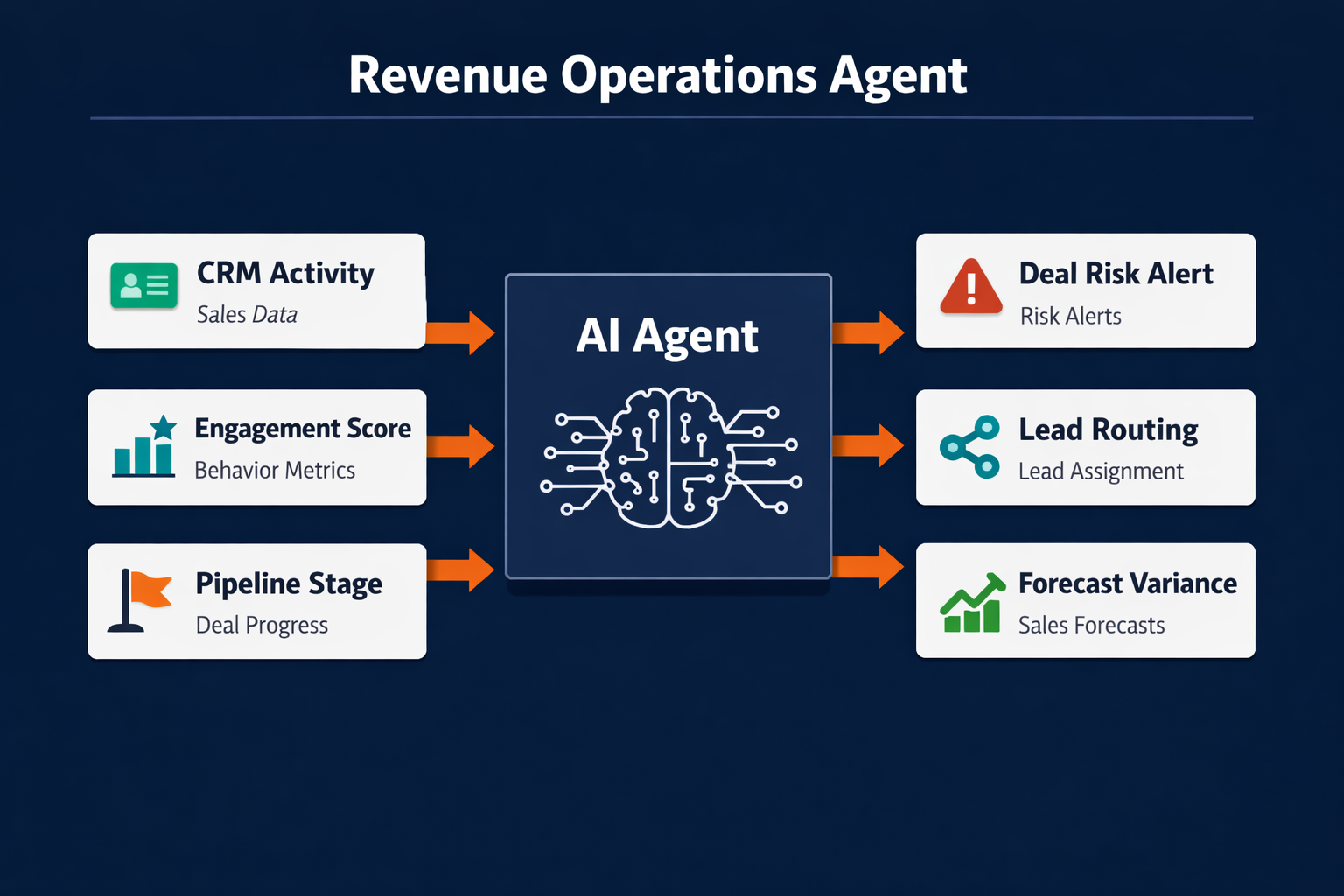
An agent monitors inbound leads in real time, scores them against your ICP criteria (company size, intent signals, tech stack, engagement depth), and routes to the right rep based on capacity and segment ownership. It updates Salesforce or HubSpot automatically and triggers the first outreach sequence without waiting for an SDR to check the queue. Lead response time drops from hours to minutes, which matters because response time is one of the strongest predictors of early conversion.
7. Deal risk flagging based on engagement-gap detection
Deals stall when contact goes quiet and nobody notices. An agent tracks engagement cadence in your CRM (email opens, meeting frequency, champion activity) and flags deals where contact has dropped below a defined threshold. It pings the owning rep in Slack naming which stakeholder went dark, how many days ago, and what the last touchpoint was. Sales managers stop relying on reps to self-report pipeline risk.
8. CRM data hygiene and contact enrichment automation
CRM data degrades at roughly 30% per year through role changes, company moves, and incomplete records. An agent runs nightly against your contact and account records, identifies stale data (no activity in 90 days, invalid email format, missing firmographic fields), enriches against Apollo or Clearbit, and either updates the record or flags it for rep review. Forecast accuracy improves within 60 days because the pipeline is built on accurate data.
9. Pipeline forecast variance analysis
A RevOps agent compares weekly pipeline snapshots, identifies deals that moved out, pushed, or dropped without a rep-logged reason, and surfaces the variance to the sales leader with context. Connected to Salesforce and a BI tool (Looker, Tableau), it generates a weekly variance digest that previously took a RevOps analyst two hours to compile. Automating revenue operations at this layer gives leadership accurate pipeline signal without the weekly manual prep.
10. Renewal risk scoring and outreach sequencing
For SaaS businesses, renewal risk is revenue risk. An agent monitors product usage (Amplitude, Pendo, Mixpanel) and support ticket volume for each account in the renewal cohort, computes a risk score, and triggers a CS or account management outreach sequence for accounts below threshold. The sequence runs in your CRM with no manual triage; high-risk accounts get human attention, while low-risk accounts renew without CS intervention.
11. Channel conflict detection and attribution
In multi-channel or partner sales models, deals get double-touched and commission disputes follow. An agent monitors deal creation across channels, detects duplicate contacts or accounts, flags potential conflicts to ops in real time, and marks records accordingly. The post-close attribution argument disappears.
Stalled deals become closed-lost before anyone notices.
Finance & Procurement Operations
Finance and procurement operations contain the highest-volume, most rules-based workflows in the company. Industries more exposed to AI see 3× higher revenue growth per employee (PwC, 2025 Global AI Jobs Barometer), and finance ops is where that productivity gap shows up most directly on the P&L.
12. Invoice processing and AP automation
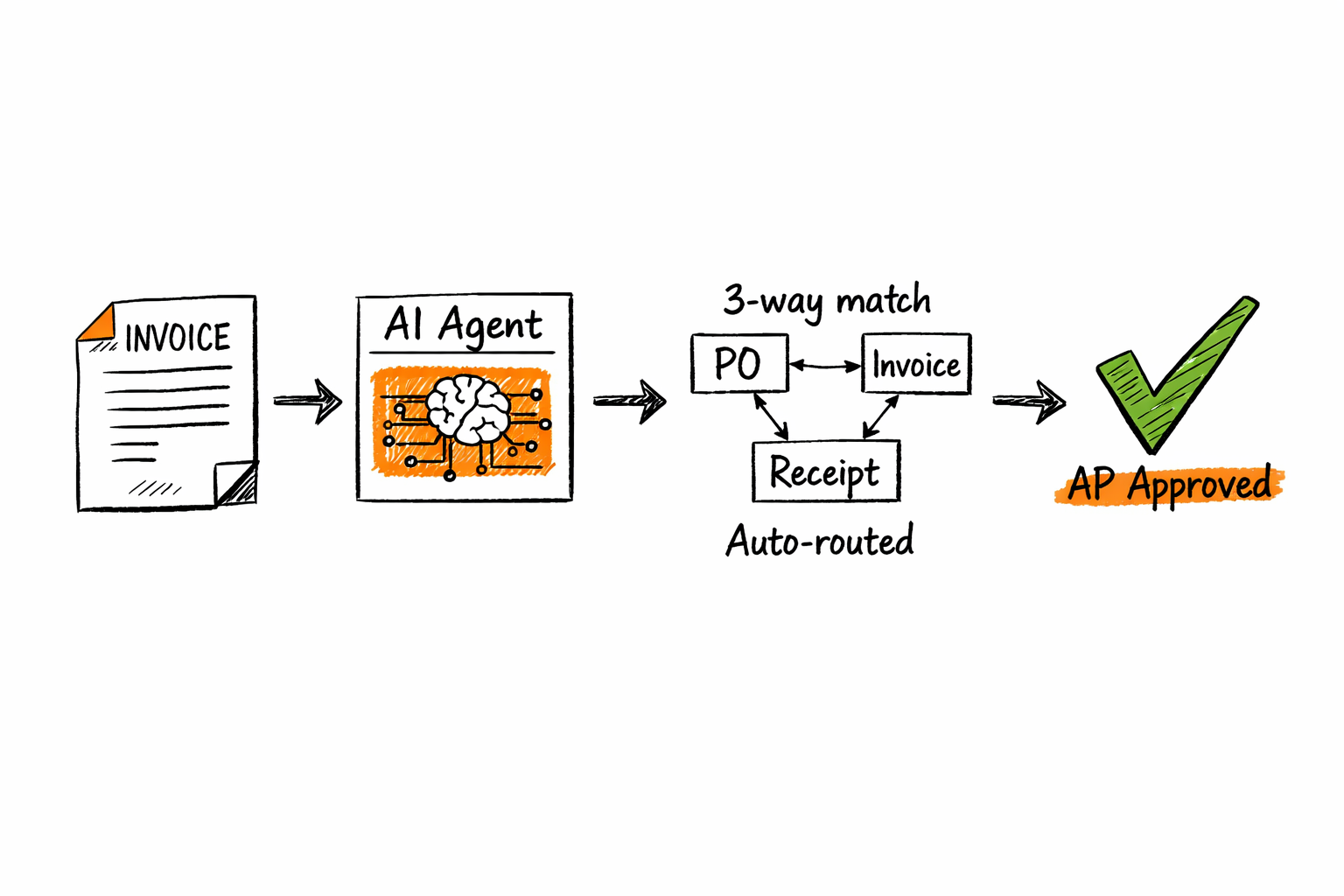
An agent ingests invoices (email, PDF, EDI), extracts line-item data, matches against purchase orders in your ERP (NetSuite, SAP, QuickBooks), flags discrepancies, and routes for approval. Three-way matching (PO, invoice, and goods receipt) runs without a human touching the document until approval is required. AP teams running this typically reduce invoice processing time by 60–80% and eliminate manual data entry errors. The volume of invoices that require human review drops to exception-only.
13. Expense anomaly detection and policy flagging
An agent runs nightly against expense submissions in Expensify or Concur, cross-references against your policy rules, and flags out-of-policy items for finance review. Beyond obvious violations, it identifies statistical anomalies, such as an employee's expense volume spiking 3× versus their 90-day baseline, that surface process issues before they become audit findings.
14. Vendor risk assessment and onboarding
Onboarding a new vendor manually means weeks of back-and-forth on insurance certificates, compliance questionnaires, and procurement approvals. An agent collects documentation, scores against vendor risk criteria (financial stability, data handling, geographic risk), routes for legal and compliance review, and tracks completion status in a single workflow. Vendor onboarding that took three weeks compresses to three to five days.
15. Budget variance monitoring and flagging
A finance agent monitors actuals versus budget in your FP&A tool (Adaptive, Anaplan, or Google Sheets at early stage) and triggers a Slack alert to the budget owner when a cost center hits a defined variance threshold (say, 10% over budget with 40% of the quarter remaining). It attaches a category-level breakdown so budget conversations happen while there's still time to correct, not at month-end close.
16. Procurement approval routing
Purchase requests above a dollar threshold sit in approval queues for days, and an agent eliminates that wait by routing them automatically. It identifies the right approvers based on amount, category, and org structure, sends approvals via Slack or email, escalates after 24 hours with no response, and posts the approval trail to your procurement system. Project management automation follows a nearly identical routing pattern. Same logic, different trigger.
Three-way matching is a rule. It doesn't need a person to run it.
Customer Success & Support Ops
Customer success and support operations run under constant volume pressure. The use cases below give AI agents the classification, routing, and monitoring work, letting CS teams spend their time on the relationships that require human judgment.
17. SLA breach prediction and alerting
An agent monitors open tickets in Zendesk, Intercom, or Freshdesk and calculates time-to-SLA-breach for every active case. When a ticket is tracking toward a breach, the agent alerts the assigned rep and their manager via Slack with time remaining and case context before the breach, not after. SLA compliance typically improves without headcount changes.
18. Churn signal detection and CS routing
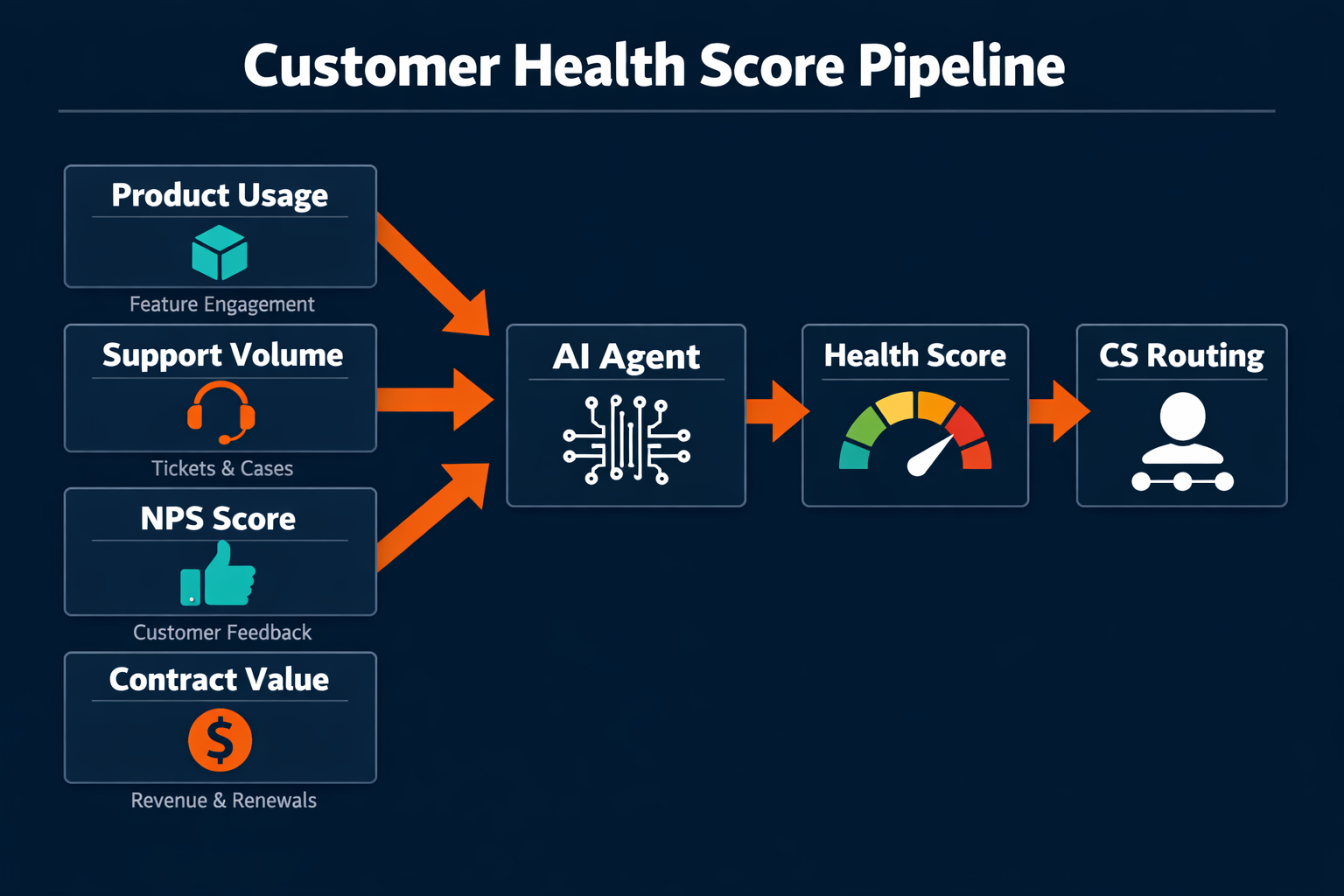
Churn signals are distributed across product data, support volume, and CRM activity, spread too thin for any CSM to monitor continuously. An agent aggregates signals (login frequency drop, feature adoption decline, support ticket spike, NPS score decline) and generates a daily at-risk account list for each CSM. Accounts with compound negative signals get escalated for human intervention, so the agent handles the monitoring while the CSM handles the conversation.
19. Support ticket classification and Tier-1 auto-resolution
An agent classifies every inbound ticket by issue type, urgency, and customer tier, routes to the right team, and resolves Tier-1 issues directly (password resets, account access, standard billing questions) via response templates and system actions. Deflection rate for Tier-1 issues typically reaches 30–40% within the first 90 days, and human agents receive only the tickets that require judgment.
20. Customer health score calculation and executive escalation
Customer health is a composite of usage depth, support load, NPS, contract value, and stakeholder engagement. An agent computes it weekly from your product analytics (Amplitude, Pendo), support tool, and CRM, and posts the updated health dashboard to the CS team channel. Accounts that drop below threshold trigger an executive alert. Automating account management at this layer gives CS leadership an early warning system that doesn't depend on rep self-reporting.
21. Customer feedback aggregation and product-team routing
NPS responses, support tickets, G2 reviews, and Intercom conversations all contain product signal. An agent aggregates these sources, clusters themes by feature area or pain type, and delivers a weekly product-signal digest to the product team's Slack channel or Linear board. Product managers make prioritization decisions on aggregated signal, not whoever spoke up loudest at the last all-hands.
An outdated health score is a blindfold.
HR & People Operations
HR ops contains some of the most high-volume, deadline-sensitive workflows in the company, where a single missed step carries real risk. An access account left open after an offboarding creates a security exposure; an onboarding sequence stuck in a queue for three days costs a new hire their first week. AI agents convert these from manual checklists into automated, reliable sequences.
22. Employee onboarding orchestration
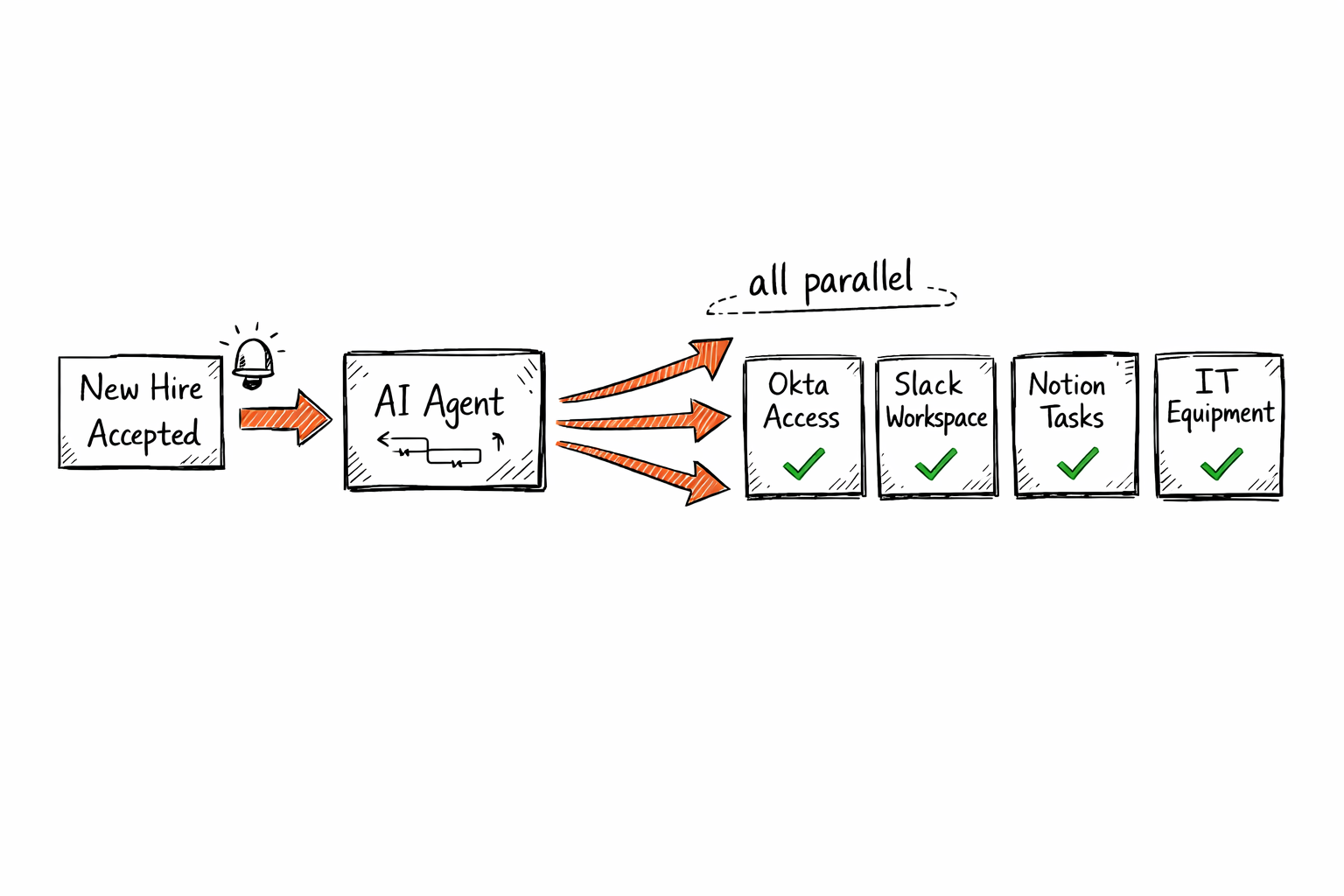
When a new hire accepts, an agent triggers the full onboarding sequence, provisioning accounts in Okta and Google Workspace, scheduling orientation meetings, assigning tasks in Notion or Confluence, notifying IT for equipment, and alerting the hiring manager and finance team. Everything runs in parallel from a single trigger, and time-to-productivity for new hires drops from weeks to days. Not because the content changed, but because the coordination did.
23. Employee offboarding and access revocation
Offboarding failures create security exposure. An agent handles the departure sequence, revoking access in Okta and each connected SaaS tool, notifying IT for device recovery, triggering final payroll steps in Rippling or Workday, archiving data per retention policy, and generating a completion checklist for HR. Nothing falls through because the agent owns the sequence, not a shared spreadsheet that depends on people remembering.
24. Workforce scheduling and capacity matching
For teams with shift-based or project-based scheduling (support, services, field ops), an agent matches capacity to demand by pulling from your workforce management system (Deputy, Workday, BambooHR), identifying gaps, and proposing schedule adjustments. When a gap is identified, it notifies available team members via Slack, and managers approve before the agent executes the update.
25. Employee pulse survey analysis and manager flagging
Pulse surveys (Lattice, Culture Amp, Leapsome) generate data that HR rarely has capacity to fully analyze before the next cycle. An agent ingests responses weekly, clusters negative themes by team and manager, calculates engagement trend lines, and surfaces early warning signals to HR leadership. Managers with declining engagement scores receive a private digest with specific context before the annual review cycle makes the conversation harder.
Access provisioning is a checklist. It just needs something that doesn't forget.
Project & Program Management
Project ops is where coordination overhead accumulates invisibly. Status update meetings, dependency check-ins, and progress reports consume engineering and PM hours without producing anything. Agents take this work off the calendar.
26. Sprint planning and capacity allocation
Before sprint planning, an agent analyzes velocity data from Jira or Linear, computes available capacity per engineer (accounting for PTO, carry-over items, and known dependencies), and generates a recommended sprint scope with risk flags attached. PMs walk into planning with pre-computed capacity data and a draft scope already assembled, so planning sessions that used to run two hours now finish in 30 minutes.
27. Cross-team dependency tracking and unblocking
In multi-squad engineering orgs, blocked tickets are the most common cause of delivery slip. An agent monitors blocked issues in Jira or Linear, identifies the blocking team, and sends a direct Slack message to the responsible engineer with context and a 24-hour SLA before escalating to the PM. Blockers surface proactively, not at standup when it's already a day late.
28. Status report generation and stakeholder distribution
Weekly status reports pull data from Jira, GitHub, and Slack and take 30–60 minutes to compile. An agent generates them automatically, covering sprint progress, completed items, open blockers, and upcoming milestones, then distributes via Slack or email to the stakeholder list. Program managers reclaim the time; stakeholders receive consistent, on-time updates.
Status meetings exist where agents don't.
Compliance, Security & Audit
Compliance and security operations sit at the end of the ROI ranking not because the stakes are lower (they aren't), but because the payback cycle is longer and less linear. A security agent that prevents one data breach pays for itself many times over; the calculation just doesn't show up in a 30-day ROI dashboard. As Accenture observed in their 2024 Technology Vision, "AI is starting to reason like us, and will soon comprise entire ecosystems of AI agents who will work with one another and act for people and organizations alike." Compliance and security are where those ecosystems are already replacing the most reactive, manual work.
29. Continuous compliance monitoring and audit trail generation
An agent monitors your infrastructure and SaaS stack for compliance drift, catching access reviews left outstanding, policy violations, and configuration changes that deviate from your SOC 2 or ISO 27001 baseline. It generates an audit trail automatically and flags violations in real time rather than discovering them during annual audit prep. Security teams that run this stop spending six weeks per audit cycle manually assembling evidence. IBM's 2024 Cost of a Data Breach Report found the average breach reaches $4.88 million, and much of that exposure traces to detection lag and incomplete audit coverage.
30. Security vulnerability triage and remediation tracking
Vulnerability scanners (Snyk, Dependabot, Qualys) generate more findings than most security teams can remediate in priority order. An agent triages findings by severity and exploitability, assigns owners, creates remediation tickets in Jira, tracks completion, and escalates overdue items to the security lead. Security debt becomes a managed queue instead of an unreviewed backlog.
A compliance spreadsheet assembled at audit time isn't a control. It's a reconstruction.
Which platform fits your operations team?
The right AI agent platform depends less on the specific use case and more on where your operations team already works. If your incident management stack runs on PagerDuty and Slack, look for a platform that can trigger runbooks and post to channels without custom integration work. If your RevOps team lives in Salesforce, the platform needs native CRM access rather than just a webhook.
Pazi connects directly to your existing tooling stack and runs inside the communication channels your team already uses, without requiring a parallel infrastructure layer. The use cases above are ranked by ROI because they pair cleanly with tools like Jira, Zendesk, and Salesforce that most operations teams already have in production. Start with the highest-ROI use case that maps to a tool you already trust, and expand from there.
Quick-Reference Summary Table
Use this table to identify which use cases match your team's function, what outcome to expect, and how complex the deployment is.
ROI signals are reported ranges from deployed operations teams. Results vary by implementation and tooling stack.
| # | Use Case | Operations Function | ROI Signal | Deployment Effort |
|---|---|---|---|---|
| 1 | Incident triage and priority routing | IT / SRE | 40–60% reduction in false escalations | Low |
| 2 | Runbook execution for known failures | IT / DevOps | Eliminates Tier-1 on-call pages | Medium |
| 3 | Deployment monitoring and rollback | IT / DevOps | MTTR reduced by 50%+ | Medium |
| 4 | Alert deduplication and escalation | IT / SRE | 50–70% alert volume reduction | Low |
| 5 | Capacity forecasting and pre-emptive scaling | IT / Infra | Eliminates capacity-driven outages | Medium |
| 6 | Lead scoring and rep routing | RevOps | Lead response: hours → minutes | Low–Medium |
| 7 | Deal risk and engagement-gap flagging | RevOps | 20–30% less stage-1 slippage | Low |
| 8 | CRM hygiene and contact enrichment | RevOps | 20–40% forecast accuracy improvement | Low |
| 9 | Pipeline forecast variance analysis | RevOps | 2+ hrs/week saved for RevOps analysts | Low |
| 10 | Renewal risk scoring and outreach | RevOps / CS | 10–15% improvement in net revenue retention | Medium |
| 11 | Channel conflict detection | RevOps | Eliminates attribution disputes | Low |
| 12 | Invoice processing and AP automation | Finance | 60–80% processing time reduction | Medium |
| 13 | Expense anomaly detection | Finance | Catches violations before audit | Low |
| 14 | Vendor risk assessment and onboarding | Procurement | 3 weeks → 3–5 days onboarding | Medium |
| 15 | Budget variance monitoring | Finance | In-quarter correction before month-end | Low |
| 16 | Procurement approval routing | Procurement | Multi-day queues → same-day routing | Low |
| 17 | SLA breach prediction and alerting | Support Ops | SLA compliance improves 15–25% | Low |
| 18 | Churn signal detection and CS routing | CS | 10–20% churn reduction in monitored cohort | Medium |
| 19 | Ticket classification and Tier-1 resolution | Support Ops | 30–40% ticket deflection | Low–Medium |
| 20 | Customer health score calculation | CS | Prevents 5–15% annual churn | Medium |
| 21 | Customer feedback aggregation | CS / Product | PM decision lag reduced by 1–2 weeks | Low |
| 22 | Employee onboarding orchestration | HR | Time-to-productivity: weeks → days | Medium |
| 23 | Employee offboarding and access revocation | HR / Security | Eliminates access-gap risk | Medium |
| 24 | Workforce scheduling and capacity matching | HR / Field Ops | Reduces gaps and unplanned overtime | Medium |
| 25 | Pulse survey analysis and manager flagging | HR | Early engagement risk signal | Low |
| 26 | Sprint planning and capacity allocation | Engineering / PM | Planning sessions: 2 hrs → 30 min | Low–Medium |
| 27 | Cross-team dependency tracking | Engineering / PM | Blocker resolution: days → hours | Low |
| 28 | Status report generation | Program Management | 30–60 min/week per PM saved | Low |
| 29 | Continuous compliance monitoring | Compliance / Security | 6-week audit prep → ongoing coverage | High |
| 30 | Vulnerability triage and remediation tracking | Security | Security debt becomes a managed queue | Medium |
"If an agent can see the signal, classify the urgency, and route to the right person, a human doesn't need to be in the middle of that loop. They need to be at the end of it."
Pazi is a platform for building and running AI agents that connect to the tools your operations teams already use, including Slack, Jira, Salesforce, PagerDuty, Zendesk, and more. Agents run where your team works, own complete workflows rather than individual tasks, and escalate to humans when decisions require judgment. If the use cases above describe work you want off your operations team's plate, Pazi is worth a closer look.



