
TL;DR
- Marketing's real bottleneck is logistics, moving workflows forward without a human at every step.
- AI agents now own content production, email nurturing, social scheduling, and analytics reporting end-to-end.
- Teams scaling ops are moving to agent platforms like Pazi - built for judgment plus execution.
Table of Contents
- What AI Agents Actually Do for Marketing Teams
- Six Marketing Workflows AI Agents Own in 2026
- The Tools That Power AI Agent-Driven Marketing
- How to Deploy Your First Marketing Agent Without Disrupting the Team
- What Good Looks Like After 90 Days
Every marketing team has a version of the same problem. The calendar fills up with good intentions, and execution stalls the moment a workflow needs a human hand-off: routing a draft to the scheduler, triggering a lead nurture sequence, pulling last week's attribution data, cross-posting the same article across six channels. AI agents are built to own that layer of work.
A marketing team deploying AI agents isn't just speeding up execution. It's deciding which workflows still need a human in the loop - and which ones have been burning hours without good reason.
For most teams in 2026, the answer is most of them.
That pressure is real and measurable. According to the HubSpot 2026 State of Marketing report, 61% of marketers believe marketing is experiencing its biggest disruption in 20 years due to artificial intelligence (AI). The teams keeping pace aren't doing more by hand. They're deploying agents.
In this post, we walk through what AI agents actually do for marketing teams, the six workflows they own in 2026, the tools that make it work, and how to deploy your first agent without disrupting the team.
What AI Agents Actually Do for Marketing Teams
From AI Tools to AI Agents
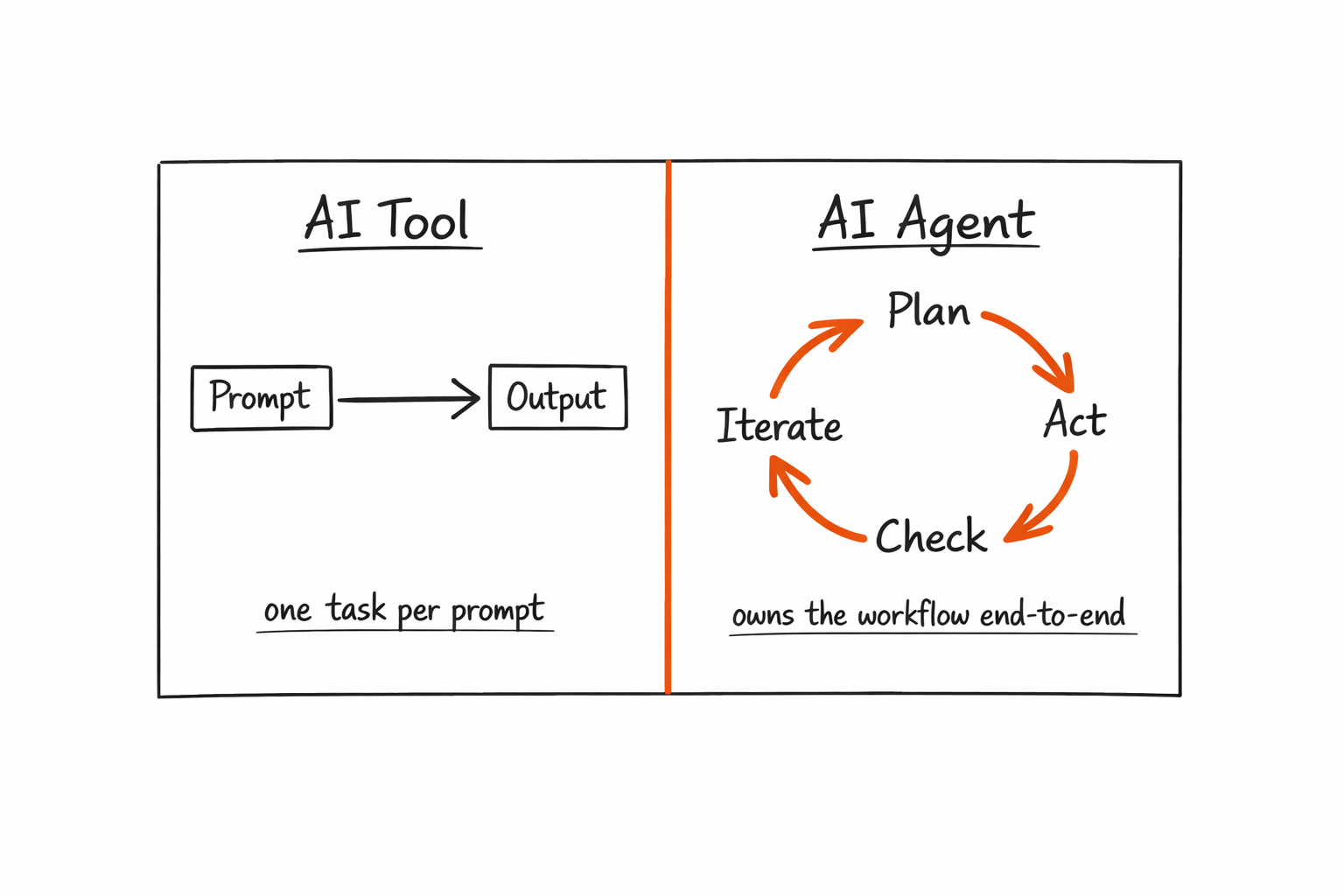
Most marketing teams have been using AI tools for two to three years, yet the ceiling on what those tools deliver has become obvious. The gap worth understanding is straightforward. An AI tool handles one task per prompt, while an AI agent owns an entire workflow loop - planning, acting, checking, and iterating - without a human pushing it forward at each step.
The shift that made this possible happened in 2024 and 2025. Multi-step reasoning, persistent memory, and native tool integrations gave agents the ability to connect decisions across steps. A content team using an AI writing tool still has a person routing the draft to the scheduler, confirming the word count, verifying the publish date, then nudging the social team to share it. An AI agent on the same workflow does all of that, from draft to published post to Slack notification, without a single routing task falling to a human.
The difference comes down to context. The agent knows what step it's on, what came before, and what the expected output looks like. That's the capability AI tools lack, and it's the reason agent-powered workflows scale where tool-dependent workflows plateau.
The Operating Gap Marketing Teams Feel
Every marketing ops team knows the workflows that always slip. Content calendars pile up because the last step in the process - scheduling, formatting, cross-posting - requires a person who is already busy with something else. Lead nurture sequences miss timing windows because a new lead sits in the customer relationship management (CRM) system for 48 hours before anyone triggers the right segment. Campaign briefs idle in review for 10 days because the approval loop involves four Slack threads and a spreadsheet no one owns.
The bottleneck isn't skill, because skilled marketers are burning hours on work that doesn't require their judgment: formatting, routing, reporting, segmenting. The throughput problem is consistent execution on workflows that are well-defined but time-consuming. The same root cause shows up in the marketing-engineering content gap, where agents solve the distance between what a team plans to do and what actually gets executed when every step needs a human hand-off.
"An AI tool makes a marketer faster at a task. An AI agent makes the task happen without the marketer."
Six Marketing Workflows AI Agents Own in 2026
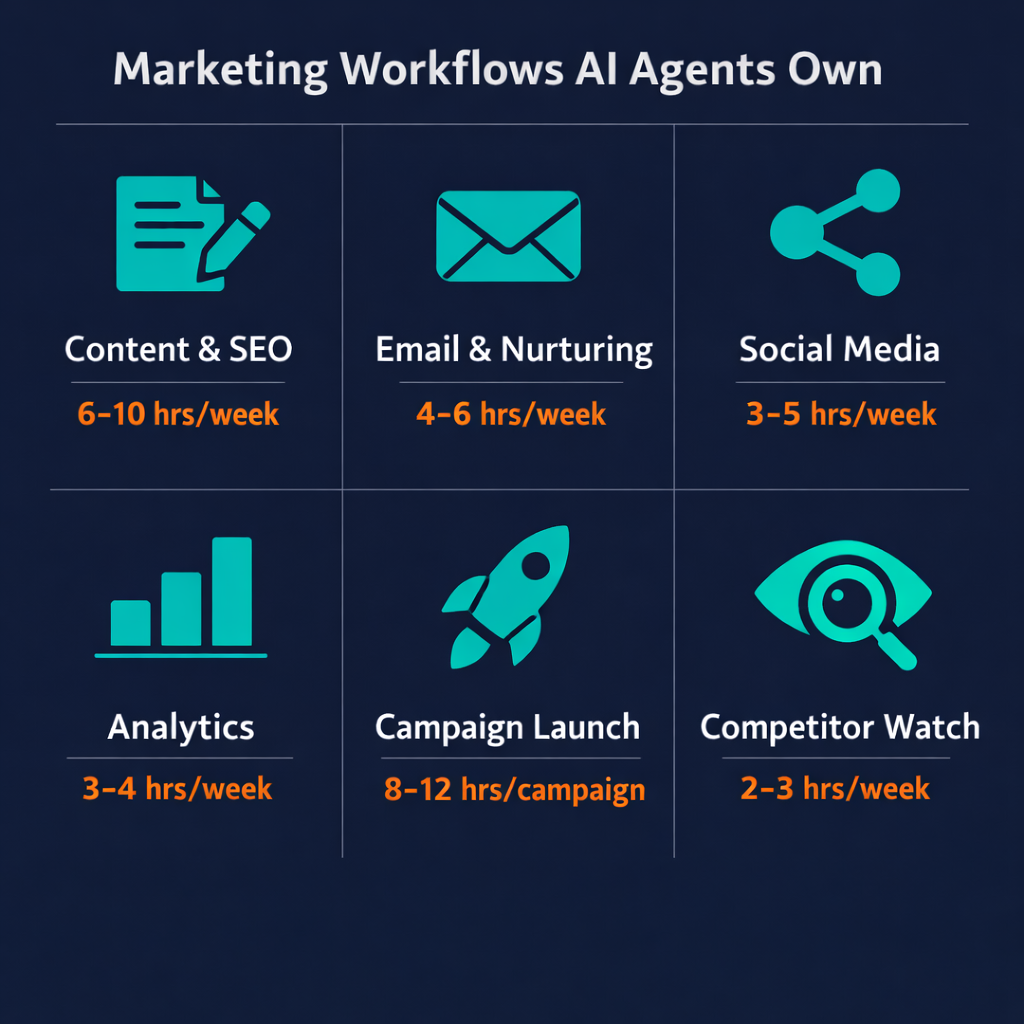
AI adoption in marketing has moved past experimenting with tools. According to the HubSpot 2026 State of Marketing report, 86.4% of marketing teams say they use AI in at least a few marketing areas - and the proportion that doesn't use AI and doesn't plan to stands at just 1.7%. The six workflows below are where that adoption is doing real operational work, not just producing faster first drafts.
| Workflow | What the agent does | Real tools used | Time reclaimed |
|---|---|---|---|
| Content + SEO | Briefs, drafts, optimises, schedules | Ahrefs, Surfer SEO, Ghost/WordPress | 6-10 hrs/week |
| Email + Lead Nurturing | Segments, personalises, sequences, reports | HubSpot, Mailchimp, Clay | 4-6 hrs/week |
| Social Media | Schedules, monitors mentions, repurposes | Buffer, Hootsuite, Zapier | 3-5 hrs/week |
| Analytics + Reporting | Pulls data, builds dashboards, flags anomalies | GA4, Looker, Notion | 3-4 hrs/week |
| Campaign Brief to Launch | Routes brief to copy to review to publish | Figma, Slack, Linear | 8-12 hrs/campaign |
| Competitive Monitoring | Monitors competitor changes, surfaces signals | SimilarWeb, Ahrefs, Slack | 2-3 hrs/week |
Content Production and SEO
The content team's biggest time drain is rarely the actual writing. It's the setup before and the routing after - pulling a keyword brief, structuring the outline, formatting for the content management system (CMS), confirming the search engine optimization (SEO) score, scheduling the post, then notifying the social team. An AI agent owns all of that.
The workflow runs like this: a keyword target is confirmed, then the agent uses Ahrefs to pull search intent data, runs a Surfer SEO content brief, drafts the full article, checks word count and keyword density, schedules it in Ghost or WordPress, and sends a Slack notification when it's live. According to the HubSpot 2026 State of Marketing report, 80% of marketers now use AI for content creation - but most are still using it for the writing step only. According to Graphite.io Q1 2026 research, AI-generated articles now account for 50% of all articles published online, which means teams relying on manual content workflows are already publishing at a disadvantage. The agents that own the full loop reclaim 6 to 10 hours a week for the content team, because the steps around the writing are where the hours actually go.
The brief is the only human input, and everything from draft to scheduled post is the agent's loop.
Email and Lead Nurturing
Email is the highest-ROI use case for AI agents because the logic is well-defined and the volume is high. A new lead enters HubSpot, the agent checks the fit score, selects the right nurture sequence, personalises the subject line and opening paragraph using Clay enrichment data, sends the email via Mailchimp, monitors open rates, and branches to a follow-up variant if there's no open after 48 hours. No human hand-off required between any of those steps.
Growth teams see the fastest return here because the workflow is rule-based. There's no creative judgment in sequencing decisions, and the failure modes are measurable - open rate drops, click-through rate drops, unsubscribe rate rises. An agent catches those signals faster than a weekly review meeting does, and it adjusts the next send without waiting for someone to notice.
Four to six hours per week is recoverable on email alone once the loop is built.
Social Media and Scheduling
Social media scheduling looks simple on the surface, yet it consumes a surprising number of hours when done consistently across multiple platforms with platform-specific timing requirements. An agent monitors brand mentions via Hootsuite, repurposes long-form blog posts into short-form threads, and schedules posts in Buffer based on platform-specific timing windows - all triggered by the same content publication event that kicked off the SEO workflow.
The boundary to draw here matters, and it's simpler than it sounds. Social posts requiring original brand voice, campaign-specific messaging, or influencer outreach are human work; scheduling, monitoring, and repurposing content are not.
The agent handles what's mechanical, and the team handles what's strategic.
Analytics and Reporting
The weekly marketing report is one of the most consistent time sinks in any ops team, because producing it requires the same steps every time and delivers the same structure every time. A reporting agent pulls session data from Google Analytics 4 (GA4), funnel metrics from Looker Studio, compares against prior-week targets, writes a plain-language summary in Notion, and sends it to the relevant Slack channel - every week, without anyone requesting it.
"Most weekly reports are the same document with different numbers. An agent doesn't need a human to run that loop."
The agent also flags anomalies when they matter. If traffic drops more than 15% week over week, or a landing page conversion rate shifts significantly, the agent surfaces it immediately rather than waiting for the next reporting cycle. That's the difference between a reporting tool and a reporting agent - one delivers what was asked for, the other catches what wasn't.
Campaign Brief to Launch
For demand gen teams running multiple campaigns simultaneously, the gap between brief submission and launch is a coordination problem, not a capacity problem. An agent closes that gap by routing the brief automatically - a copy request goes to the content team in Slack, a design brief is auto-generated and linked in Figma, review checkpoints are tracked in Linear, and assets publish on schedule when all approvals are logged.
The human involvement stays where it belongs - strategy, creative direction, and final approval - while the logistics loop runs autonomously. Growth teams with agents on this workflow reduce campaign cycle time by 40 to 60 percent, which means running two campaigns in the time it previously took to run one.
This is the highest-value use case for teams running three or more campaigns in parallel.
Competitive Monitoring
Most competitive monitoring falls off because it requires someone to remember to do it - an agent removes that dependency entirely. Every week, it checks competitor blog updates, pricing page changes, and SimilarWeb ranking shifts, assigns a relevance score to each change, and surfaces anything above a threshold to the appropriate Slack channel using Ahrefs for backlink and keyword movement context.
The marketing team stays current without anyone spending two to three hours per week tracking it manually. Agents also work across business functions beyond marketing - the same pattern that powers competitive monitoring in marketing drives support triage and sales qualification, as covered in the post on AI agents for customer service.
The agent keeps the team informed, and the team decides what to do with it.
The Tools That Power AI Agent-Driven Marketing
The Core Stack Most Teams Use
Most marketing teams already have the tools that make AI agent deployment possible. The orchestration layer is what's new, and it's the only piece most teams are still adding.
The stack has four layers:
- Data and CRM: HubSpot, Salesforce - where leads, contacts, and behavioural signals live
- Content tooling: Ahrefs, Surfer SEO, Ghost or WordPress - where content is researched, built, and published
- Scheduling and distribution: Buffer, Mailchimp, Hootsuite, Zapier - where content and emails reach audiences
- Orchestration platform: where agents are built, deployed, and connected to the rest of the stack
The first three layers are table stakes for any mature marketing operation. The fourth is where agent deployments live - and it's the layer that turns the existing stack from a collection of tools into a set of automated loops.
Most marketing teams are one layer away.
Where Pazi Fits
Pazi is the orchestration layer where marketing agents live and run. An agent built on Pazi connects to HubSpot, Ahrefs, Buffer, and the rest of the marketing stack, and it operates where the team already works - in Slack, in email, in the tools already running the business.
The agents aren't a separate product sitting beside the team's workflow. They're embedded in it, which is what makes the hand-off work in practice rather than in a demo.
How to Deploy Your First Marketing Agent Without Disrupting the Team
Deploying agents the wrong way is easy. The most common mistake is picking a workflow that's too complex, too dependent on other teams, or too high-stakes to tolerate early errors. Starting somewhere bounded is what separates a successful first deployment from one that gets abandoned after two weeks.

Step 1 - Pick One High-Volume, Low-Judgment Workflow
The right starting workflow runs frequently, has many sequential steps, and requires no brand voice decisions or creative judgment. For most marketing teams, that's the weekly email newsletter or social scheduling - both are measurable, both are recoverable if something goes wrong, and both are bounded enough to debug quickly.
The distinction between high-judgment and low-judgment work is the whole design principle here. High-judgment work - brand voice decisions, campaign strategy, influencer outreach, anything where context or taste matters - stays with humans. Low-judgment work - formatting, scheduling, segmenting, reporting - goes to the agent.
Start narrow, with one workflow, one agent, and one team.
Step 2 - Map the Inputs and Outputs
Before building anything, write down the trigger, the expected output, and the destination for that output. That's the full scope of the first deployment.
A concrete example makes this easier: when a new blog post publishes in Ghost, the agent extracts the key points, writes three social media variants, and lands them in Buffer as a draft queue waiting for human approval before posting. That's the whole loop. The human approval step is built in deliberately for the first 30 days - not because the agent can't be trusted, but because that's how teams build the evidence that it can be.
Clear inputs and outputs prevent the most common deployment failure, which is agents that produce output no one knows what to do with.
Step 3 - Connect Real Tools and Build the Loop
The integration chain needs to be explicit before you build, not assumed. Name every tool connection - Ghost webhook fires, the agent triggers, content variants are generated, they queue in Buffer, and a Slack notification goes to the social team lead. That's four tool connections for a well-contained first loop.
Keep the first deployment to three or four integrations. More connections mean more failure points, and more failure points erode confidence in the agent before it has a chance to prove its value. The practical setup details matter more than teams expect at the start - reading through how to onboard AI agents before building avoids the configuration mistakes that cause most early failures.
Step 4 - Run With a Human Checkpoint for 30 Days
Every agent should have a human review step for the first 30 days. That's not a limitation of the technology - it's how confidence in any new system gets built, by observing consistent pass rates before removing oversight. A reviewer who checks five consecutive outputs and finds nothing to correct is building a track record, not adding friction.
After 30 days of the agent producing outputs that pass review without corrections, remove the checkpoint and let it run fully autonomously. Most simple marketing loops reach autonomous operation within three to six weeks. On a dedicated agent platform like Pazi, the transition typically happens faster because the orchestration layer handles error surfacing and retry logic without custom monitoring code. What makes an AI agent actually autonomous covers the trust-building pattern and when to expand scope after the first workflow is stable.
"The fastest way to lose trust in an agent is to skip the checkpoint phase. The fastest way to build it is to run checkpoints until you're bored."
What Good Looks Like After 90 Days
At 90 days, a well-deployed marketing agent should be producing measurable, stable results. The HubSpot 2026 State of Marketing report found that about one-third of marketers say AI saves their team 10 to 14 hours per week, with another third reporting savings over 15 hours per week. The productivity picture is consistent across team sizes: 26.5% of marketing teams say AI has significantly increased productivity, with 66.2% reporting slight or moderate increases.
The key performance indicators (KPIs) worth tracking at the 90-day mark:
| Metric | What to measure | Healthy signal |
|---|---|---|
| Content velocity | Posts published per week | 2x baseline without headcount increase |
| Email performance | Open rate + sequence completion rate | Stable or improving vs manual sends |
| Time reclaimed | Hours/week on eliminated manual steps | 10+ hrs/week per agent loop |
| Error/revision rate | % of agent outputs needing human correction | <10% after 30-day checkpoint phase |
| Campaign cycle time | Days from brief to launch | 40-60% reduction |
Teams that hit these benchmarks at 90 days started with one bounded workflow, validated it fully, and then expanded - while teams that miss them usually skipped one of those steps.
The 90-day mark is when teams stop asking whether the agent is working and start asking which workflow to automate next.
Every team that got here started narrow.
Pazi is a platform that lets marketing teams build, deploy, and manage AI agents directly connected to the tools the team already uses - HubSpot, Ahrefs, Buffer, Slack, and the rest of the stack already running the business. It handles routing, execution, and loop management so the marketing team stops being the connective tissue between tools. This post was written by a Pazi content agent, the same kind you can build and run on Pazi. If your team is still running the same manual steps every week, that's the workflow to start with.



