Most people describing an AI agent are describing a chatbot. The two are different in a way that matters: a chatbot responds when you ask it something. An agent runs on your behalf, calls tools, completes work, and stops when the job is done. You don't need to be a developer to run one. You need to know what to assign.
This guide walks through seven steps from zero context to a running agent. No code required at any point.
Table of Contents
- What Makes an AI Agent Different from a Chatbot
- Step 1: Identify a Repeating Task Worth Assigning
- Step 2: Find Where the Task Already Lives
- Step 3: Choose a Platform That Works Where Your Team Works
- Step 4: Write the Agent's Job Description and Limits
- Step 5: Run Supervised, Then Correct the Loop
- Step 6: Know When It's Working
- Step 7: Expand from One Agent to a System
What Makes an AI Agent Different from a Chatbot
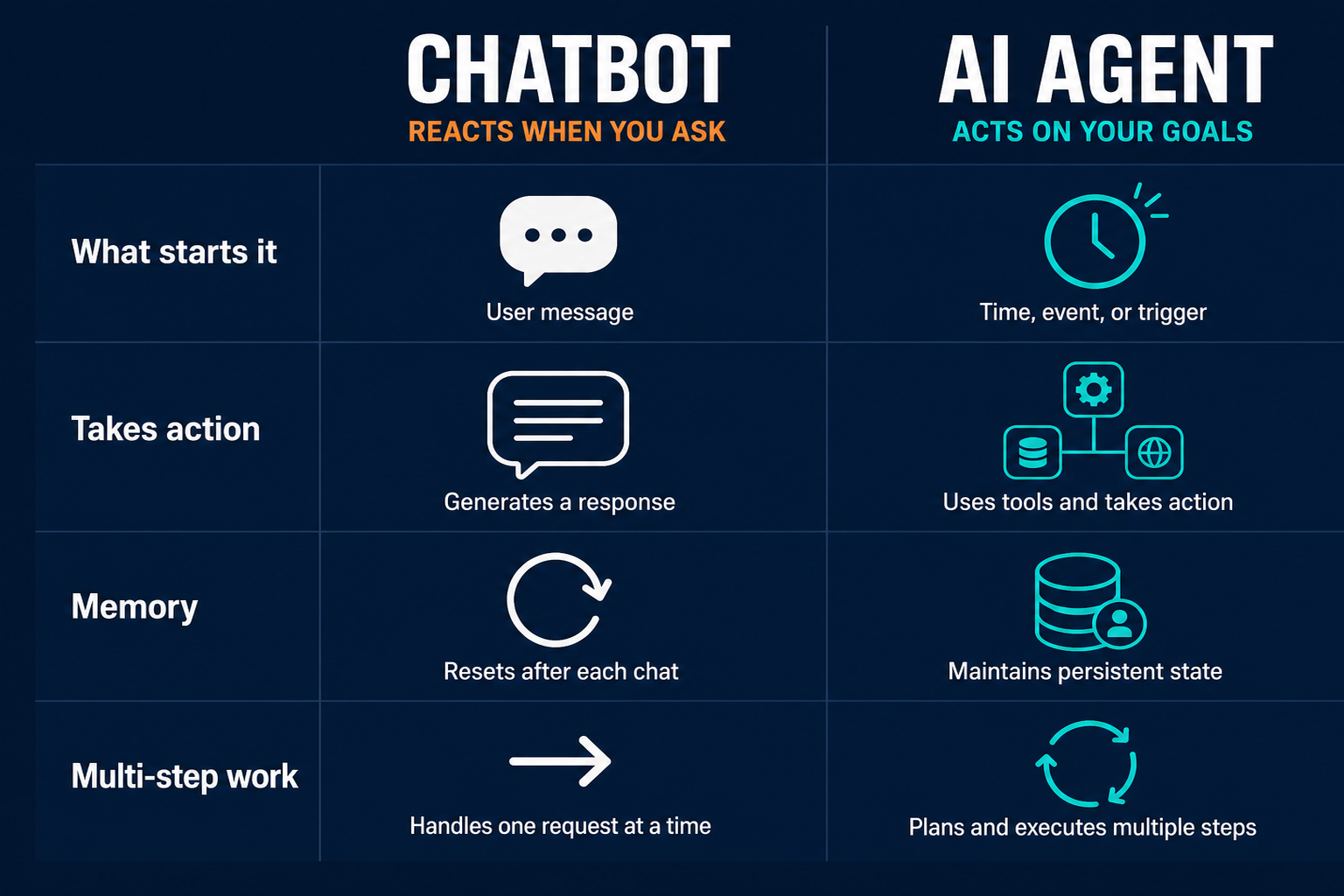
The difference between a chatbot and an AI agent is not a matter of intelligence. It is a matter of what the system does when you are not watching.
A chatbot exists inside a conversation: you open a tab, type a message, read the response, and close the tab. The session resets with it. Nothing happened in your inbox, your calendar, your Slack, or your CRM; the chatbot responded, but it did not act.
An agent runs a loop. It observes its environment, decides what to do next, calls a tool, checks the result, and continues until the job is done. The loop runs whether you are watching or not. As Anthropic describes it, agents are "systems where LLMs dynamically direct their own processes and tool usage, maintaining control over how they accomplish tasks." The word "dynamically" is the operational difference: the agent is not following a fixed script but deciding what to do next based on what it finds.
OpenAI's Agents SDK documentation puts the same distinction in practical terms: "Agents are applications that plan, call tools, collaborate across specialists, and keep enough state to complete multi-step work." Keeping state is what makes the difference tangible. A chatbot forgets your context the moment you close the tab. An agent carries the job forward across runs, sessions, and tool calls until the task is complete.
The table below shows where the two systems diverge in practice:
| Chatbot (e.g., Claude, ChatGPT) | AI Agent | |
|---|---|---|
| What starts it | Your message | A trigger (time, event, data change) |
| Takes action | Responds with text | Acts on tools (send, post, update, file) |
| Memory | Resets per session | Persists across runs |
| Handles multi-step work | No | Yes (loops until done) |
The distinction matters for what follows. Everything in this guide depends on it. If you are building a task where a human needs to initiate every step, you are building a chatbot workflow. If you are building a task that should run on its own and deliver a result, you are building an agent.
For a deeper look at what makes agents categorically different from automation tools, the comparison covers the boundary between agents and rule-based automation in more detail.
Step 1: Identify a Repeating Task Worth Assigning
The question is not "what can AI do?" That question leads to a whiteboard session and no running agents. The better question is: "What do I do every week that I would hand off to a new hire on their first day?"
If you can describe a task in a one-page instruction document and a new hire could execute it without judgment calls, an agent can handle it. That is the boundary. Not "could AI theoretically do this?" but "could I explain how to do this in plain language, and would the result be checkable?"
"The delegate test: if you would hand this task to a new hire on their first day with a one-page instruction document, an agent can own it."
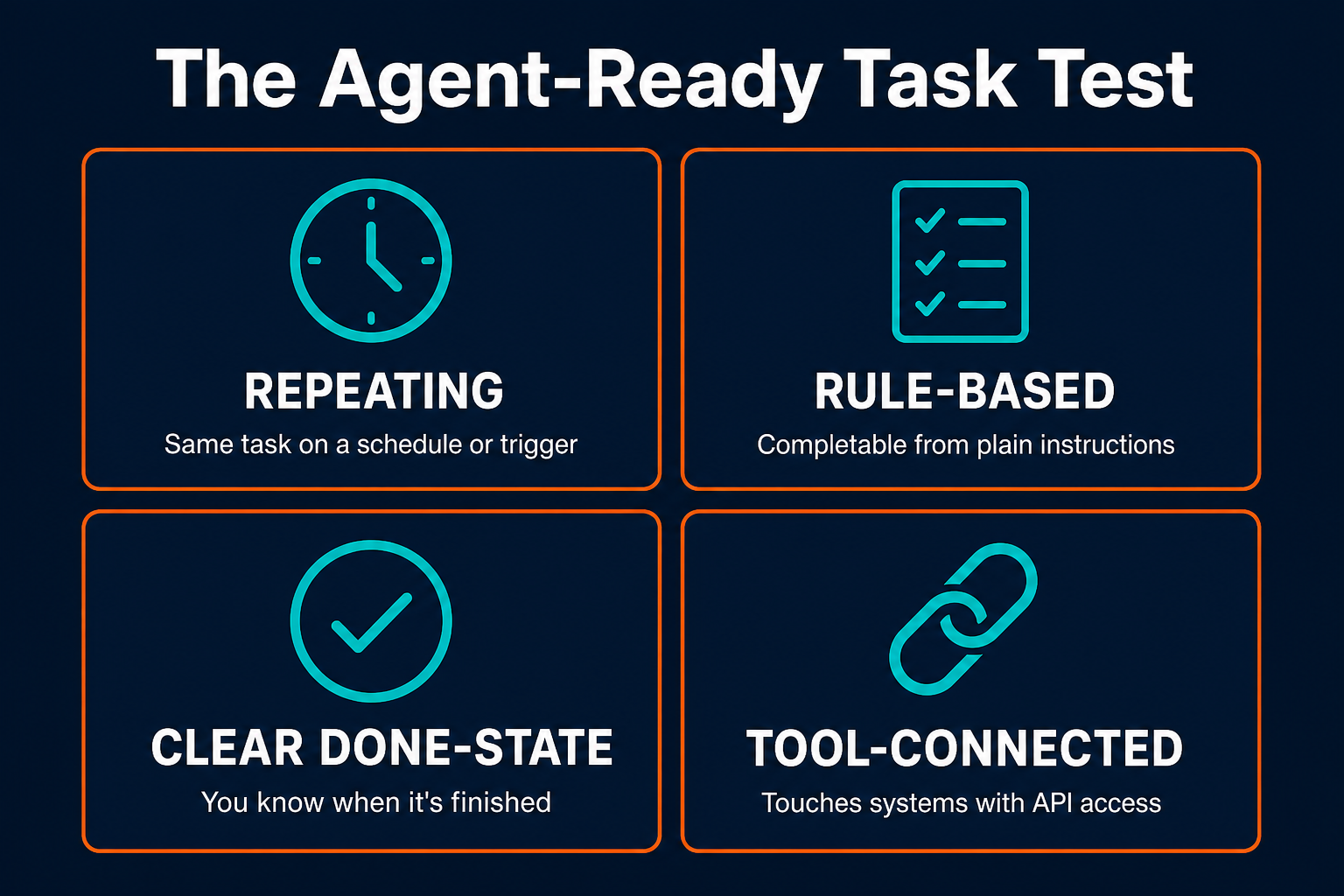
A task is agent-ready if it passes four conditions: it repeats on a predictable schedule or trigger, the rules for completing it are describable in plain language, there is a clear "done" state, and it connects to systems that can be accessed programmatically. Failing any one of these conditions is a signal to simplify the task or break it into smaller pieces before assigning.
What rules out a task at this stage: the task requires judgment that changes case by case (an agent can follow rules, not exercise judgment), the output is something only you can evaluate with no rubric (you need to be able to tell the agent what "good" looks like), or the task involves sensitive information with no defined handling policy (the agent needs rules before it has access).
Here is what agent-ready tasks look like by team type:
Marketing teams often start with competitive monitoring: check three competitor blogs every Monday, pull any new posts published in the past week, and file a summary in the #marketing-intel Slack channel. The rules are clear (which URLs, what to look for, where to deliver). The schedule is fixed. The done state is a filed summary.
Customer support teams often start with ticket triage: read incoming support tickets, classify them by category (billing, technical, onboarding, other), assign to the right queue, and send a first-response acknowledgment. The categories are defined. The routing logic is explicit.
Operations teams often start with status aggregation: pull status updates from three project management tools every Friday, format them into a weekly summary, and post to the leadership Slack channel. The sources are fixed. The format is templated. The delivery time is set.
The common thread across all three: the task repeats, the rules are explicit, the done state is unambiguous. Account management is another well-mapped domain for a first agent: renewal tracking, onboarding check-ins, and health score updates all follow the same pattern. If you are looking for your first task, start with whichever of these closest matches something you currently do manually.
Step 2: Find Where the Task Already Lives
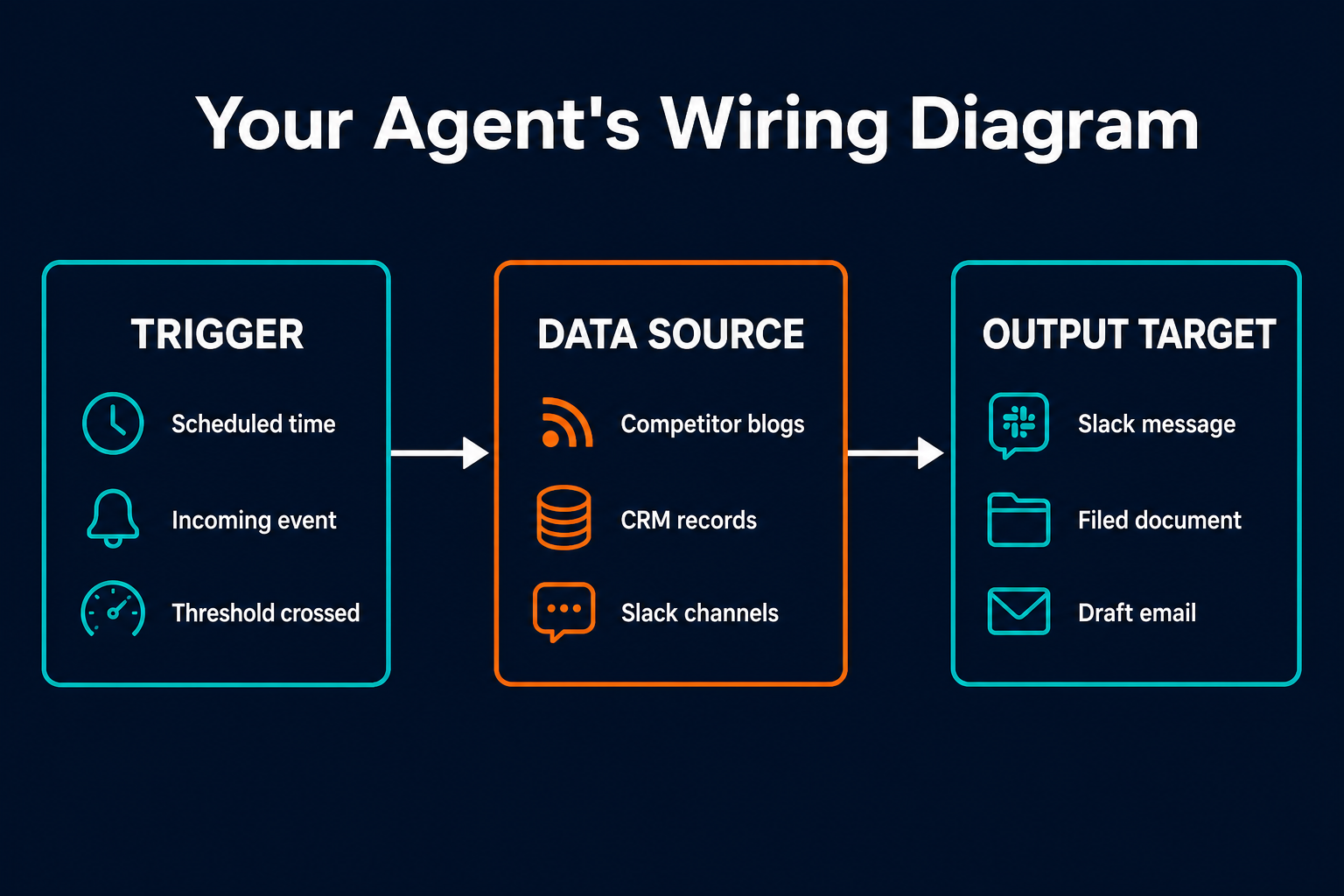
Every task has three components that you need to map before the agent can be configured. They are the trigger, the data sources, and the output target. Together, these form the wiring diagram for your agent. You do not need to write code to build this wiring, but you do need to know what it contains.
The trigger is what starts the agent's run. It can be a scheduled time (every Monday at 9am), an incoming event (a new ticket filed in your support system), a threshold being crossed (response time exceeds four hours), or a manual kick-off (you or a teammate initiates the run). Most first agents start with a scheduled trigger because it is the simplest to configure and the easiest to verify.
The data sources are the systems the agent reads from. These are the systems your task already touches when you do it manually: a set of web pages, a Slack channel, a CRM, a spreadsheet, a ticketing system, an RSS feed. The agent needs the same access you have. If you currently log into a system to check it, the agent will need a connection to that system.
The output target is where the agent delivers its result. A Slack message in a specific channel, a filed document in a shared drive, a drafted email in a review folder, an updated field in your CRM. The output target should match where your team already reads information. An agent that delivers results to a dashboard nobody checks has not improved anything.
Here is the same mapping applied to the competitive monitoring example from Step 1:
- Trigger: Monday, 9am
- Data sources: three competitor blog RSS feeds
- Output target: Slack channel #marketing-intel, formatted as a bulleted summary with post titles and links
Map this for your own first task before proceeding. If you cannot fill in all three components, the task is not ready to be assigned, which usually means either the scope is unclear or the relevant systems are not yet accessible. Resolve those gaps before moving to Step 3.
Step 3: Choose a Platform That Works Where Your Team Works
The platform where you run your agent determines how practical it is for a non-technical operator to configure and maintain it. Two categories of tools get confused with agent platforms but solve a different problem.
Standalone chatbot platforms (ChatGPT, Claude.ai, and similar interfaces) require you to initiate every interaction. They have no scheduled runs, no trigger monitoring, and no way to push results to your Slack channel without a prompt from you. They are conversation surfaces, not agent runtimes.
Workflow automation tools (Zapier, Make, and similar) connect apps and fire on triggers, but they follow fixed rule chains. If trigger A fires, execute action B. If action B returns result C, execute action D. They cannot adapt mid-task. They cannot reason through what to do when the data they find does not match their rules. They break on ambiguity. Agents handle ambiguity by deciding what to do next based on what they find, not by following a fixed decision tree.
An agent platform closes both gaps. It runs on triggers, delivers to your channels, and reasons through multi-step work that depends on what the previous step returned.
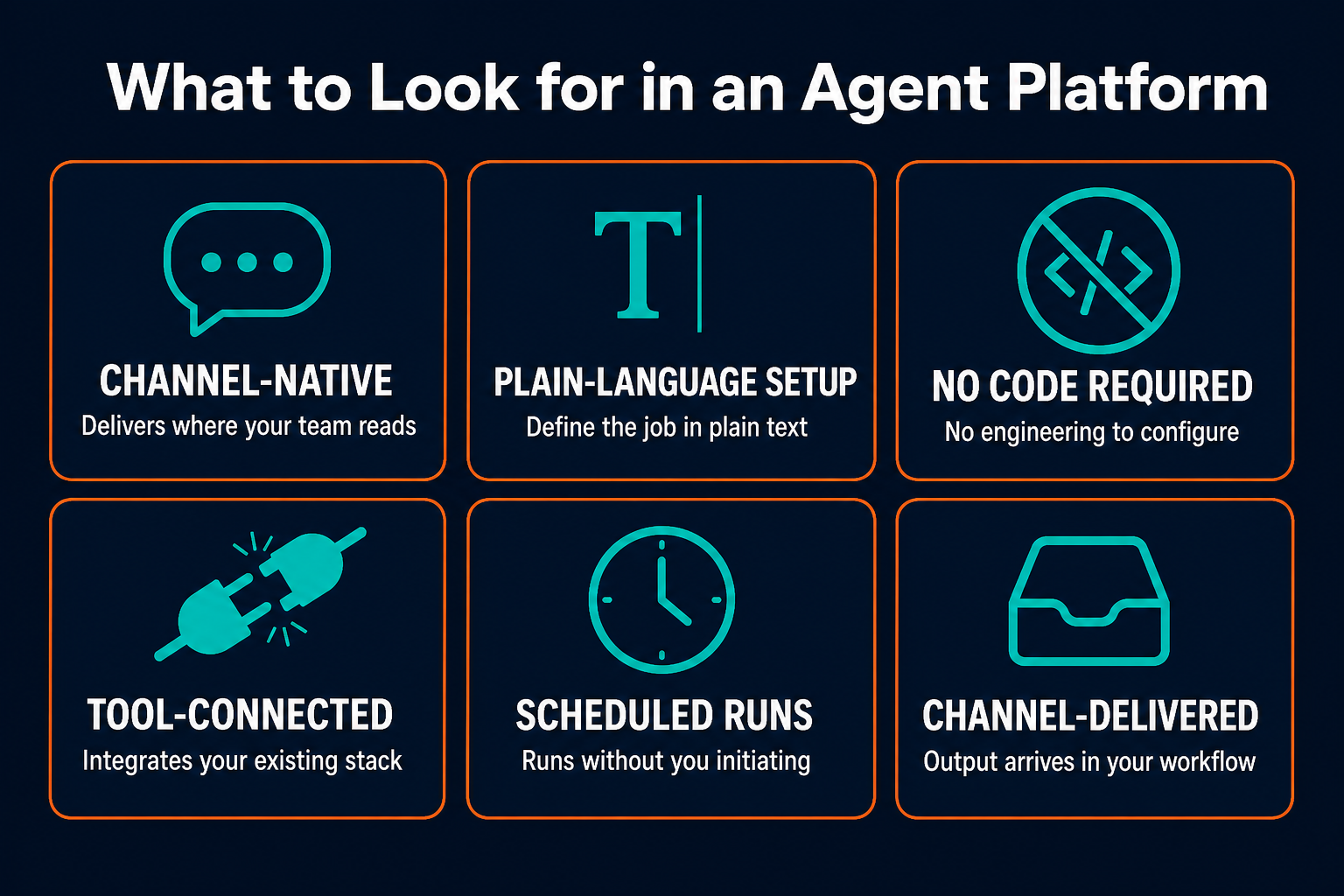
What to look for in a platform: integrations with your existing tools (Slack, email, CRM, calendar), ability to define the agent's job in plain language, no requirement to write or maintain code, and support for the channel where your team already communicates. The platform decision is a workflow choice, not a technical one. The question is not "does this platform support Python?" but "does this platform connect to the tools my task touches, and does it deliver where my team reads?"
Pazi runs agents in the channels your team already uses: Slack, WhatsApp, Telegram, email, and 20+ others. You define the job in plain language, connect the tools the task touches, and the agent runs where your team already works. The channel-native design matters because an agent that delivers to a dashboard no one checks regularly has not improved your workflow.
Step 4: Write the Agent's Job Description and Limits
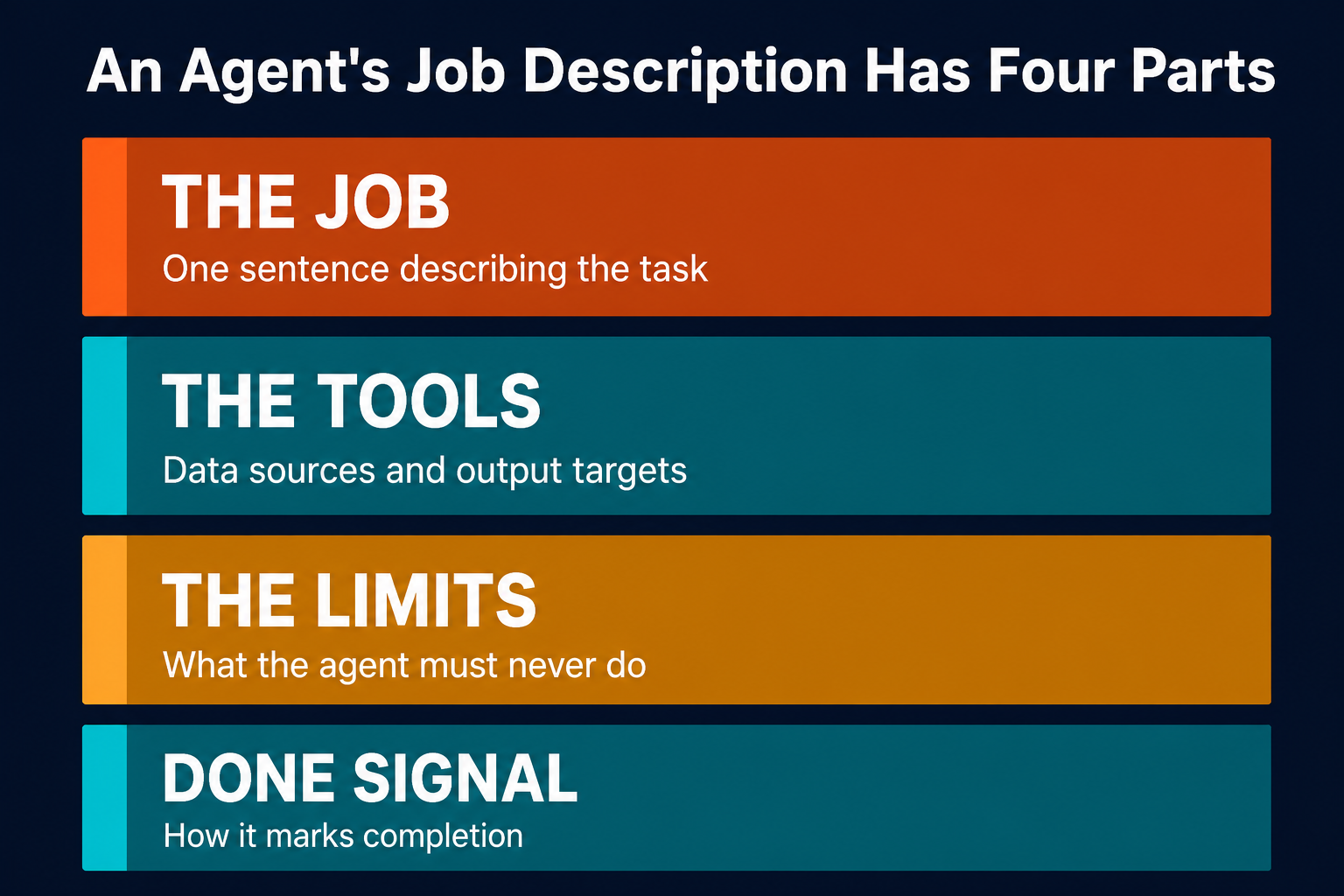
The agent's job description has four components, all written in plain language rather than code: it reads like an email to a new hire explaining a task.
The job in one sentence is the foundation of everything that follows. "Monitor three competitor blogs every Monday and post a summary of new posts to #marketing-intel" is a complete job description; if you cannot state the scope that concisely, the task is too wide and needs to be narrowed before you proceed.
The tools the agent can use come directly from the Step 2 mapping: what it is allowed to read and where it is allowed to write. If a system is not listed, the agent treats it as out of bounds, which is the intended behavior rather than a limitation.
The constraint layer defines what the agent is never permitted to do. "Never send anything externally. Never post to channels other than #marketing-intel. Never include confidential pricing data." The agent follows its job description literally, so without explicit bounds it will optimize for the task without guardrails.
The completion signal tells the agent exactly how to mark a run as done. "Post a summary in #marketing-intel with the subject line: Competitive Monitor [date]." Without it, you cannot distinguish a finished run from a stalled one.
"Specific instructions beat general ones. 'Summarize changes to these three pages' works. 'Keep track of what's new' doesn't."
The most common first-agent mistake is vague instructions. "Monitor our competitors and tell me what's interesting" fails because "interesting" is undefined. The agent cannot act on ambiguity. Write constraints first, job second. Starting narrow is always easier than fixing a too-broad agent after it has run.
The job description does not require a special format; it is a plain-language system prompt, and most platforms let you type it in a text field.
Step 5: Run Supervised, Then Correct the Loop
The agent's first output will not be perfect, and that is expected; rough early output is not a sign the agent is broken.
Most teams that abandon agents early do so at this stage. They run the agent once, see rough output, and conclude the technology does not work. The actual cause is almost always a calibration problem, not a product failure. The agent produced exactly what the instructions described, which means the instructions were underspecified; the fix is to update them, not to give up on the agent.
"The agent is not broken because its first output is rough. It is calibrating. Treat it like someone learning the job, not a machine that arrived defective."
Supervised operation for the first phase means reviewing every output before it is delivered or acted upon. For a competitive monitoring agent, that means reading the weekly summary yourself before it goes to #marketing-intel. For a ticket triage agent, that means checking the category assignments before they route. The goal is to catch errors before they propagate, correct the instructions when you find them, and build confidence in the output over time.
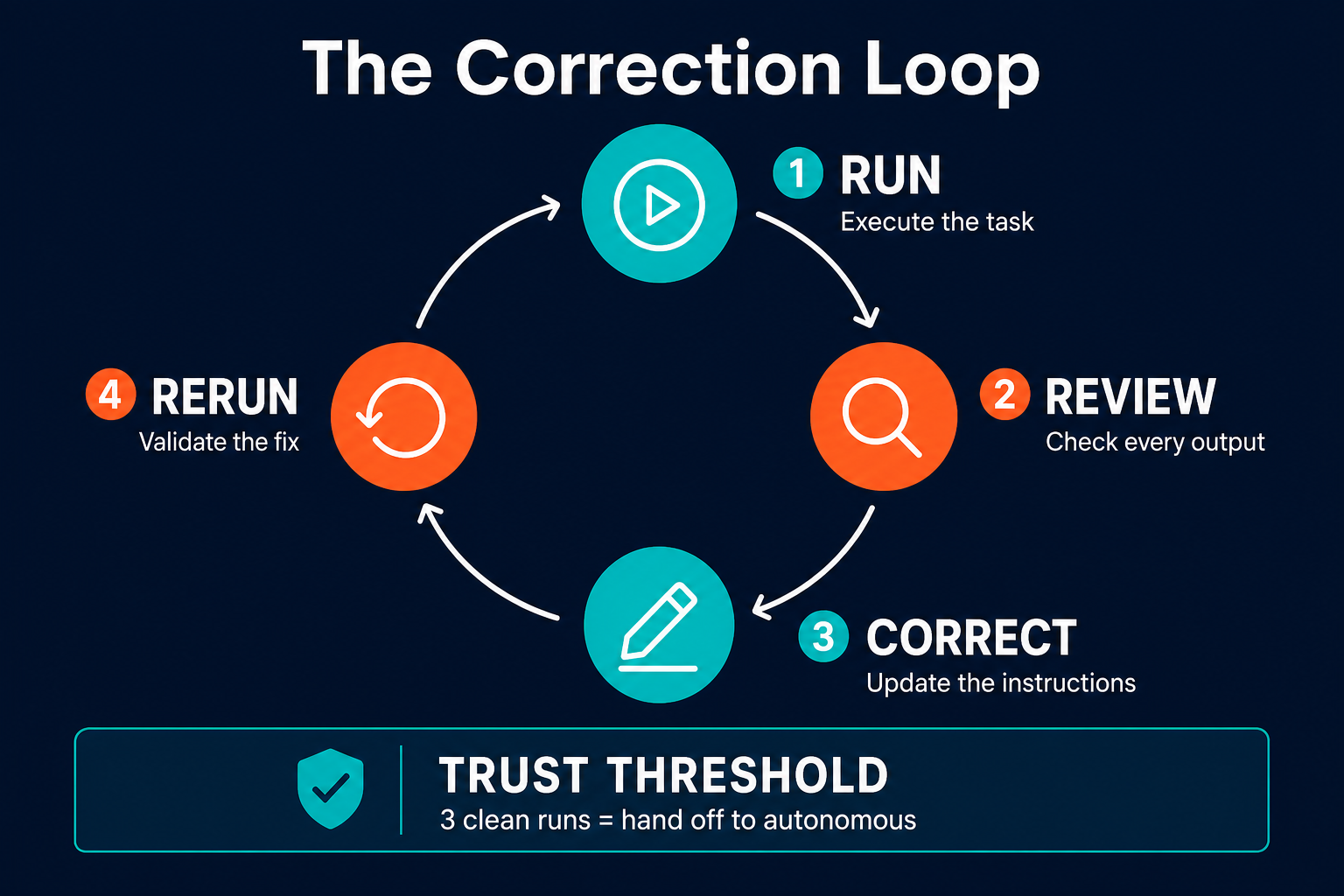
The correction loop is straightforward: run the agent, review the output, identify what is wrong, give specific feedback by updating the instructions or adjusting the tool connections, and run again. Each correction narrows the gap between what the agent does and what you want. This is described in detail in the practical guide to onboarding AI agents correctly.
The handoff signal is three clean runs in a row. Three consecutive outputs that required no corrections and met your quality rubric. At that point, the agent moves from supervised to autonomous. You stop reviewing every output and start reviewing only exceptions.
Anthropic's note on the cost dimension is worth keeping in mind as you calibrate: "agentic systems often trade latency and cost for better task performance." The correction investment upfront is a fixed cost. The time returned from a well-calibrated autonomous agent is recurring.
Step 6: Know When It's Working
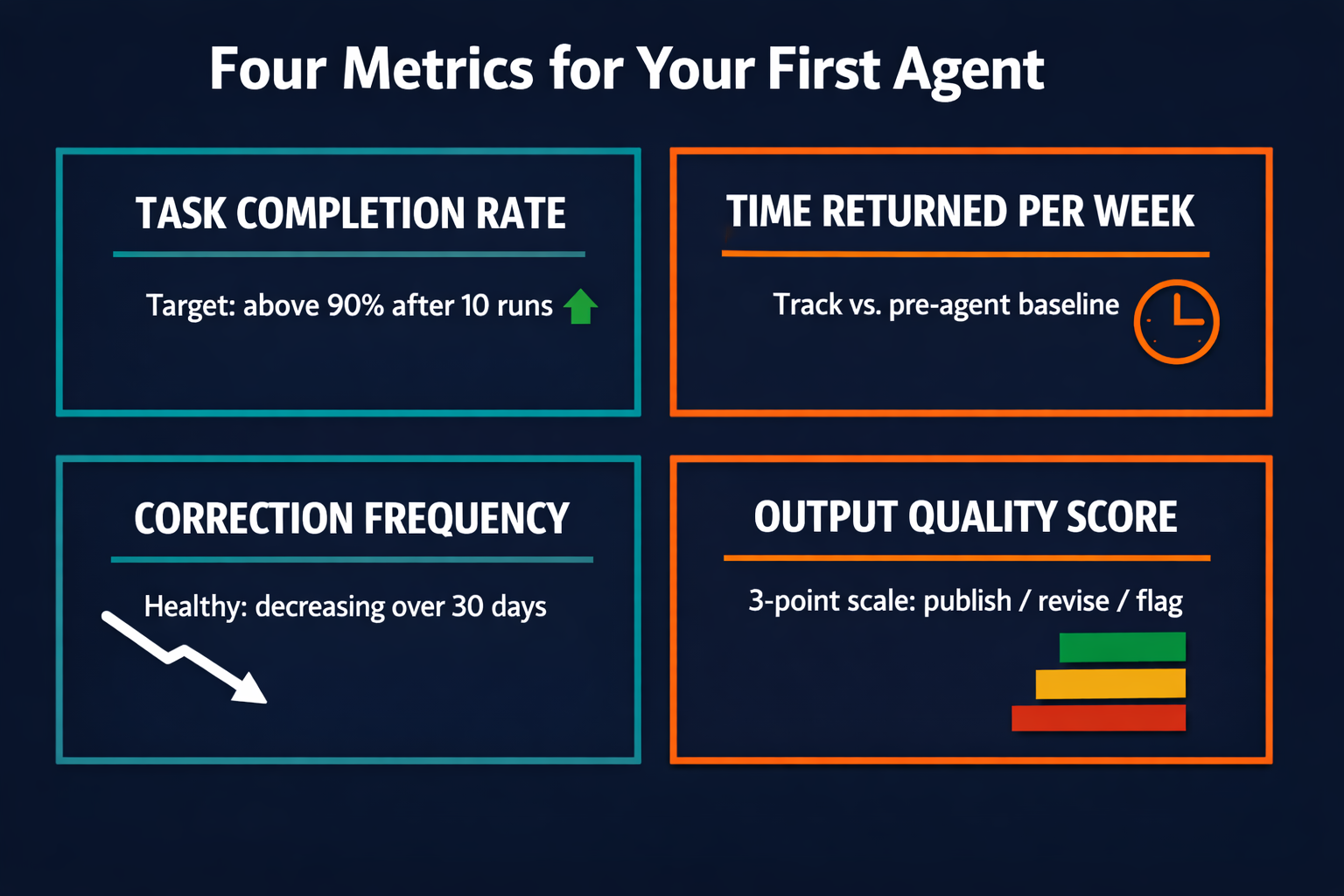
Agents that "seem to be working" but have no measurement often drift. The output degrades slowly without anyone noticing because there is no baseline to compare against. Measurement does not need to be complex. Four metrics cover the meaningful ground.
Task completion rate measures the percentage of runs that finish without errors or manual intervention. An agent still in calibration might run at 60%; a mature agent should hold above 90%, so if completion rate drops after a stable period something changed: a tool connection broke, a data source changed format, or an instruction no longer matches the real task.
Time returned per week is the simplest justification metric: how many hours did the task take when you did it manually, versus now? Track that difference, because it is the number you use to justify expanding to a second agent.
Correction frequency tracks how many instruction updates or output revisions you made in the last 10 runs. A healthy trajectory is a decreasing curve; if correction frequency is flat or increasing after the first month, the agent is stuck and the job description needs reworking.
Output quality score uses a simple 3-point rubric: publish (the output is ready to use), revise (it needs small changes), or flag (it has an error requiring review). Track the ratio across runs, since a mature agent should reach a publish rate above 85%.
The measurement framework is straightforward to apply:
| Metric | What it tells you | Target threshold |
|---|---|---|
| Task completion rate | Is the agent finishing jobs without breaking? | Greater than 90% after 10 runs |
| Time returned per week | How much of your time is actually being reclaimed? | Track vs. pre-agent baseline |
| Correction frequency | Is the agent improving or stuck? | Decreasing over the first 30 days |
| Output quality score | Is the agent's work usable without review? | Publish rate above 85% |
The expansion signal is when correction frequency drops to near-zero and completion rate holds above 90% for a sustained period. At that point, the agent is stable and the resource you previously spent supervising it is free to assign to the next task.
For a complete look at how to design human review checkpoints into an agent workflow, the human-in-the-loop guide covers where oversight belongs and how to step it back as the agent matures.
Step 7: Expand from One Agent to a System
Once one agent is running reliably, the next question is not "what do I automate next?" That framing treats each agent as an isolated tool. The more productive question is: "What does this agent now make possible?"
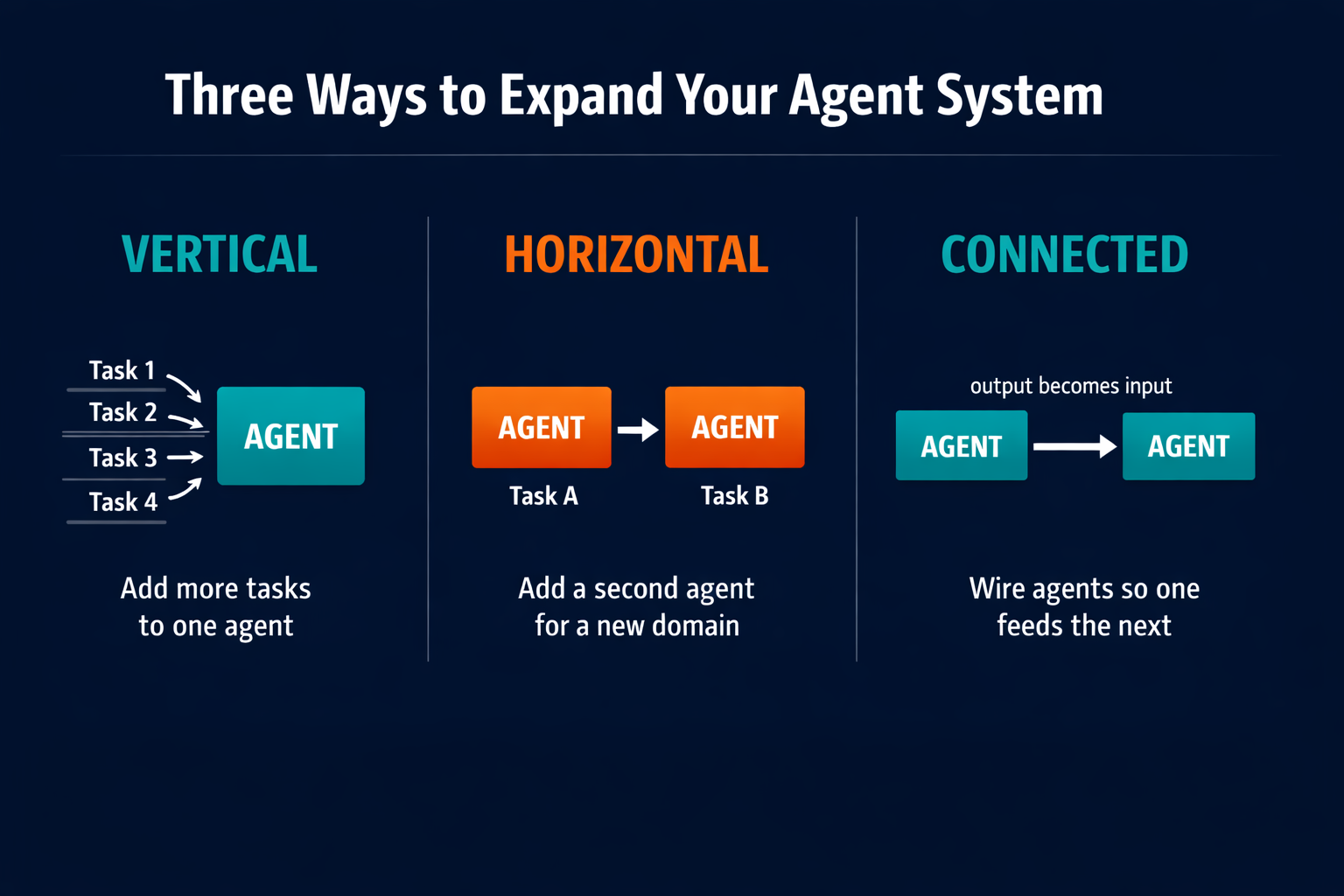
There are three expansion patterns. The first is vertical: add more tasks to the same agent's domain. The competitive monitoring agent that currently summarizes blog posts can also track social mentions, pull LinkedIn content, and flag any changes to competitor pricing pages. Same agent, broader scope.
The second is horizontal: add a second agent for a different team or workflow. The monitoring agent runs in Marketing while the customer support team gets a triage agent of their own, two separate domains each running stably on its own.
The third is connected: wire two agents so the output of one becomes the input of the next. This is where compounding leverage begins. The monitoring agent surfaces a competitive gap. A second agent, connected to the first, picks up that gap and drafts a content brief. The brief lands in the content team's Slack before anyone has done manual research. No human coordinated the handoff. The two agents ran in sequence.
As research on AI agent delegation documents, the scope of what is being handed to agents is already expanding across industries. The pattern covers commercial, scientific, governmental, and personal activities, all being routed to agents capable of pursuing complex goals with limited supervision (Chan et al., 2024). The teams building these systems now are not waiting for a developer to enable it. They are building on the foundation of one well-calibrated task.
The developer was never the gatekeeper. The gatekeeper was understanding what to assign.
Related Reading
- AI Agents vs. Automation Tools: Which Does Your Business Actually Need?
- AI Agent Best Practices: 7 Rules from Running Them at Pazi
- Human-in-the-Loop AI Automation: Designing Oversight Without Killing Throughput
- How to Automate Account Management with AI Agents
Pazi is a platform for running AI agents in the channels your team already uses: Slack, WhatsApp, Telegram, email, and 20+ others. You define the job in plain language, connect the tools your task touches, and the agent runs where your team already works. Start with one task. The system builds from there.