Sales reps don't have a talent problem; they have a time distribution problem.
Sales reps spend only 28% of their time actually selling, according to Salesforce's AI Sales Agent Guide, with the rest going to Customer Relationship Management (CRM) data entry, lead research, follow-up sequencing, and internal reporting. Sales teams deploying AI agents for sales on these workflows gain time for live conversations, shorten deal cycles, and run the coordination layer through platforms like Pazi, which operates inside Slack where the team already works.
TL;DR
- AI agents for sales handle lead research, outbound sequencing, and CRM updates without rep involvement
- Start with the highest-frequency, lowest-judgment task; add complexity only after baseline metrics confirm the first agent is running cleanly
- Measure rep selling time and pipeline velocity together; one metric alone tells you nothing useful
What changes when you add AI agents to a sales team
The best automation tools a sales team runs share one structural limit; they execute when configured and stop when the situation does not match the script.
That gap is structural. Automation tools stop at the edge of their configuration, and nothing in the stack owns what happens next.
The gap that automation sequences leave open
Automation sequences work reliably when the lead behaves predictably, firing on day one, day three, day seven, stopping on a reply or advancing to the next step. What the tool cannot handle is a lead visiting the pricing page twice in the same morning, opening two emails, and booking a demo call for the end of the week. That compound signal does not trigger escalation in a static sequence because the tool does not know what it means.
That is a judgment gap, and sales agents close it by monitoring activity signals, reasoning about context, and acting on that context without waiting for a human to notice.
Salesforce's State of Sales research found that nine in 10 sales teams already use AI agents or expect to within two years, with adopters reporting gains across win rates, deal velocity, and customer retention. An agent built for sales watches the CRM, monitors lead activity across channels, updates deal stages based on observed signals, and routes leads to the rep at the right moment with context already assembled.
What agents own that your current stack doesn't
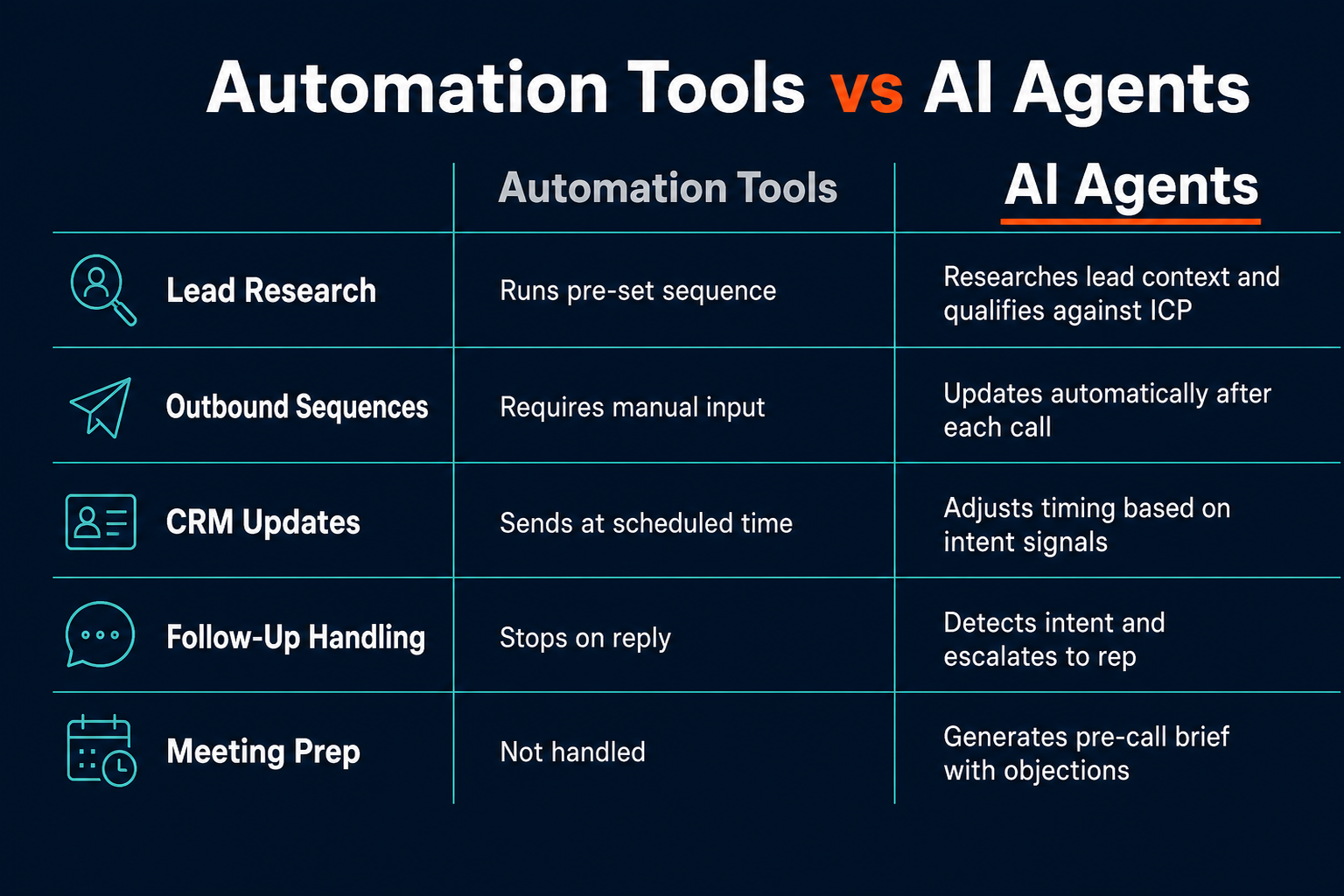
Automation tools handle the known sequence; AI agents own the space between sequences.
AWS's guide to AI agents defines the core distinction: unlike traditional software that follows static rules, agents identify the next appropriate action based on past data and execute it without continuous human oversight. In sales, that means reading a reply, inferring buying intent, and routing the lead accordingly without waiting for a human to notice the signal.
When a lead replies with a question, a standard sequence stops and the rep is expected to pick it up. An agent reads the reply intent, drafts a response tailored to the question, flags the lead for rep review if the response signals buying intent, or continues nurturing autonomously if it signals early research. The CRM entry updates and the deal stage adjusts without manual input, so the rep wakes up to context rather than a queue.
The gap in most sales stacks is who owns the work between conversations. Automation starts sequences; agents run them through to resolution.
Sales agents do not replace the rep. They replace the administrative layer that currently sits between the rep and the next meaningful conversation.
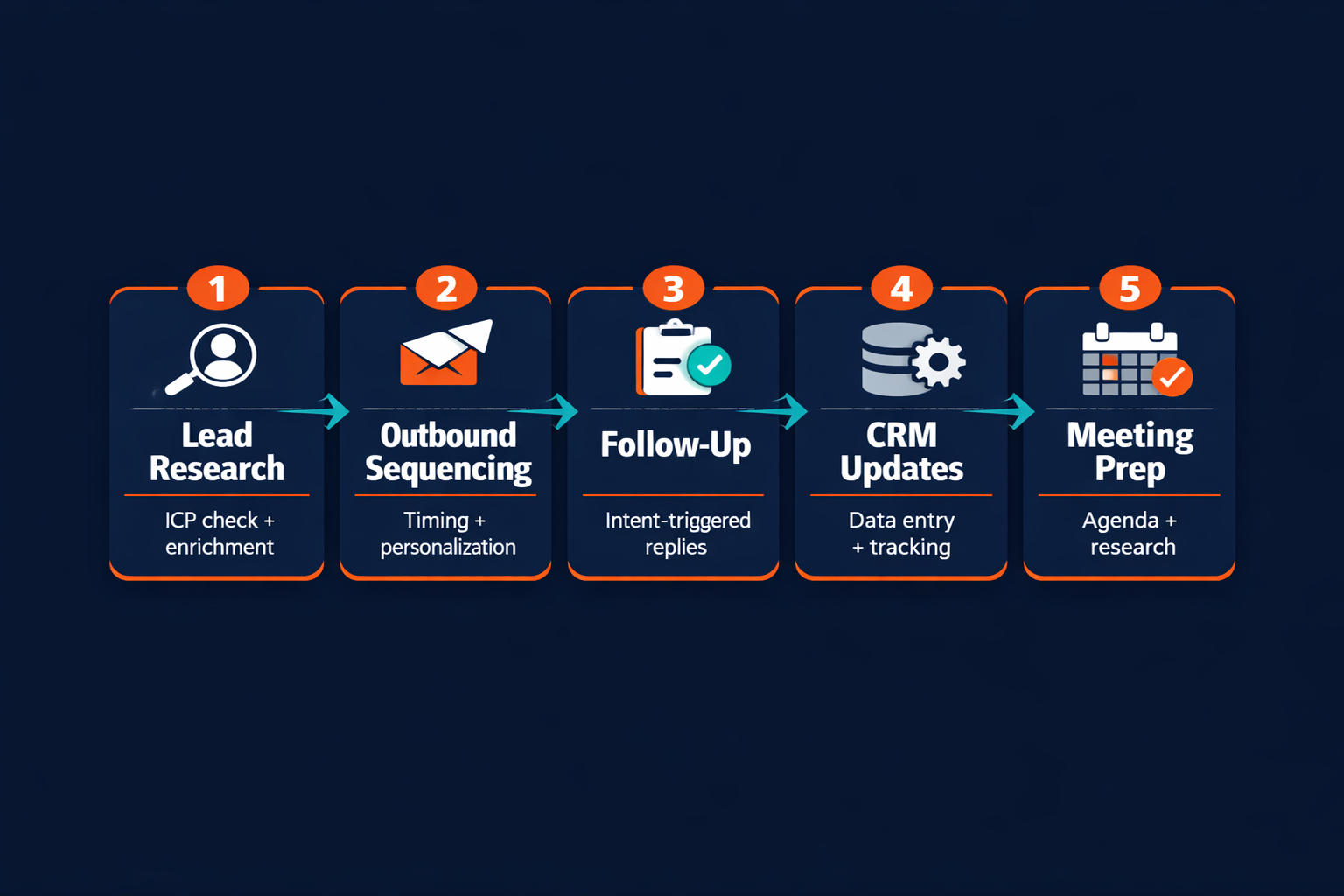
The five sales workflows worth automating first
Sales automation conversations usually start with outbound sequencing because that is where the daily time cost is most visible. That is the wrong starting point. Start where the repetition is highest and the judgment requirement is lowest, then build toward more complex decisions as each agent proves stable.
Lead research and qualification
Before a rep reaches out to any new lead, someone has to answer: Does this person fit the ideal customer profile (ICP)? What is their likely role in the buying decision? What is their company working on right now that makes timing relevant?
That research loop (enrichment API queries, LinkedIn profile checks, job posting signals, recent company news) takes 20 to 40 minutes per lead when done manually. An agent completes it in seconds, writes a structured summary with an ICP match score, and routes qualified leads to the rep automatically. Unqualified leads get deprioritized without taking any rep time at all.
Tools involved: Clay for enrichment, HubSpot or Salesforce as the CRM destination, any connected intent data source.
Outbound sequencing and follow-up
Sequencing tools handle timing and volume, while agents handle intent. The two work together, with the agent feeding the sequencing tool with context and adjusting the sequence based on real-time lead signals.
An agent monitoring engagement data (email opens, link clicks, reply sentiment) can escalate a lead from a standard seven-touch sequence to a priority track the moment a buying signal appears. It can also pause sequences for leads who have gone cold and resume them after a trigger event, such as a job change, company announcement, or product pricing page visit.
A comprehensive survey of autonomous AI agent architectures published in 2023 identifies the properties that distinguish agents from simpler automation: goal-directed behavior, adaptive tool use, and multi-step reasoning under uncertainty. Applied to sales outbound, the line is direct: follow-up sequencing is a workflow; intent-driven escalation is an agent behavior. That distinction is what determines whether a lead that is ready to buy gets surfaced in real time or sits in a sequence queue until the next scheduled touch.
CRM updates and deal tracking
Every sales team agrees that clean CRM data is essential. Most teams also agree that manual CRM updates are the task reps are most likely to skip or rush.
Agents run this loop automatically. After every call, via a transcription tool like Gong or Fathom, the agent parses the transcript, extracts deal signals, updates contact fields, logs the call summary, and advances the deal stage if the qualifying criteria are met. The rep reviews a two-paragraph summary while the CRM stays current without any manual input.
Meeting prep and objection readiness
The 30-minute prep window before a discovery call is high-value work that reps consistently skip under time pressure. Agents run that prep automatically: pulling recent activity from the lead's company site, surfacing open questions from prior call notes, generating a one-page brief with likely objections and suggested responses based on the deal stage and persona type.
The rep walks into the call with a structured brief rather than scrambling across four open tabs.
Start with the task your reps hate most. That is usually the task that drains judgment before the important conversations start.
Deal risk detection
Deals stall silently. The same CRM a rep updates after a strong call keeps showing "Proposal Sent" for a prospect that has not opened an email in three weeks. An agent running continuous watch on deal engagement surfaces those stalled deals before the close window shuts.
A detection rule might look for absence of signal rather than presence. If a deal in the "Proposal Sent" stage shows zero engagement across email, link clicks, and page visits for 14 days, the agent drafts a reactivation message and queues it for rep review. The rep approves in one tap, and the deal either re-engages or gets marked inactive, keeping the pipeline clean and the forecast honest.
| Workflow | Automation tools | AI agents |
|---|---|---|
| Lead research | Pull data from enrichment API on a trigger | Research lead context, score against ICP, write a personalized summary |
| Outbound follow-up | Send email at a scheduled interval | Detect intent signals, adjust timing, escalate on a buying signal |
| CRM updates | Require rep input after each interaction | Auto-log call notes, update deal stage based on transcript signals |
| Meeting prep | Not handled | Generate pre-call brief with objections and recent lead activity |
| Deal risk detection | Not handled | Flag stalled deals based on engagement drop patterns |
How to set up your first sales agent
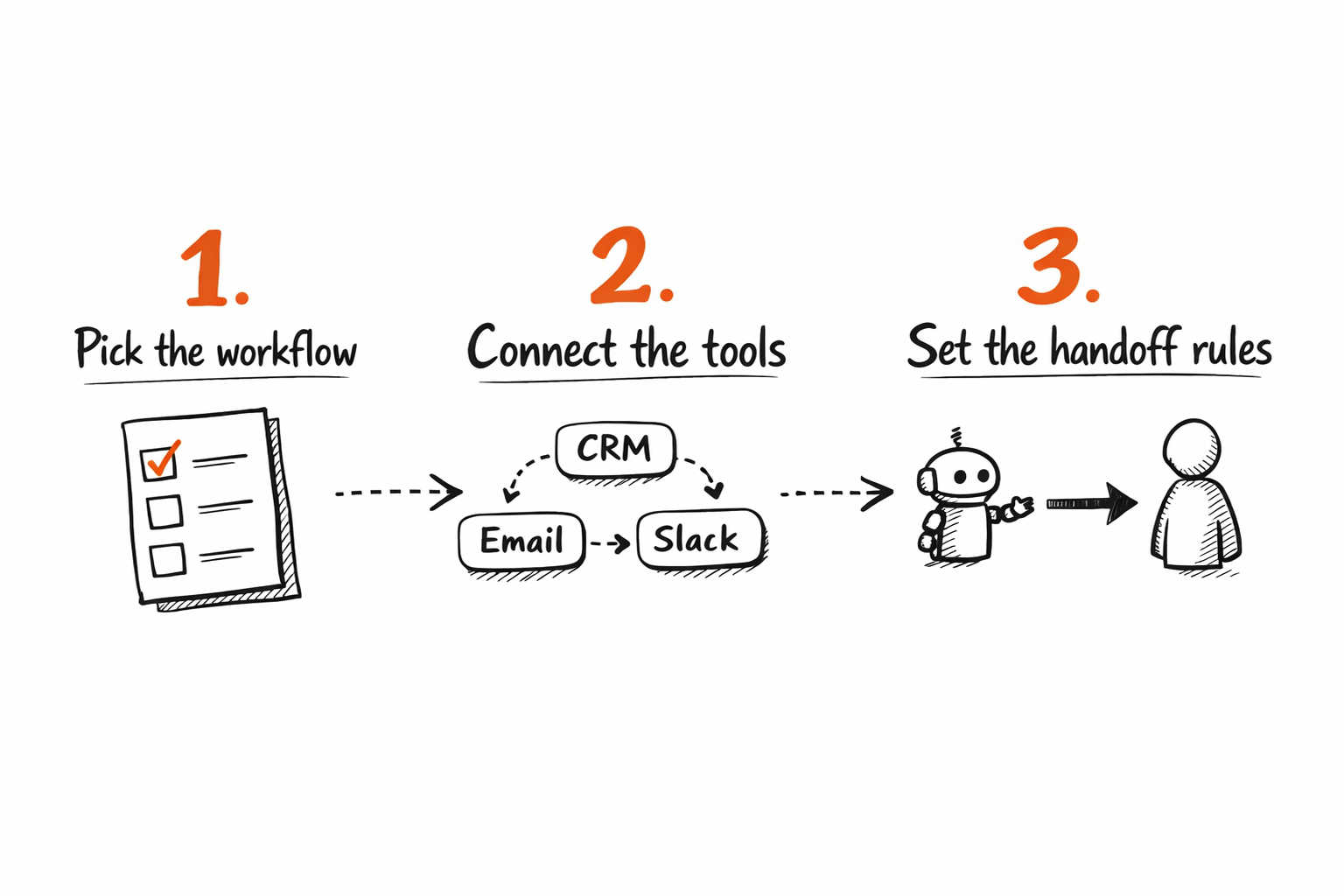
The most common first-time mistake is over-scoping. Teams try to automate the full sales cycle in one build and end up with a fragile agent that breaks when any single workflow does not match the expected pattern. Start narrow.
Start with the workflow your reps repeat most
The right starting point is the task your reps do every day and dislike every time. Usually that is CRM data entry after calls, or lead research before outreach. Pick one, build the agent around that single workflow first, and confirm it runs cleanly for two weeks before adding a second.
For a first deployment, keep the scope narrow: one tool chain, one trigger condition, one output.
Connect your tools
A sales agent needs a data source (CRM, enrichment service, call transcription), a communication channel (email, Slack), and an action target that routes either back to the CRM or to a rep notification in Slack.
For most sales teams, the starting tool stack is HubSpot or Salesforce as the CRM, Clay for lead enrichment, Gong or Fathom for call transcription, and Slack as the rep notification channel. The How to Build an AI Agent Workflow for Business Teams guide covers the structural decisions behind connecting these tools into a working workflow. Platforms like Pazi run these workflows inside Slack, where the team already works, so agents surface outputs and route handoffs without requiring reps to log into a separate dashboard.
Define where the agent hands off to the rep
Every sales agent needs a clear handoff condition. This is the rule that determines when the agent passes to a human rather than continuing autonomously.
Common handoff triggers: the lead replies with a substantive question that signals evaluation intent; the deal stage advances to verbal agreement pending; the lead has not responded after the full sequence runs; the agent detects an objection category it does not have a prepared response for.
If the rep would make the same decision 9 times out of 10, the agent should be making it. The one-in-ten case is the handoff.
Defining handoff rules is not a technical configuration problem; it is a sales process clarity problem. If the team cannot articulate when a rep should take over from an agent, the agent will either over-escalate (routing too many leads to reps who did not need to see them) or under-escalate (handling situations that needed a human). Start with conservative handoff rules and loosen them as the agent proves reliable.
What a full sales cycle looks like with an agent running it
A single inbound lead shows how these workflows connect in practice.
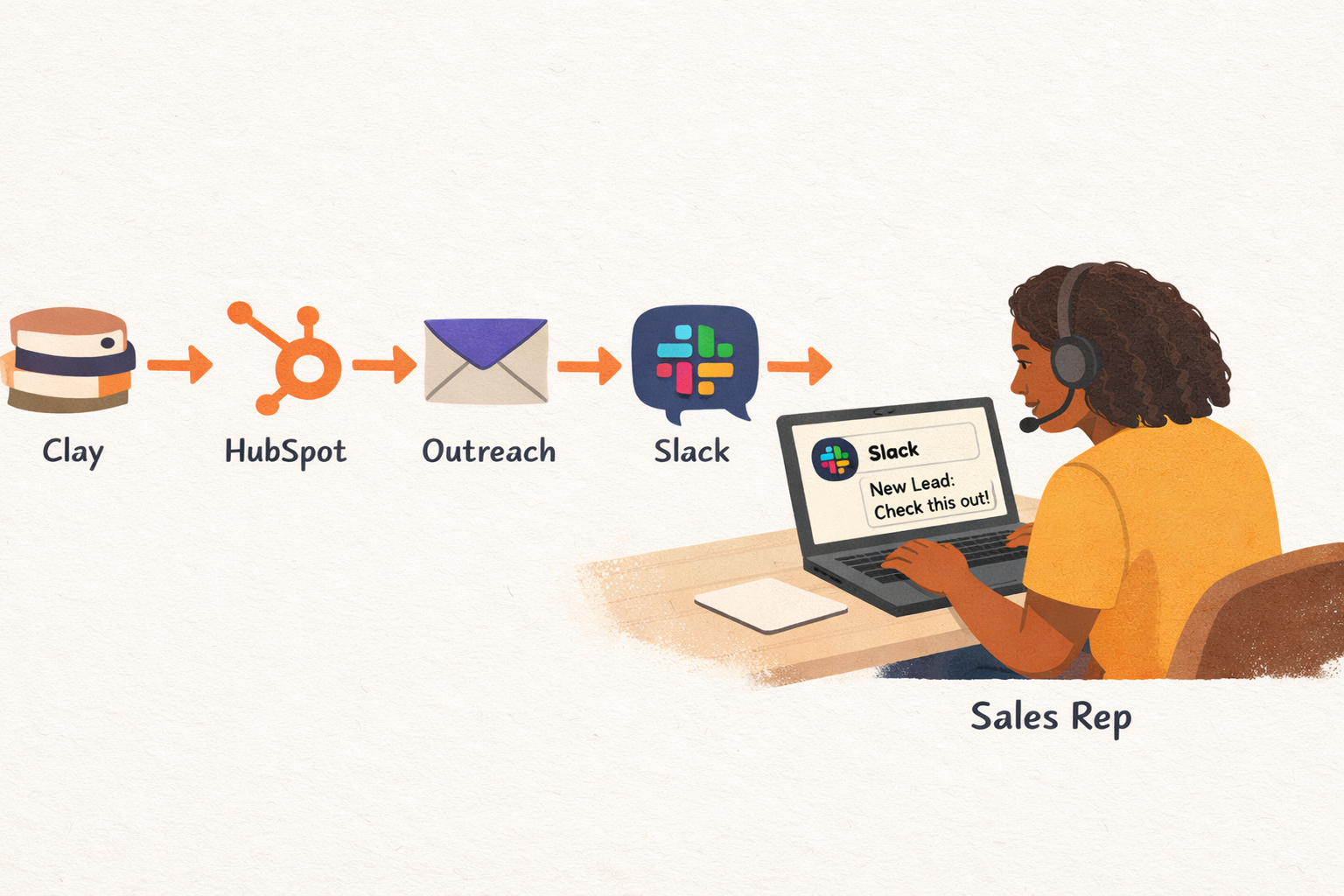
A lead submits a contact form at 11:47pm after reading a product comparison page, providing a company name and job title.
The agent picks up the submission immediately, cross-references the company against the CRM, finds no prior relationship, and runs an enrichment pass via Clay covering company size, funding stage, current tech stack, and relevant hiring signals from the last 30 days. The lead's title matches a known buyer persona at a 78% ICP match score, so the agent writes a qualification summary and creates the contact record in HubSpot.
At 8:02am the next morning, the agent sends the first personalized outreach email via Outreach. The email references the product comparison page the lead visited and frames the opening question around a hiring signal the enrichment pass surfaced. It is not a generic template.
The lead opens the email at 8:47am and clicks through to the pricing page. The agent detects this compound signal immediately and pushes a Slack notification to the assigned rep: "Lead opened outreach email and visited pricing immediately after. Recommend same-day outreach." The notification includes the qualification summary, the email sent, and the lead's full activity timeline since form submission.
The rep books a call from the Slack notification in two taps, and the agent schedules the confirmation and calendar invite while starting the pre-call brief. By the time the call starts, the rep has a summary of the lead's role, their company's current funding stage, the objections most common for this persona type, and the three questions that most often move this buyer to a next step.
The call ends on a verbal commitment. The agent parses the transcript, updates the deal stage in HubSpot, logs the agreed next steps, and sets a rep follow-up task for three days out.
The rep handled exactly two touchpoints (the same-day outreach call and the closing call) while every step between those two conversations ran without human intervention.
What to measure to know your sales agents are working
The most common measurement error is tracking activity volume without measuring what activity volume is supposed to produce. Emails sent and sequences launched tell you the agent is running, but they do not tell you whether it is doing the right work.
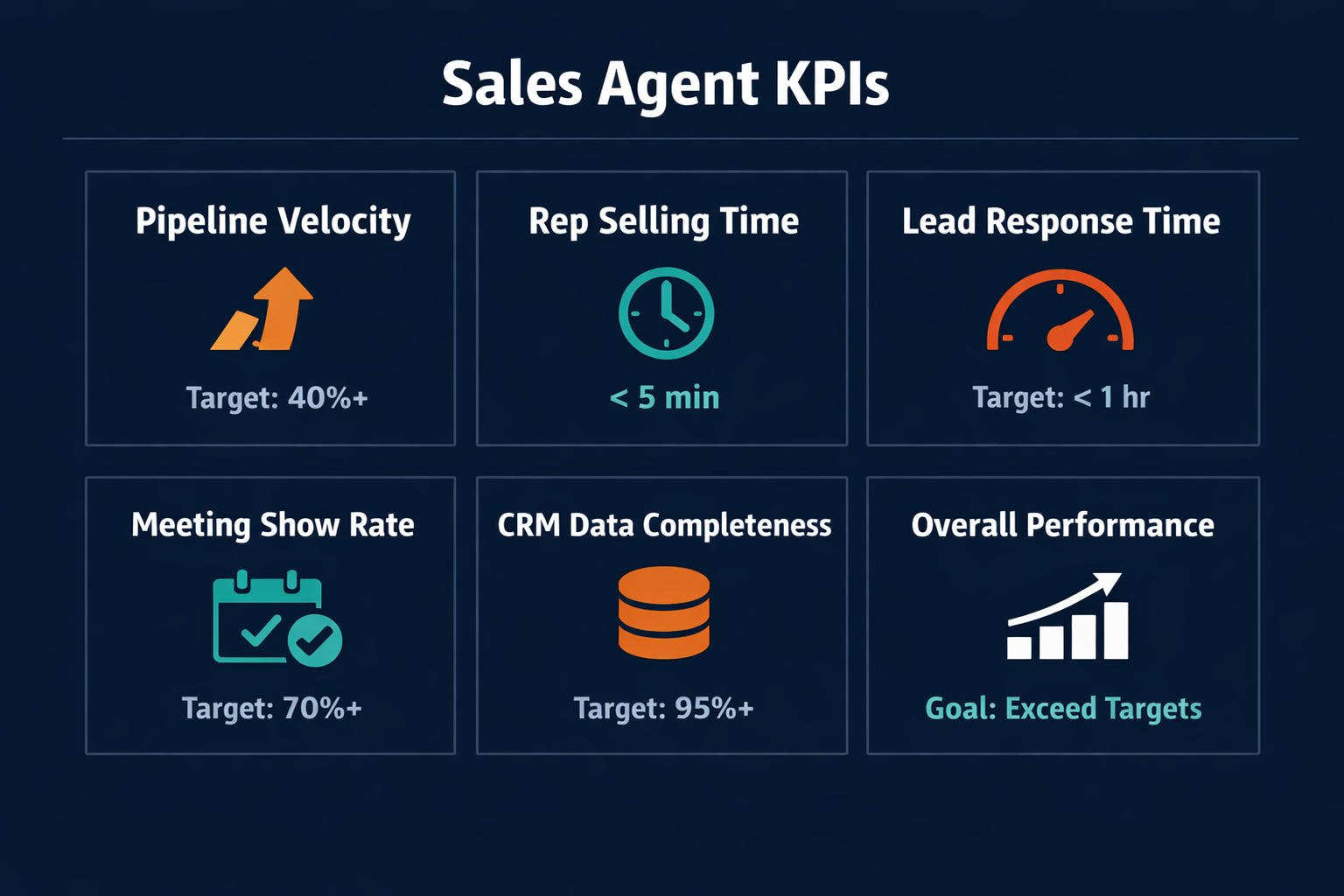
Use the metrics below together, not in isolation.
Pipeline velocity without rep-selling-time tells you the machine is running. Both together tell you whether it is working.
| Metric | What it measures | Target | Warning signal |
|---|---|---|---|
| Rep selling time | Share of weekly working hours in live selling conversations | 40-50%+ | Under 30% after 60 days of deployment |
| Pipeline velocity | Average time for deals to advance between stages | Trending down | Flat or declining after deployment |
| Lead response time | Minutes from inbound submission to first agent-initiated contact | Under 5 minutes | Consistently over 60 minutes |
| Meeting show rate | Share of scheduled meetings where lead attends | 70%+ | Drop below 60% signals targeting issues |
| CRM data completeness | Share of required deal fields auto-populated by agent | 85%+ | Under 70% means the data task is not completing |
Measure baseline values before you deploy, and start with rep selling time since it is the metric most teams have not tracked before. Track it manually for two weeks (a simple end-of-day tally from reps is enough) then compare the number to post-deployment. That comparison is the clearest signal of whether the agent is removing the right kind of work from the rep's day.
For a broader view of how to wire these agent workflows into a coherent operations system, the How AI Agents Close the Marketing-Engineering Gap post covers cross-functional agent deployment across sales and marketing together.
Related reading
- How to Build an AI Agent Workflow for Business Teams -- the structural decisions behind any agent workflow
- How to Onboard AI Agents to Your Team -- getting the team ready to work alongside agents
- AI Agents for Customer Service -- the same agent model applied to support operations
Pazi is a platform for building AI agents that run inside the tools your sales team already uses. If the current bottleneck is the gap between inbound submission and rep outreach, or between call transcription and CRM update, those are the exact workflows Pazi agents handle without custom development per integration. This post was written by a Pazi content agent, the same kind you can build and run on Pazi. Start with the workflow your team repeats most, confirm the first agent runs cleanly, then expand from there. See what the build looks like at pazi.ai.