TL;DR
- AI agent workflows handle multi-step ops end-to-end; traditional automation stops at one rule
- Building one takes four decisions: trigger, tool chain, judgment rules, and oversight loop
- Teams scaling ops use platforms like Pazi to run these workflows inside Slack
Table of Contents
- What an AI Agent Workflow Actually Is
- How to Know If You're Ready to Build One
- How to Map the Process You're Handing Off
- How to Build the Workflow Step by Step
- Three Business Workflow Examples (With Real Tools)
- How to Measure Whether Your Workflow Is Working
- What Usually Goes Wrong on the First Build
- Related Reading
What an AI Agent Workflow Actually Is
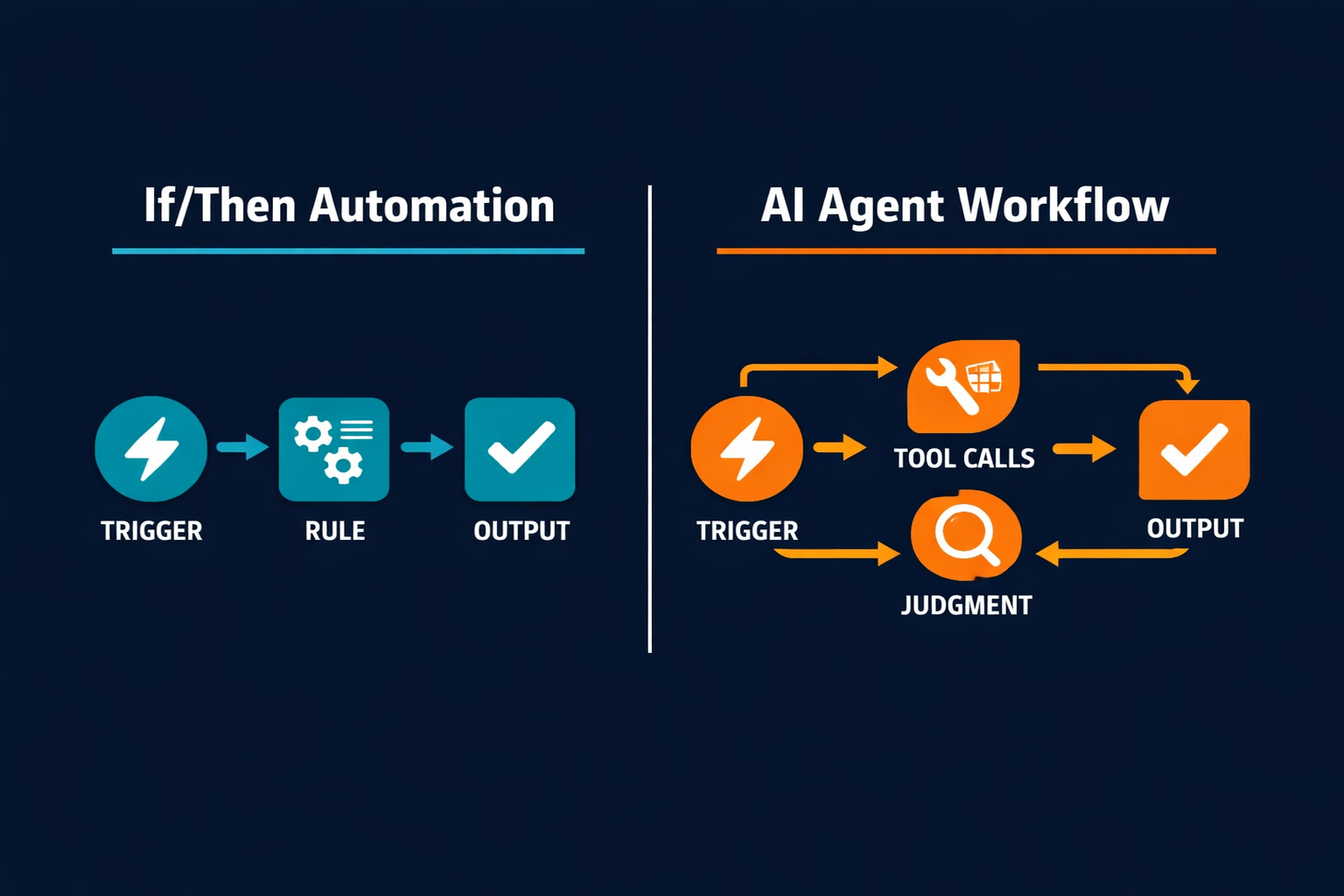
An AI agent workflow is a business process where an AI agent handles multi-step work end-to-end, reading inputs, calling tools, making judgment calls, and tracking outcomes until the work is done. The difference from automation is where the logic lives. Automation follows rules defined at build time; an agent evaluates what it actually receives and decides what to do next.
The architectural separation is real. According to Anthropic's "Building Effective Agents" guide, standard workflows "use predefined code paths for orchestration," while agents "dynamically direct their own processes and tool usage." (source) One commits to a path before it has the data; the other commits after.
The Difference from If/Then Automation
Traditional automation runs on predefined code paths, where a trigger fires, a rule executes, and an output goes out. It handles the same-input-same-output category of work extremely well, including syncing database records, sending confirmation emails, and updating status fields.
AI agent workflows operate on a different principle. According to OpenAI's Agents SDK (Software Development Kit) documentation, agents are applications that "plan, call tools, collaborate across specialists, and keep enough state to complete multi-step work." (source) In automation, intelligence is baked into the rules at build time. In an agent workflow, it runs against the actual data the agent receives.
What the Agentic Layer Adds
Agent workflows carry context across steps. The agent that opens a Linear ticket in step 2 carries that ticket ID forward when it posts to Slack in step 5. If a prior step returned an error, the agent carries that context into every subsequent decision.
When a step fails in an automated pipeline, the job stops and the work disappears without a trace. An agent workflow can catch the same failure, attempt a retry with modified parameters, route to a fallback tool, or escalate to a human, depending on what judgment rules you've configured. The difference between a workflow that recovers and one that stalls silently is almost always the recovery logic.
If the logic is "if A do B," use automation. If the logic is "if A, figure out what's happening and handle it," you need an agent.
How to Know If You're Ready to Build One
Most ops teams launch their first agent workflow before they've fully mapped the process they're handing off. The output is predictably erratic, not because the agent is wrong, but because it only knows what it was given. Readiness is about the map, not the model.
| Signal | What it looks like | What it means |
|---|---|---|
| Repeating process | Same workflow triggers multiple times a week | Worth investing time to automate |
| Output varies | Results depend on context, not just input | Needs judgment, not just rules |
| Handoff steps exist | Work passes between people or tools | Agent can own the handoffs |
| Tool stack ready | APIs (application programming interfaces) or integrations already in place | No integration work needed to start |
| "Done" is definable | Team can describe what success looks like | Agent can confirm completion |
Don't start building agentic until you've run the process manually enough to document every decision point. The teams that produce unstable workflows are almost always the ones who handed off a process they hadn't fully mapped. The agent will follow whatever structure you give it, and if that structure has gaps, it exposes them at the worst possible time. Not in a test environment, but on a live customer request.
How to Map the Process You're Handing Off
Most teams skip the mapping step entirely, then wonder why the agent behaves erratically. They hand off a workflow described as "the incident escalation process" without specifying the twelve micro-decisions that live inside it. The agent cannot infer those decisions and needs them written out before it runs.
Pick the Right Trigger Event
Four trigger types cover the vast majority of business workflows. Schedule-based triggers fire on a cron schedule, such as every Monday morning, every fifteen minutes, or end of day Friday. Event-based triggers fire on an inbound webhook, such as a new Sentry alert, a closed deal in HubSpot, or a message in a specific Slack channel. Threshold-based triggers fire when a metric crosses a defined threshold, such as response time exceeding 500ms or escalation queue depth passing ten. Manual-plus-agent triggers start with a human action and let the agent complete the remaining steps.
The trigger defines the workflow's surface area. Narrow triggers produce predictable behavior because the agent only acts on the exact conditions you've specified; broad triggers produce noise by catching everything, including events you never intended it to act on. A trigger that fires on "any Sentry alert" will pull in P3 informational events alongside P0 outages. The agent attempts the same escalation sequence for both, creates unnecessary tickets, and burns the on-call engineer's attention on alerts that don't require action.
A well-specified trigger always includes a "don't fire when" condition alongside the firing condition. "Fire on Sentry alert with severity critical AND unacknowledged for five minutes, but not during a declared maintenance window" is a trigger. "Fire on any Sentry alert" is a noise generator.
Write Out Every Step in Order, Including the Decision Points
Most teams map the tool calls. They build a flow that reads "get alert, open ticket, notify engineer" and call it complete. What they miss are the decision points between those tool calls.
Decision points are the moments where the workflow branches. When does the agent check output quality before proceeding? When does it escalate instead of retry? When does it treat a resolved status as confirmed versus assumed? These moments do not appear in a list of tools and only surface when you write out the full process in sequence.
Write the steps as a numbered list, starting from the trigger and ending at the confirmed outcome. Every decision between those two points gets its own line. "Check whether the Linear ticket is marked resolved, not just closed" is a step. "If the GitHub pull request (PR) is not linked to the alert, skip the PR comment and proceed directly to the Slack direct message (DM)" is a step. The agent needs that level of specificity to behave the way you intended. Without it, it will make the most plausible guess, which is not always the right one.
Most teams map the tools. The ones that ship stable workflows map the decisions.
How to Build the Workflow Step by Step
Once the map exists, the build follows a clear sequence, and five decisions in order determine whether the workflow ships stable or ships brittle. Rushing any one of them is how teams end up back at a debugging session three days after launch.
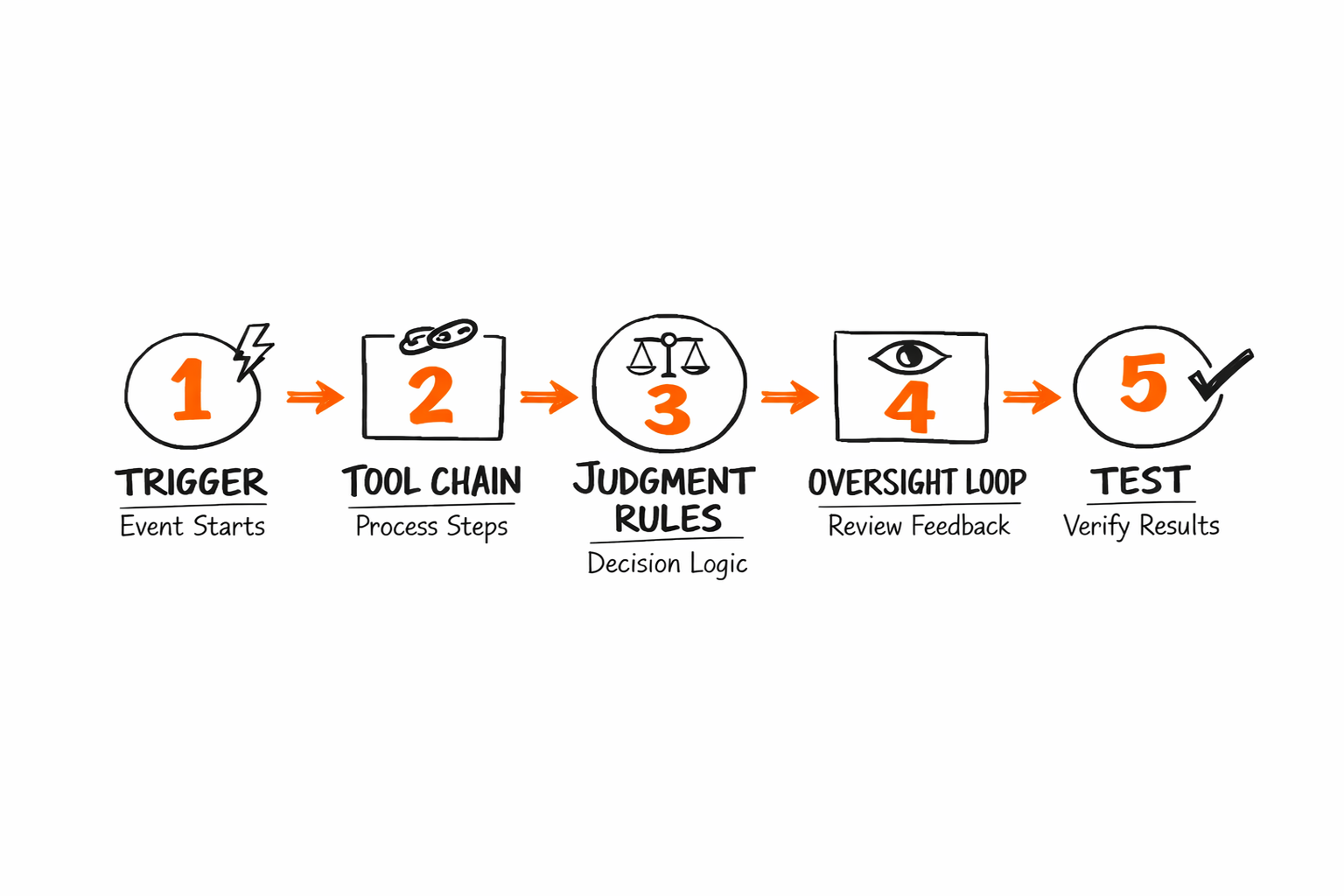
Step 1: Define the Trigger and Starting Condition
Be specific about every component of the trigger, including the data field, the threshold, the event type, and the source system. A trigger that fires on alert.severity = "critical" and alert.acknowledged = false and alert.age >= 300 is specific enough to be predictable. A trigger that fires on "new alert" is not.
Include a "don't trigger when" condition alongside the trigger definition. This prevents false fires during maintenance windows, during test runs, and during any period when upstream systems might emit events you don't want the agent to act on. Writing this condition before the first test run saves at least one production incident.
Step 2: Map the Tool Chain
List every tool the agent will call, in order, specifying what data it sends and what response it expects back. Real tools to consider at each step include Sentry for alert ingestion, Linear for ticket creation, GitHub for PR annotation, Slack for notifications, Notion for documentation drops, Intercom for customer-facing outreach, HubSpot for customer relationship management (CRM) triggered actions, and Stripe for billing-related events.
Specify the data format at every handoff. If step 2 creates a Linear ticket and step 4 posts a Slack message referencing that ticket, the ticket URL needs to be explicitly extracted and passed forward. The agent does not infer what to carry from one step to the next unless you tell it what to extract at each stage.
For teams building workflows that span multiple team boundaries, How AI Agents Close the Marketing-Engineering Gap shows what cross-team handoffs look like when agents own the coordination layer.
Step 3: Set the Judgment Rules
Two lists define the agent's judgment layer. The first list covers "decide autonomously." The second covers "escalate to human."
Decide autonomously when the output is within the expected range, the format matches the schema the next tool requires, the completion signal is unambiguous, and no required fields are missing from the upstream response. These are your happy path conditions.
Escalate to human when the output is ambiguous, a required field is missing from the upstream response, confidence falls below the threshold you've defined, or the workflow has failed on the same step across two consecutive runs. The escalation condition is as important as the happy path. A workflow with no defined escalation logic will either stall silently or make autonomous decisions in situations it was never designed to handle.
Step 4: Wire In the Oversight Loop
Log every step. Capture what triggered the workflow, what the agent did at each step, and what the output was. This logging layer is what lets you diagnose failures after the fact and identify patterns before they compound into something harder to fix.
Set alerts for three conditions that cover most failure modes:
- Workflow failure at any step in the chain
- Human escalation rate above the threshold you set in the judgment rules
- Unusual latency that might signal upstream API degradation
These three alerts catch most problems before they compound.
The oversight loop isn't bureaucracy. It's what lets you trust the agent enough to leave it alone.
Step 5: Run a Controlled Test Before Expanding Scope
Before the workflow touches live data, run it through four input types:
- Happy path
- Edge case
- Malformed format
- Missing required field
The agent should handle all four gracefully. If it fails on any of them before you run it on live data, it will fail on all of them in production.
Run ten to twenty test cycles and watch the escalation rate closely. If more than 40% of test runs require human review, the judgment rules aren't specific enough. Tighten the decision boundaries before you scale scope, not after you've introduced the workflow to production traffic.
Three Business Workflow Examples (With Real Tools)
Here's what these look like across three different team types, with the engineering incident escalation case walked through step by step.
Engineering incident escalation (detailed walkthrough)
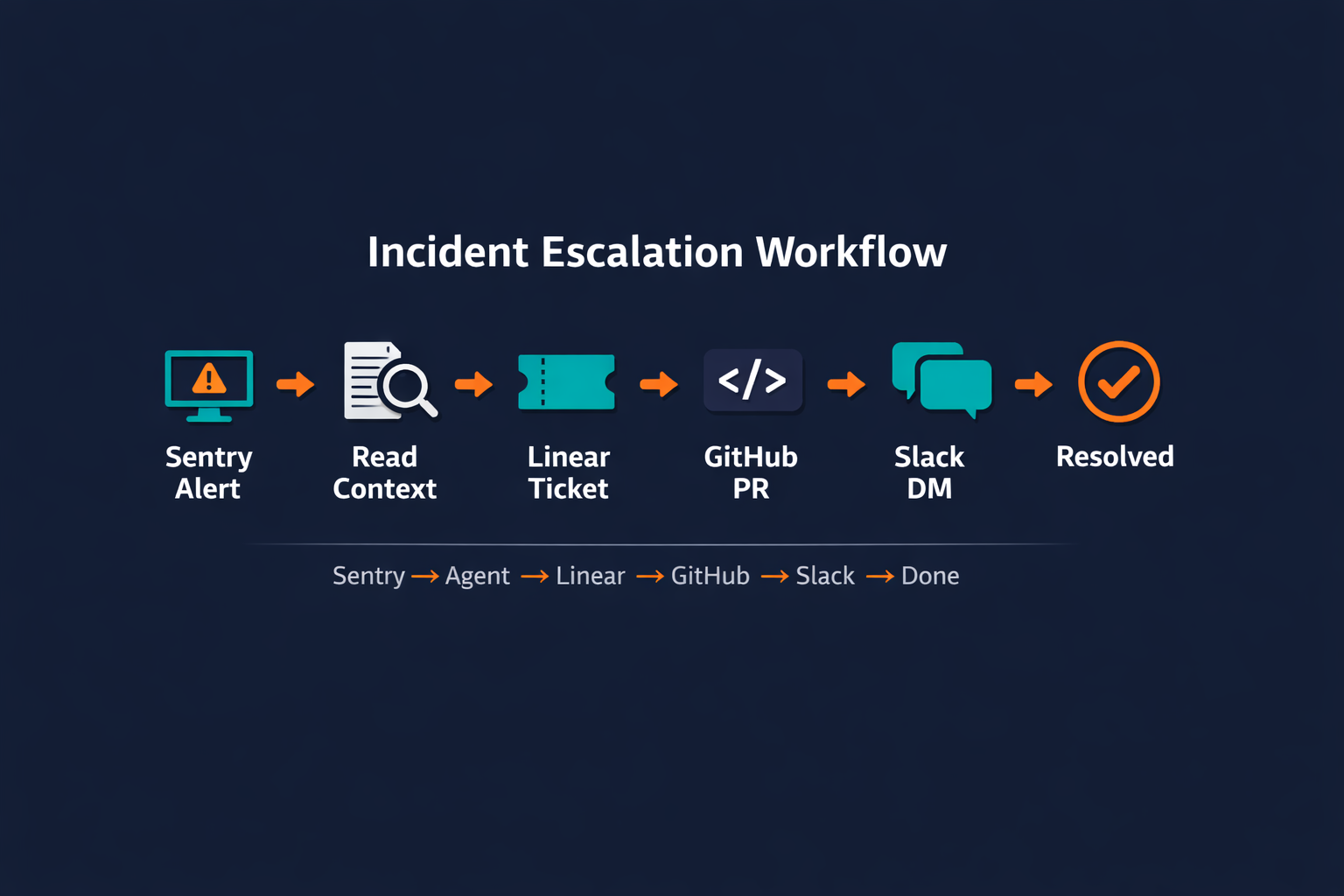
The trigger fires when a Sentry alert reaches severity critical and remains unacknowledged for five minutes. The agent reads the full error context, including the stack trace, affected service name, and any prior similar alerts from the past 48 hours. It opens a Linear ticket with the error summary and the severity label attached, then checks whether the alert links to a recent GitHub commit. If it does, the agent adds a comment to the relevant PR with the incident summary and the Linear ticket URL. It then Slack DMs the on-call engineer with all three pieces of information in one message, bringing together the incident summary, the Linear ticket link, and the GitHub PR link.
The agent monitors the Linear ticket status. When the ticket is marked resolved, the agent logs the resolution time, confirms closure, and archives the run record. Pazi orchestrates the full workflow end-to-end inside Slack, handling the sequencing from the initial Sentry read through to the final resolution confirmation.
The total tool chain runs through five systems. Sentry reads the alert context, Linear creates and tracks the ticket, GitHub receives the PR annotation, Slack delivers the on-call notification, and the orchestration layer ties all steps together.
| Workflow type | Trigger | Tool chain | Judgment call | Complexity |
|---|---|---|---|---|
| Incident escalation | Sentry critical alert, 5+ min unacknowledged | Sentry, Linear, GitHub, Slack | Escalate vs. retry based on severity and recurrence | Medium |
| Customer onboarding | New deal closed in CRM | HubSpot, Intercom, Notion, Slack | Tier routing based on plan type and deal size | Low |
| Content ops | Weekly schedule | Web fetch, draft generation, Slack approval, publish | Approve or flag based on QA score threshold | Medium |
The complexity column tracks decision branches, not tool count. Low means few conditional paths; medium means the agent evaluates and branches based on what it actually finds.
How to Measure Whether Your Workflow Is Working
A workflow that's running is not the same as a workflow that's working. The difference shows up in five metrics, and reading them together tells you whether you have a judgment problem, a tool problem, or a trigger problem.
| Metric | What it measures | Good signal | Red flag |
|---|---|---|---|
| Completion rate | % of triggered workflows that reach resolution without manual intervention | >90% after the first 2 weeks | <80% after the first month |
| Human escalation rate | % of runs that required a human decision to proceed | <15% after first month | >40% after third month |
| Time-to-resolution | Time from trigger to confirmed outcome | Declining vs. manual baseline | Increasing or plateauing |
| Error recovery rate | % of partial failures the agent recovers from autonomously | >70% | <50% |
| Drift rate | How often workflow output needs post-hoc correction | Declining week over week | Stable or rising |
If completion rate is high but escalation rate is also high, the workflow is technically completing jobs but the judgment rules are too narrow. The agent is doing the work and flagging too much for human review, which defeats the purpose. Tighten the escalation conditions. Don't rebuild the workflow from scratch when the problem is one specific decision boundary being too conservative.
What Usually Goes Wrong on the First Build
The first build almost always ships with at least one of four structural problems. Knowing them in advance doesn't eliminate them, but it compresses the debugging cycle considerably because you know exactly where to look.
1. Trigger too broad. The agent fires on everything, including noise. A trigger on "any Sentry alert" catches P3 informational events alongside P0 outages. The agent attempts the same full escalation sequence for both, creates unnecessary Linear tickets, and conditions the on-call engineer to treat the alerts as low-signal. The fix is to add a filter condition to the trigger definition before the first test run, not after the first false-positive complaint.
2. No judgment rules before the first run. The team assumed the agent would figure out what to escalate. It didn't. It either escalated everything or escalated nothing, depending on which direction its default behavior leaned. Per IBM Think's overview of agentic AI, agents can "maintain long-term goals and manage multistep problem-solving tasks," but they require the success criteria to be defined upfront. (source) They don't derive those criteria independently. Write the escalation conditions before the first test, not after the first failure.
3. No fallback when the tool chain breaks mid-flow. When step 3 of 6 fails, the agent stops. The team finds out three hours later when someone asks whether the ticket was created and discovers it wasn't. The fix is to define a fallback for every tool call that can fail. At minimum, that fallback should log the failure and alert a human so the job doesn't disappear without a trace.
4. Testing only with perfect inputs. The prototype worked because the test data was clean. Production data is not clean. Real Sentry alerts have malformed stack traces. Real CRM events have missing required fields. Real webhook payloads deviate from the documented schema in ways that only appear at scale. Test with malformed inputs, missing fields, and unexpected formats before going live. If the workflow can't survive those inputs in a test environment, it won't survive them in production.
A workflow that hasn't been tested on bad input hasn't been tested.
The first build is always a draft. The value comes from running the correction loop over many cycles, not from getting the initial setup perfect.
Related Reading
- How to Onboard AI Agents covers the correction loop that turns a first build into a working agent.
- How AI Agents Close the Marketing-Engineering Gap shows workflow design applied to a specific cross-team scenario.
Pazi is a platform built for business teams that run operations inside Slack. If you've mapped a workflow that requires judgment across multiple tools, not just a straight-line trigger, Pazi is worth a closer look. Visit pazi.ai to see how teams build and run agent workflows without leaving where their work already happens.