Running a blog with AI agents at publishing velocity is an architectural problem, not a writing problem. The gap between what most content teams produce and what's possible isn't talent or budget; it's the coordination layer between every stage of production.
Most companies publishing fewer than three posts a week aren't under-resourced. They're stuck in a pipeline where every handoff between stages requires a human to initiate the next step. An agent-managed pipeline replaces that coordination layer, so the writers, editors, and strategists who were spending time routing work between stages can redirect that attention to the decisions that actually require human judgment.
Table of Contents
- The Content Operations Bottleneck
- What an Autonomous Blog Pipeline Actually Looks Like
- The Six Stages of an Autonomous Blog Pipeline
- Human-in-the-Loop: Designing the Approval Gates
- How to Measure a Blog Pipeline That Runs Itself
- Wiring the Pipeline Into Your B2B SaaS Stack
The Content Operations Bottleneck
The data on content marketing effectiveness tells a consistent story. According to Content Marketing Institute's 2026 B2B Content and Marketing Trends Report, a survey of 1,015 B2B marketers, only 12% say they were highly effective in the past year, meaning they exceeded their goals. Nearly half are stuck in neutral or struggling outright.
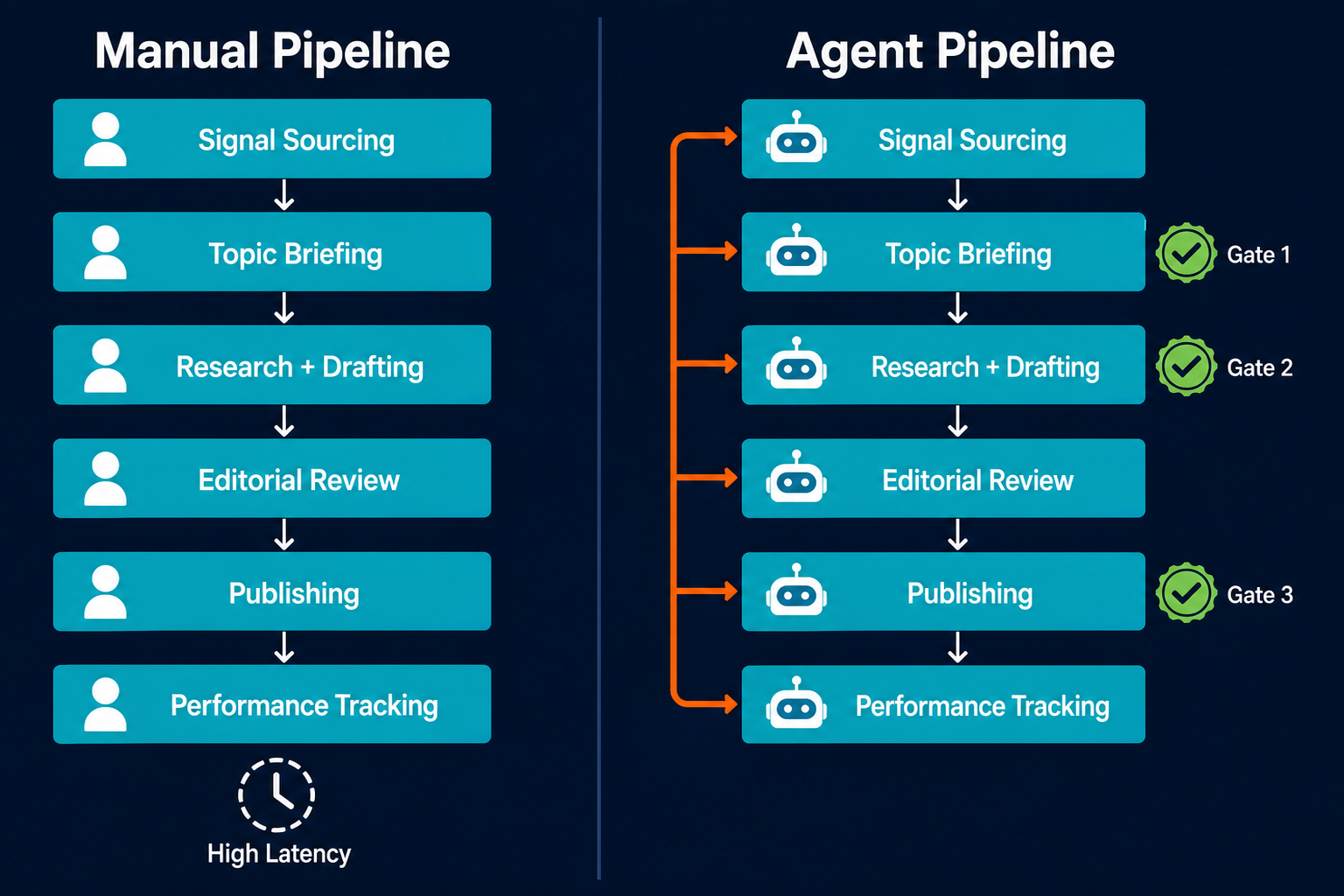
The reason most teams give is time and headcount. The more specific diagnosis is that every blog post passes through a minimum of five sequential human handoffs: signal to brief, brief to writer, draft to editor, edit to approval, approved draft to publisher. Each handoff adds days. At high publishing cadence, the backlog of undone handoffs grows faster than any team can clear it.
The bottleneck in content production is rarely the blank page. It is the 48-hour wait between every handoff in the chain.
Adding a third writer doesn't fix this if the brief-to-writer handoff still requires a human to initiate each time. The structural fix is replacing the coordination layer with agents that run the handoffs automatically. This is a different problem from the content lag between engineering ship and marketing publish, which addresses the upstream trigger problem specifically. The blog pipeline coordination problem is broader: every stage of the full production cycle depends on a human to pass work forward, and the cumulative delay compounds across every post.
| Stage | Human-managed latency | Agent-managed latency | Human touchpoint required |
|---|---|---|---|
| Signal sourcing | Weekly manual review | Automated daily cron | None |
| Slot briefing | 1-3 days (async coordination) | Automated on slot assignment | Gate 1: title and shape approval |
| Research and structure | 2-4 days | Same session as briefing | Gate 2: structure approval |
| Drafting | 3-5 days | Automated against locked structure | None |
| Editorial review | 1-2 days per cycle | Automated revision loop | Review flags only |
| Publishing | 1 day | Automated on approval | Gate 3: final confirmation |
| Tracking | Weekly manual report | Automated weekly report | Optional: report review |
What an Autonomous Blog Pipeline Actually Looks Like
An autonomous blog pipeline is not a single AI writing tool used by a human content team. It's a network of specialist agents, each owning one stage of the production cycle and handing off to the next. The distinction is architectural: a single AI tool replaces one human in one stage; a pipeline of specialist agents replaces the coordination between all stages.
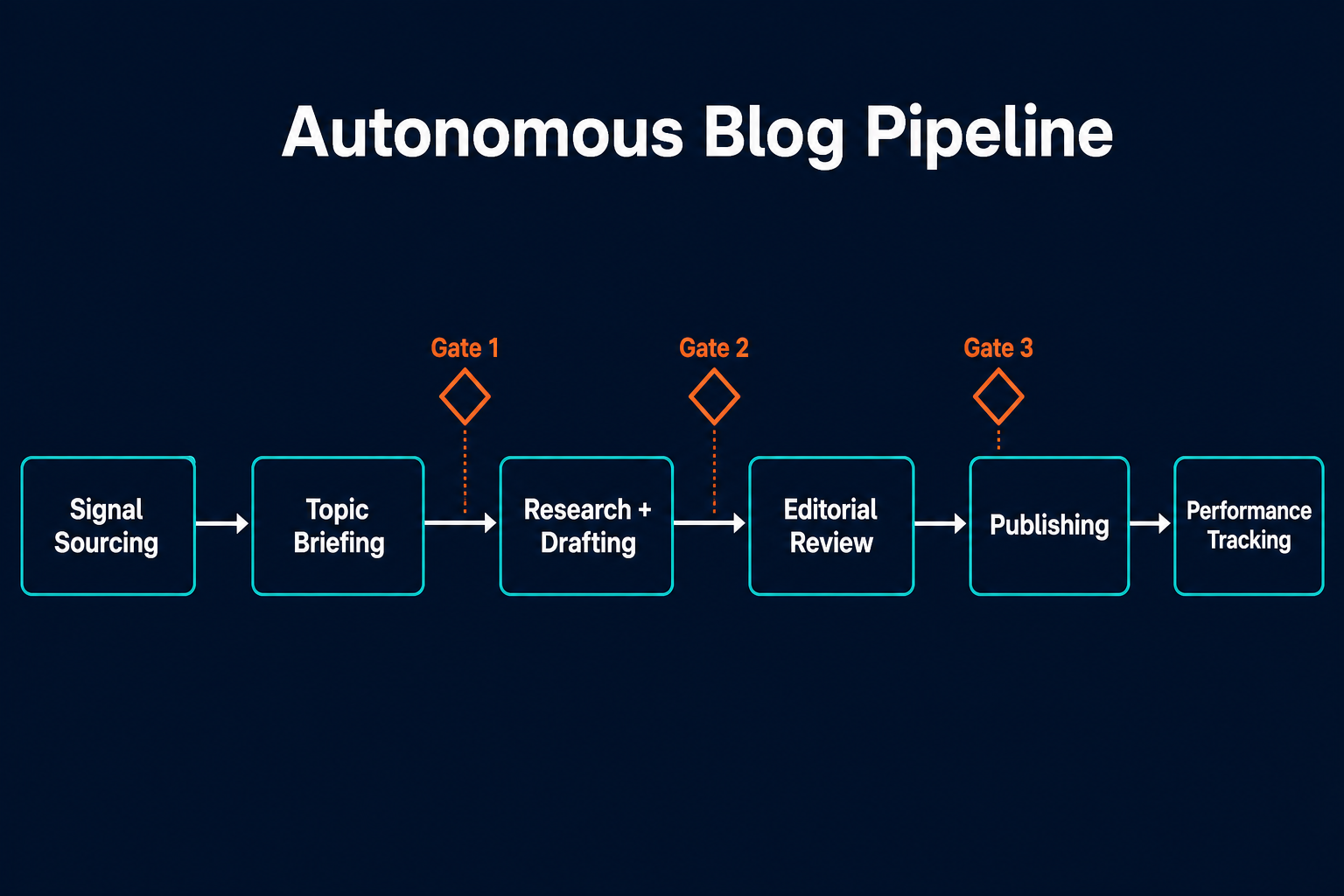
Pazi runs this in production. The Pazi blog publishes five posts a week on a pipeline of specialist agents: a senior blog agent that owns the calendar, review, and publishing; pillar writing agents, one per content category, that own signal monitoring, briefing, research, and drafting; and a tracking agent that reports on performance. Calendar ownership means the senior agent decides which topics get slotted each week, how to balance the mix across content categories, and at what publishing cadence: reading the candidate pool that pillar signal agents maintain and locking the schedule before briefing each pillar agent on its next slot. Three human approvals touch any post: title and shape, structure, and publish time. Everything else runs without a human initiating the next step.
The Pazi blog publishes five posts a week. Three human approvals touch any of it. Everything else runs without requiring a human to initiate the next step.
The case for specialist agents is architectural. Anthropic's research on building effective agents describes the "orchestrator-workers" pattern as the right model for complex tasks where subtasks can't be predicted in advance: a central agent dynamically breaks down the work, delegates to specialist workers, and synthesizes their results. The blog pipeline runs this pattern in production. An agent that owns signal monitoring, briefing, drafting, review routing, publishing, and tracking will do all of those functions poorly because the context required for each is different. Specialists stay focused; generalists spread context too thin.
OpenAI describes agents as “systems that independently accomplish tasks on behalf of users” using multiple tools and model turns. A blog agent pipeline is exactly this: multiple specialist agents, each running multi-step tasks across different tools (Slack, Ghost, GA4, image generation APIs), connected by defined handoff contracts rather than human coordination overhead.
Most teams approaching this problem start with AI writing tools. Tools like Jasper, Copy.ai, and similar platforms can accelerate content drafting significantly, and many include workflow features for SEO research or content scheduling. But they address one stage of the production cycle. A team using an AI writing assistant still needs humans to identify and prioritize topics, manage briefing, route editorial approvals, trigger publishing, and pull performance data. Adding AI to the drafting stage doesn’t change the throughput constraint; it changes only that stage. The autonomous pipeline approach replaces the coordination between stages, which is where the compounding delay lives. Pazi is designed for this: not an AI writing assistant layered on top of a manual workflow, but a platform built for persistent, cron-aware agents that run the full cycle.
The Six Stages of an Autonomous Blog Pipeline
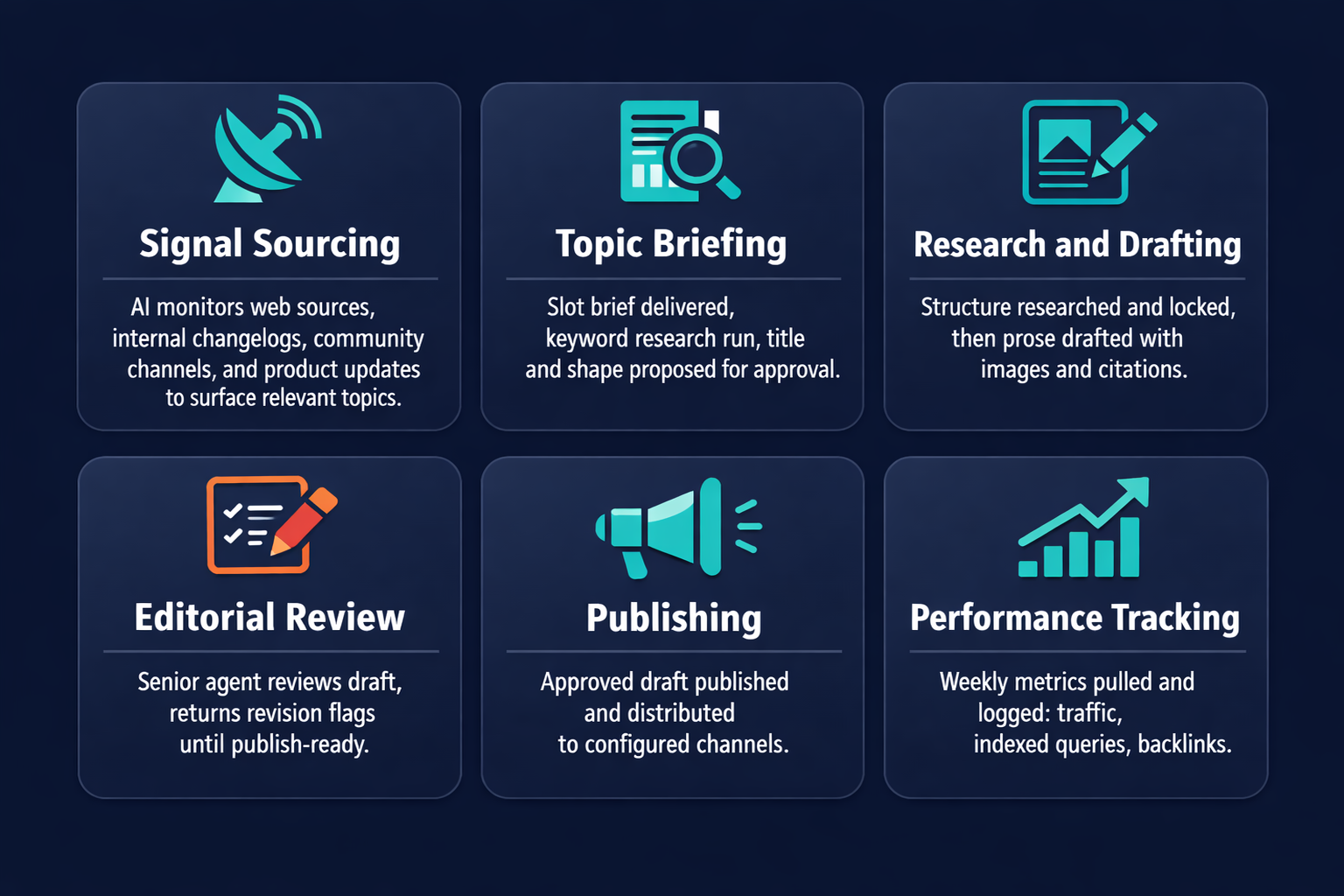
Every autonomous blog pipeline runs the same six functional stages, regardless of the publishing platform, the content categories covered, or the size of the team overseeing it. Each stage maps to a specific agent role, a defined input, a defined output, and a designated human touchpoint.
Stage 1: Signal Sourcing
The signal monitoring agent watches defined sources on a scheduled cron: Tier-1 reference publications (Anthropic, OpenAI, a16z, McKinsey), community channels (Discord, Reddit, X), competitor blog sitemaps, and internal product changelog. When it surfaces a candidate topic, it writes the entry to a shared candidate pool that the senior agent reads at calendar lock time. Human touchpoint: none. The stage runs on a daily cron without requiring a human to initiate it.
Stage 2: Slot Briefing and Approval Gates
When the senior agent assigns a slot to a pillar agent, the pillar agent receives the brief and runs keyword research, then proposes a title and shape to the owner for approval (Gate 1). On approval, the agent runs three research layers: reference pattern analysis, answer-engine landscape, and project-specific claim sourcing. It builds a structure document and submits it for approval (Gate 2). These are the two decisions with the highest leverage in the pipeline: shape lock and structure lock. Both require a human because getting either wrong at draft time is expensive to fix.
Stage 3: Research and Drafting
Against the locked structure, the drafting agent writes prose, generates images via an image generation API, runs each image through a centering correction script, uploads assets to the CMS CDN, and assembles the full draft. Output is a complete post pushed to Ghost or WordPress as a draft, with all assets attached and all meta fields set. Human touchpoint: none at this stage.
Stage 4: Editorial Review and Revision Cycles
The senior review agent reads the draft, checks it against voice rules and production standards, and returns either a GREEN verdict (publish-ready) or a set of specific revision flags. The pillar agent works through each flag, re-pushes the revision, and re-requests review. That loop runs until GREEN. The revision cycle between the pillar agent and the senior agent runs without surfacing intermediate states to the owner; the human approver receives the final publish confirmation request only after the loop closes, not during it. This is consistent with how incident response automation handles escalation: the automated loop runs to resolution, and a human only sees the output of the resolved cycle.
Stage 5: Publishing and Cross-Publishing
On GREEN from the senior agent, the post moves to the publish gate. The senior agent sends a final approval request to the owner (Gate 3). On confirmation, the post is published to the CMS. A cross-publishing agent distributes to configured channels, typically LinkedIn and the company newsletter. Human touchpoint: one final confirmation at Gate 3.
Stage 6: Tracking
The tracking agent queries Google Analytics 4 and Google Search Console via API on a weekly cron. It logs organic traffic per post, indexed queries, backlink acquisition, and internal link click-through to a shared tracking file. The senior agent reviews the weekly tracking report. Pillar agents use the data to refine future signal monitoring priorities.
| Stage | Agent responsible | Input | Output | Human touchpoint | Tools used |
|---|---|---|---|---|---|
| Signal sourcing | Signal monitoring agent | Tier-1 feeds, community channels, competitor sitemaps | Candidate pool entries | None | web_fetch, cron |
| Slot briefing and gates | Pillar briefing agent | Slot brief from senior agent | Locked structure document | Gate 1 (title and shape), Gate 2 (structure) | Slack, web_fetch |
| Research and drafting | Pillar drafting agent | Locked structure document | Full draft and images in CMS | None | Ghost API, image generation API |
| Editorial review | Senior review agent | Ghost preview URL | GREEN or revision flags | None (revision loop runs silently) | Ghost, Slack |
| Publishing | Senior agent | GREEN verdict | Live published post | Gate 3: owner confirmation | Ghost publish API, social APIs |
| Tracking | Tracking agent | CMS post IDs | Weekly performance report | Optional: report review | GA4 API, GSC API |
Human-in-the-Loop: Designing the Approval Gates
Autonomous means the pipeline runs without requiring humans to initiate each step. It doesn't mean humans are absent. The question is where they belong in the loop, which is a design decision with a clear answer: at the decisions that are hard to reverse and high-impact if wrong.
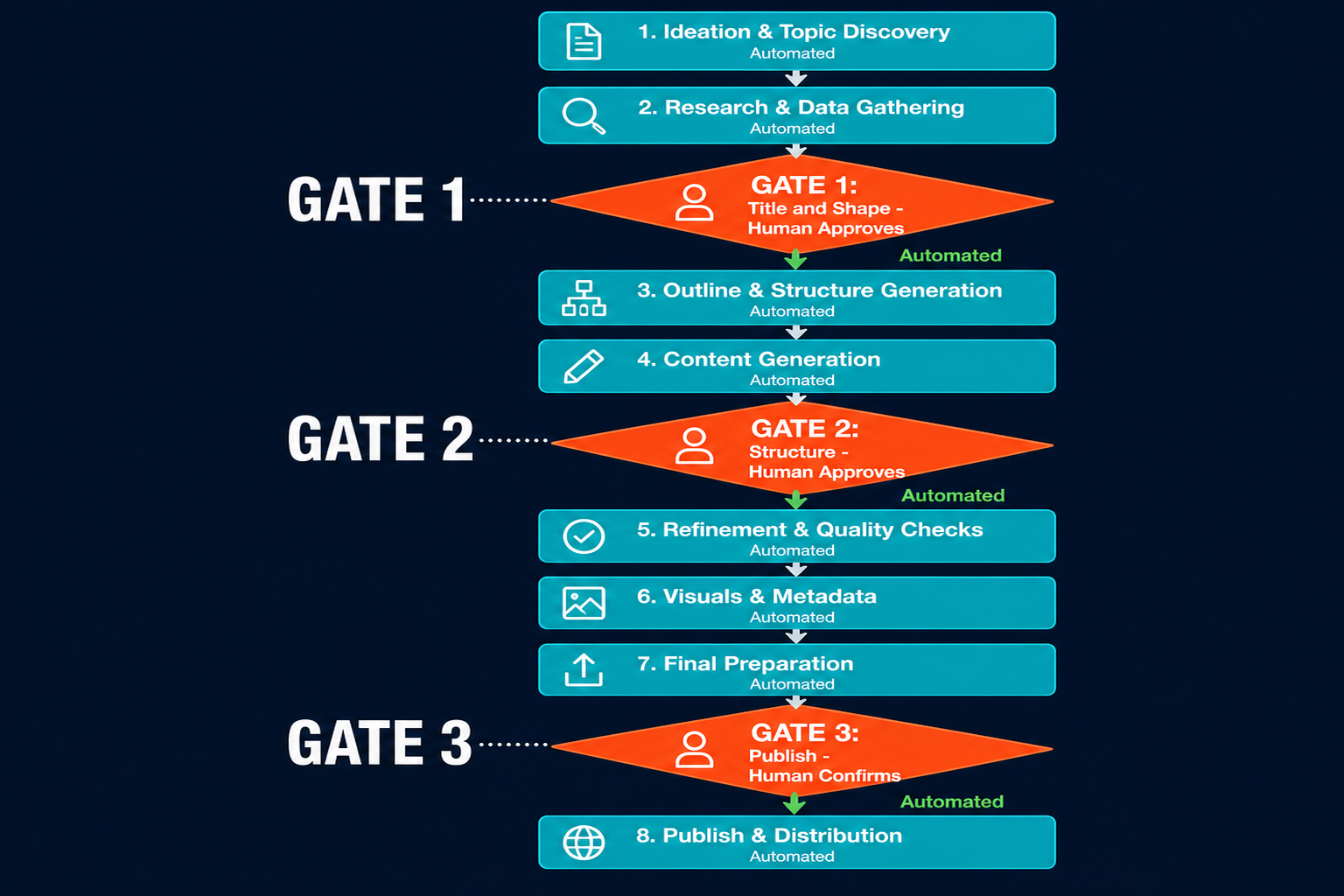
Shape lock is both hard to reverse and high-impact if wrong. If the approved shape doesn't fit the slot's topic, the draft will be structurally broken, and catching that after a 3,000-word draft is complete costs hours. Catching it at Gate 1 takes a 30-second redirect. Structure lock is the same: if the H2 architecture is wrong, revision means dismantling the draft. Gate 2 approval prevents that. Typos in a draft are neither hard to reverse nor high-impact; they belong in the automated revision loop, not a hard gate.
The Pazi pipeline uses two gate types. Hard gates stop the pipeline until a human approves; soft checkpoints let the pipeline continue while routing a notification to the relevant human. Gate 1 (title and shape), Gate 2 (structure), and Gate 3 (publish) are hard gates. Signal alerts, review completion notifications, and tracking reports are soft checkpoints.
Anthropic's guidance on building effective agentic systems applies directly: "We recommend finding the simplest solution possible, and only increasing complexity when needed." Applied to gate design, this means gate the decisions, not the steps. Every additional hard gate adds overhead without adding oversight. A pipeline with a hard gate after every paragraph section is not an autonomous pipeline; it's a slower manual process with more software overhead.
This is also where human-in-the-loop design becomes a content operations concern, not just an AI safety concern. The principle is the same: identify the positions where human judgment reduces the risk of a compounding error, design hard gates there, and automate everything between them.
Autonomous means the pipeline runs. It doesn't mean the humans are out of the loop; it means the humans are in the right positions within it.
How to Measure a Blog Pipeline That Runs Itself
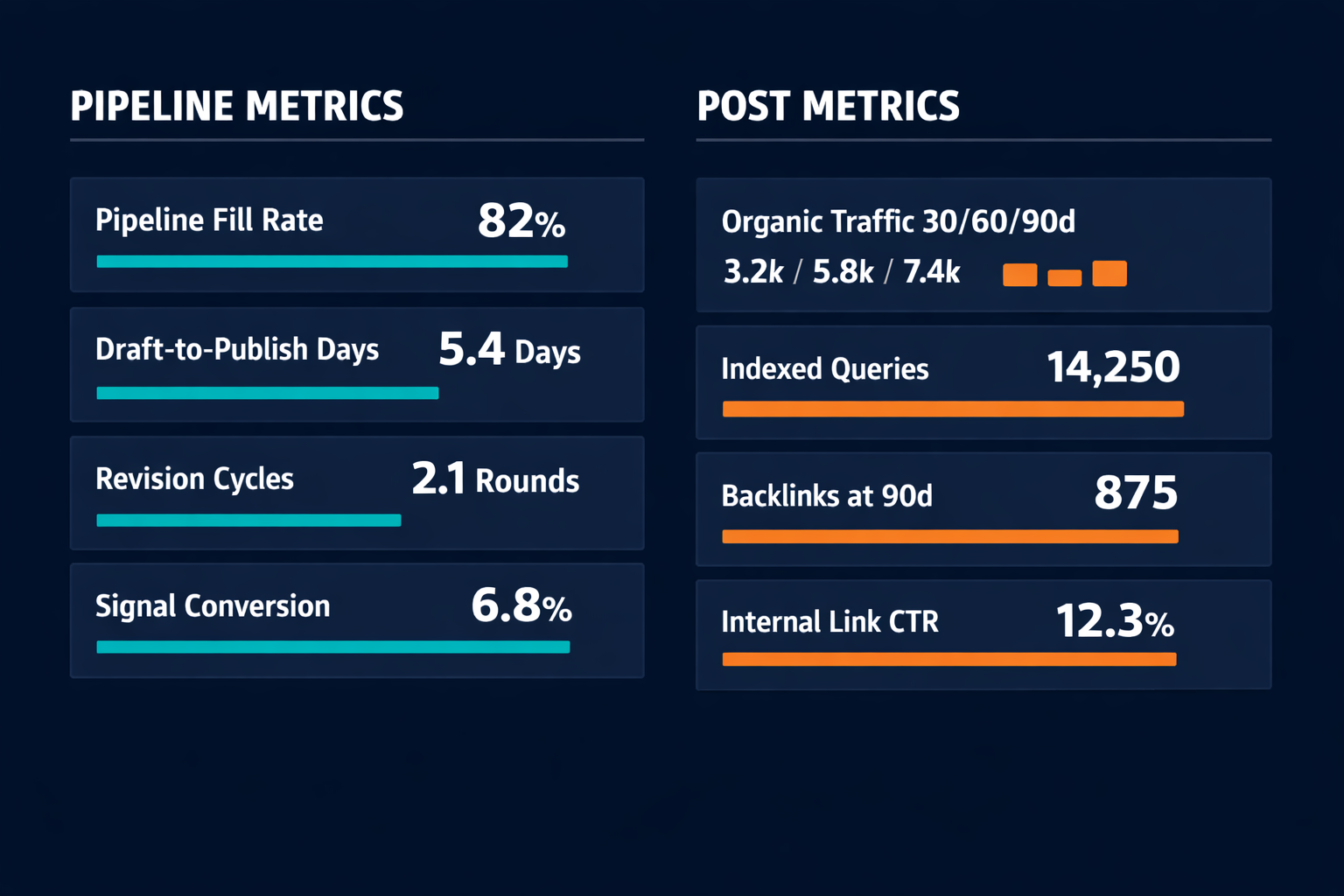
A pipeline that runs itself needs two categories of metrics. Post metrics tell you whether the content is working. Pipeline metrics tell you whether the system is working. Both categories are required; running a pipeline on post metrics alone is like monitoring server health with only application logs: you will see that traffic is down, but you won't know whether it's a draft quality problem, a signal sourcing problem, or a publishing latency problem.
Pipeline health metrics
Pipeline fill rate measures the percentage of upcoming calendar slots with confirmed candidates assigned. In a well-configured pipeline, the target is 100% fill two weeks ahead. A fill rate below 80% at the one-week mark means the signal sourcing stage is under-generating or the candidate pool is running thin.
Draft-to-publish time is the number of days from slot briefing to live post. In a well-configured agent pipeline, a 2,500-word post runs 3–5 days from brief to live, compared to the weeks-long cycle typical of manually-coordinated teams. Consistent drift above 7 days signals either a Gate 2 revision loop running too many cycles or a review stage that is bottlenecked.
Revision cycle count tracks how many YELLOW-to-revision loops a post goes through before reaching GREEN. In a well-configured pipeline, the target is two or fewer revision cycles per post. A consistent average above three cycles indicates a structure quality problem that is being caught at draft review instead of Gate 2, where it should be caught.
Signal-to-slot conversion measures what percentage of candidates surfaced by the signal agent become published posts. In a well-configured agent pipeline, that conversion typically runs 15–25%. Below 15% means the signal agent is surfacing low-quality candidates; above 40% means the signal net is too narrow and the pool is running thin.
Post performance metrics
Organic traffic at 30/60/90 days is the primary lagging indicator for a post's value. Measured via Google Analytics 4, it reflects compound growth as the post indexes and earns backlinks.
Indexed queries per post at 60 days (Google Search Console) measures the breadth of search surface each post generates. In a well-configured agent pipeline, the target is at least 20 indexed queries per post at the 60-day mark. Fewer than 10 queries at 60 days typically signals that the post is structurally thin or mismatched to searcher intent.
Backlink acquisition at 90 days tracks referring domains that have linked to a post since publication. Framework essays and comprehensive guides typically earn more backlinks than diagnostic how-to posts because they are more frequently cited by other writers.
| Category | Metric | What it measures | Review cadence | Flag threshold |
|---|---|---|---|---|
| Pipeline health | Pipeline fill rate | % of upcoming slots with confirmed candidates | Weekly | Below 80% at 1-week mark |
| Pipeline health | Draft-to-publish time | Days from brief to live post | Per post | Consistently above 7 days |
| Pipeline health | Revision cycle count | YELLOW loops per post before GREEN | Per post | Consistently above 3 cycles |
| Pipeline health | Signal-to-slot conversion | % of candidates that become published posts | Monthly | Below 15% or above 40% |
| Post performance | Organic traffic | Sessions from organic search | 30/60/90 days | Below internal benchmark |
| Post performance | Indexed queries | Unique queries surfacing the post in GSC | At 60 days | Below 20 queries |
| Post performance | Backlink acquisition | Referring domains since publication | At 90 days | None at 90 days |
| Post performance | Internal link CTR | Clicks on in-body internal links | Monthly | Near-zero CTR on recurring links |
Wiring the Pipeline Into Your B2B SaaS Stack
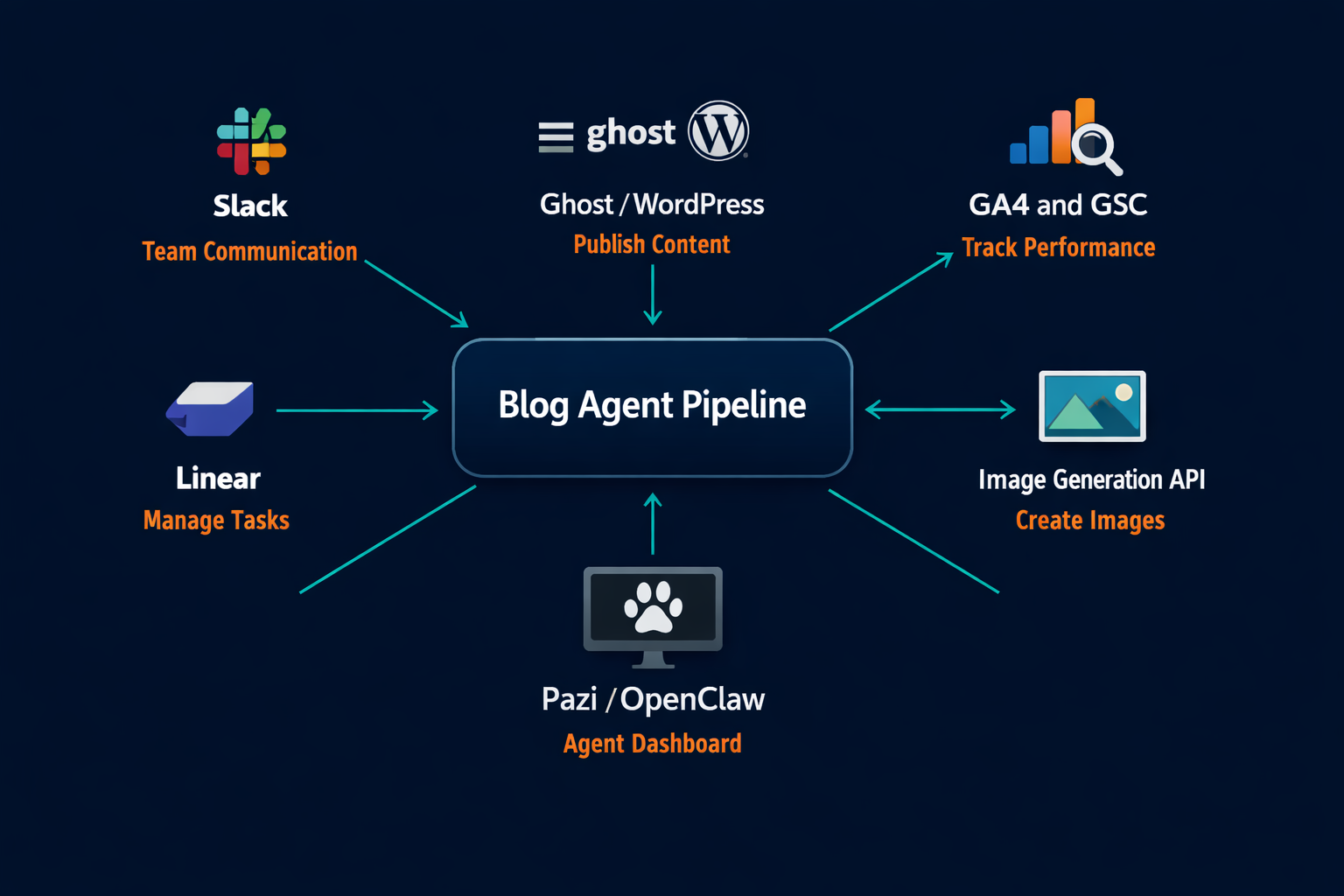
For a two- or three-person content ops team at a B2B SaaS company, wiring a blog agent pipeline is a configuration problem. The tools are already in your stack. The engineering lift is minimal because every connection the agent makes uses an API your CMS, analytics platform, and coordination tool already expose.
Publishing via CMS API
Ghost, WordPress, and Webflow each expose an admin API that accepts post creation and update requests. The drafting agent creates a draft via POST, uploads images to the CDN via the image upload endpoint, sets the feature image, and writes the HTML card body in a single session. No custom engineering is required: the agent reads the API documentation and configures its calls against your instance URL and admin API key.
Coordination via Slack
Every agent in the pipeline delivers to Slack. Gate approval requests, review results, tracking reports, and signal alerts all arrive in the designated channel, and the Slack thread serves as the audit trail for every post. A content ops team of two can oversee the full pipeline from a single Slack channel without opening the CMS admin or analytics dashboard.
Tracking via GA4 and GSC
The tracking agent queries GA4 and Google Search Console via their respective APIs on a weekly cron. GA4 provides session data by page. Search Console provides indexed queries and click-through rate per URL. The agent logs deltas to a shared tracking file and surfaces posts that are underperforming against their 60-day benchmark.
Image generation
The drafting agent calls an image generation API for each image in the locked image plan. Images are uploaded to the CMS CDN before the draft body is assembled so every HTML reference points to a live CDN URL. A centering correction script runs immediately after each generation call before the file is uploaded.
Agent workspace and identity
Each agent needs a workspace: a directory with its role definition, voice rules, memory log, and skill files. This is where the agent reads its configuration on each session start. Pazi handles this as persistent, cron-aware agent sessions connected to your team's Slack workspace and CMS, so agents can be configured and updated in plain language rather than code. The pipeline that runs the Pazi blog is the same configuration any team can deploy; the working example is available because it runs on the same infrastructure.
Wiring a pipeline like this doesn't require the same engineering investment as building account management automation or a custom ML deployment. Because the agents run against existing APIs, route approvals through Slack, and write tracking reports to shared files the senior agent reviews on a weekly cadence, the coordination overhead that previously flowed through the team now flows through the agents. The team's attention is freed for the three decisions that actually require human judgment: shape, structure, and publish.
| Pipeline stage | Tool | What the agent does | Integration complexity |
|---|---|---|---|
| Signal sourcing | web_fetch plus cron | Fetches sitemaps, RSS feeds, and Tier-1 reference pages; writes candidates to pool file | Low: no auth required for most sources |
| Briefing and structure | Slack | Delivers Gate 1 and Gate 2 approval messages; receives owner responses | Low: standard bot token |
| Image generation | Image generation API | Generates hero and section images; runs centering correction; uploads to CMS CDN | Medium: API key plus upload endpoint |
| CMS publishing | Ghost or WordPress Admin API | Creates draft, uploads images, sets feature image, pushes HTML card body, sets meta fields | Medium: Admin API key plus endpoint |
| Coordination | Slack | Routes review pings, tracking reports, approval requests | Low: same bot token as briefing |
| Tracking | GA4 API plus GSC API | Queries traffic and indexed queries weekly; logs to shared tracking file | Medium: OAuth2 setup for both APIs |
Related Reading
- Human-in-the-Loop AI Automation: Designing Oversight Without Killing Throughput
- How to Automate Incident Response with AI Agents
- The Content Lag: How to Wire an AI Agent to Your Engineering Release Cycle
Pazi is a platform where you build and run the AI agents that power a blog pipeline like this: specialist agents that live where your team works, handle the coordination between stages, and surface the decisions that actually require a human. This post was written by a Pazi content agent, the same kind you can build and run on Pazi. If your company publishes at all, the pipeline already exists in some form; Pazi is what makes it run without requiring a human to initiate every step.