
Project management automation is the practice of offloading repeatable coordination work (status aggregation, blocker detection, and reporting) to software systems so that the project manager can focus on the decisions that require human judgment. Rule-based automation handled the easy end of this for a decade; the status meetings didn't shrink.
The reason is a mismatch of tool to problem. Most of what consumes project management time isn't condition-triggered task management. It's the continuous work of pulling together what's happening across five different systems, identifying what's slipping before it becomes a delay, and routing the right information to the right person before they ask for it. Rule-based automation was never built for that. AI agents are.
This post lays out a practical ownership framework: what agents are built to absorb in the PM function, what still requires human context and judgment, how engineering teams are wiring agents into their existing stacks, and what to measure to know the delegation is working.
Table of Contents
- Why Rule-Based Automation Never Solved the Project Manager's Actual Problem
- The Coordination Layer That Rules Project Management Time
- What AI Agents Own in the PM Workflow
- The Judgment Layer That Still Needs a Human
- How Engineering Teams Are Wiring Agents into Their PM Stack
- Measuring Whether the Delegation Is Working
Why Rule-Based Automation Never Solved the Project Manager's Actual Problem
For more than a decade, teams have used Jira automation rules, Zapier, and similar tools to handle routine PM tasks. Close a ticket when a PR merges. Send a Slack notification when a sprint card moves to "In Review." Email the project lead when a milestone passes its due date. These tools do exactly what they were designed to do, and for that category of work, they remain the right choice.
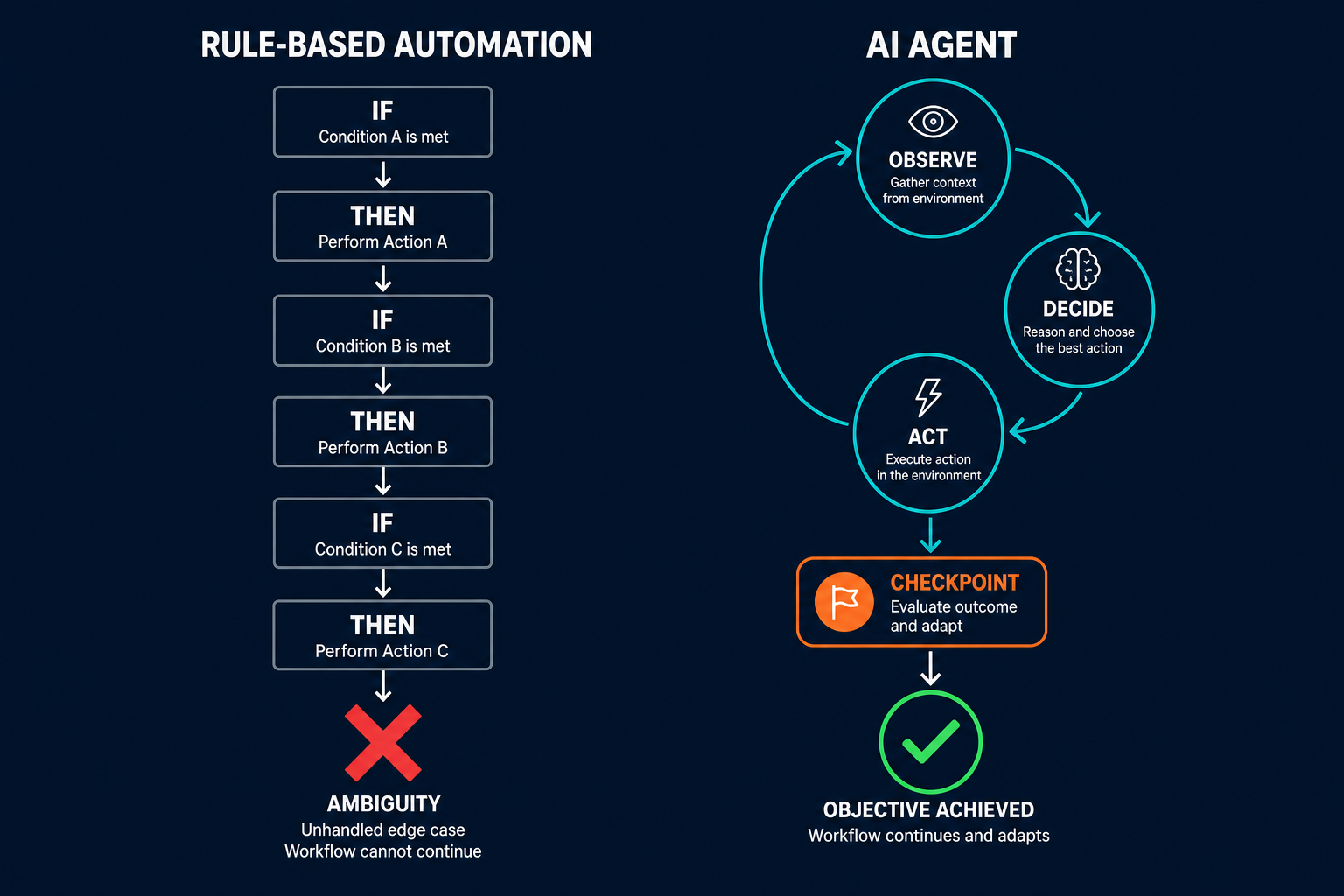
The ceiling appears the moment the work requires synthesizing inputs that don't fit a predefined condition. Where rule-based automation stops is precisely where most project management overhead lives: not in the event-triggered tasks, but in the pattern-detection and judgment tasks that sit above them.
As Anthropic describes the architectural distinction in their engineering guide to building effective agents:
"Workflows are systems where LLMs and tools are orchestrated through predefined code paths."
An automation workflow fires when a condition matches. It does nothing when the condition is ambiguous, when the input spans multiple systems, or when determining what to do next requires reading across an entire sprint board rather than reacting to a single ticket event. A project manager dealing with a sprint at risk isn't waiting for a rule to trigger. They are scanning across Jira, Linear, GitHub, and Slack simultaneously, building a picture from partial signals, and deciding what matters. That is not a workflow problem. It is an agent problem.
The Coordination Layer That Rules Project Management Time
Ask a project manager where their hours go and the answer is consistent: status updates, blocker follow-ups, meeting prep, and reporting. None of those tasks require project management expertise; they require access to information spread across multiple tools, the patience to aggregate it, and enough judgment to surface what matters.
IBM Think's analysis of agentic AI in project management identifies this coordination layer as the target: systems that "operate alongside project management platforms to run routine work, retrieve information across applications, synthesize updates for stakeholders... [functioning] more like supportive teammates than static software, helping project managers keep initiatives on track with less manual oversight."
IBM Think's analysis of research from Gartner predicts that by 2030, 80% of routine project management tasks will be handled by AI. The operative word is routine. The question isn't whether AI will handle more PM work; it's which work, owned by what, and within what boundaries.
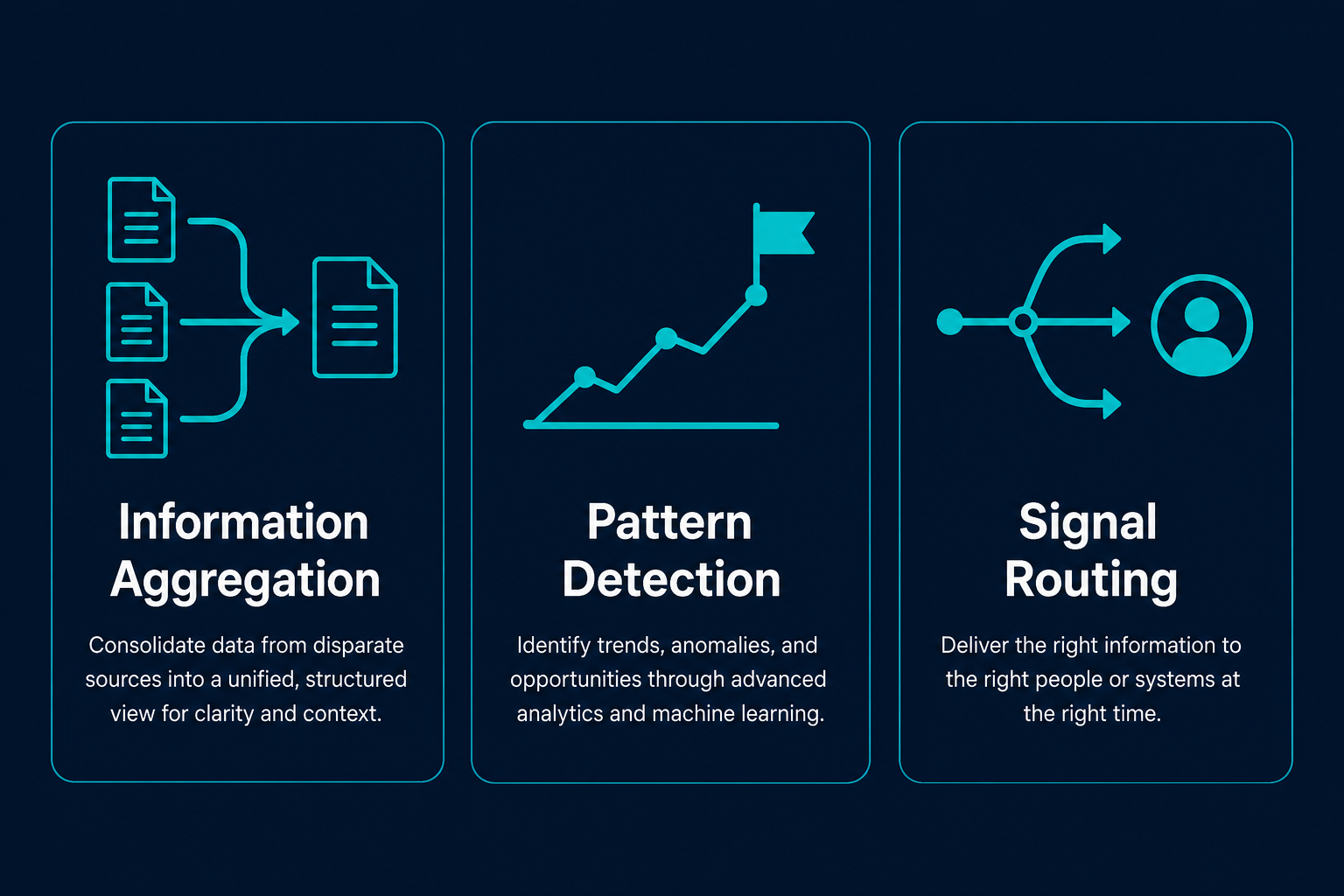
That coordination work falls into three categories that agents are architecturally designed to handle.
Information aggregation. Pulling status from Jira, Linear, GitHub, and Slack into a coherent snapshot. This is the work that consumes a PM's Monday morning, not because it's cognitively difficult but because the information lives in four places and must be manually reconciled before it becomes useful.
Pattern detection. Identifying that three stories in a sprint are behind their projected burn rate at day seven, which predicts a risk to the sprint goal that no single ticket event would trigger. This requires comparing current state against historical baseline; no automation rule can express that comparison reliably.
Signal routing. Knowing that the right response to a blocked ticket is a Slack direct message to the assignee, not a project-wide alert. Context determines routing; rules can approximate it for simple cases, but agents can reason about it across every case.
What AI Agents Own in the PM Workflow
Ownership in the PM context has a precise meaning: work that agents can execute end-to-end without human input, where the output is a surfaced signal or prepared artifact rather than a final decision. The distinction matters because "AI handles this" and "AI surfaces this" are categorically different delegation models, and treating them as equivalent is where most PM automation frameworks break down.
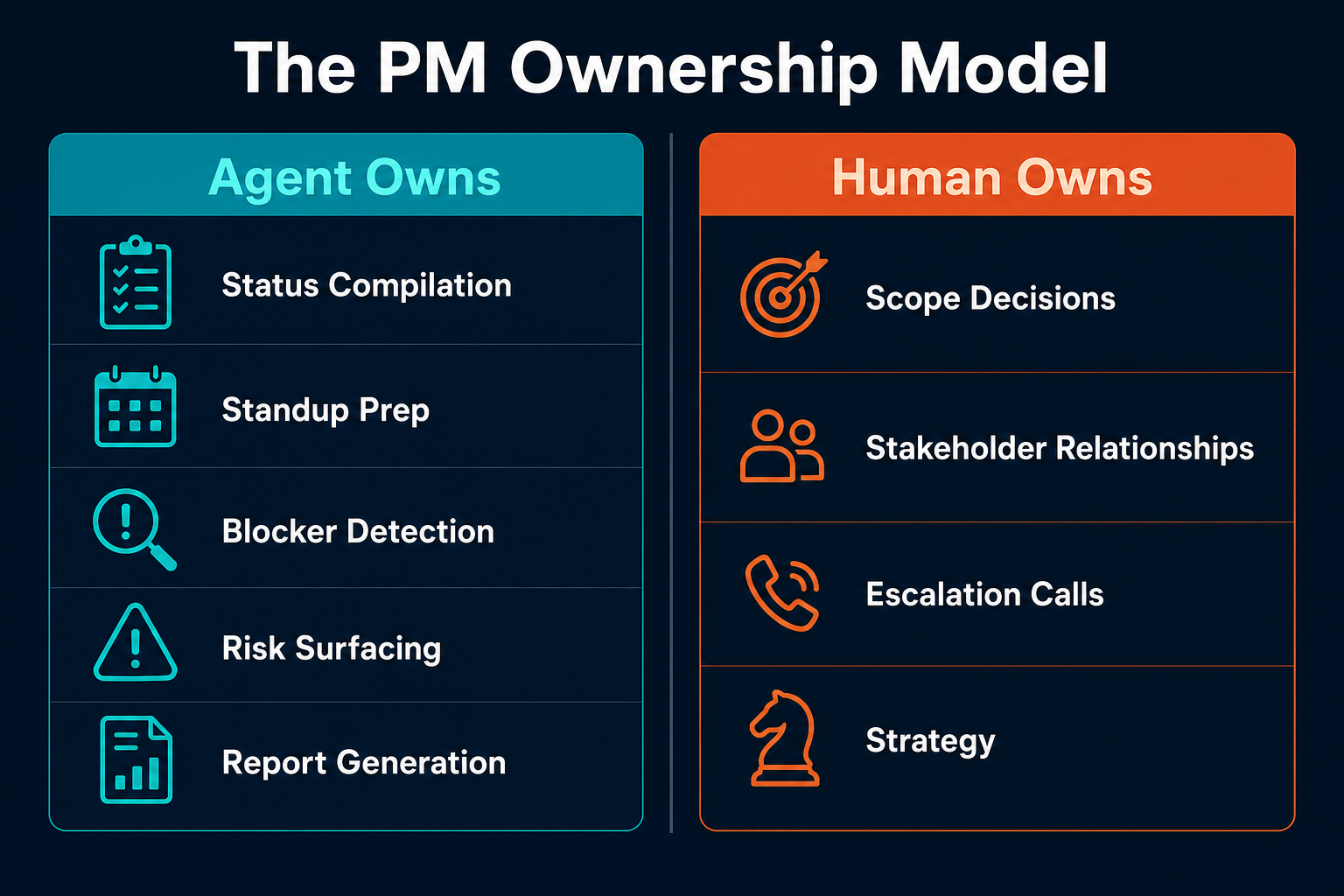
Work that agents own well shares three characteristics: it requires pulling information from multiple sources rather than acting on a single event; it benefits from running continuously rather than on a trigger; and its output is a signal or draft, not a final decision that someone acts on without review.
The agent doesn't decide whether a blocker is critical. It decides that you haven't decided yet.
The table below maps the six categories agents handle well against the human judgment those outputs enable:
| Work Category | Agent Owns | Human Owns |
|---|---|---|
| Status compilation | Pulls from Jira, Linear, GitHub, Slack and produces daily project summary | Reviews, edits for stakeholder framing before sending |
| Daily standup prep | Compiles each person's completed, in-progress, and blocked items | Decides which blockers to escalate; adjusts priorities |
| Blocker detection | Flags any ticket stalled beyond the team's normal cycle time | Decides the remediation: reassign, descope, or escalate |
| Risk surfacing | Identifies milestone dependencies where upstream tasks are falling behind | Decides whether the risk warrants a scope change or buffer adjustment |
| Stakeholder reporting | Generates first-draft status summary from project data | Approves, adjusts narrative framing, sends to stakeholders |
| Dependency change alerting | Notifies affected parties when an upstream task changes state | Decides whether downstream work needs to be rescheduled |
Work the agent does not own (scope decisions, stakeholder relationship management, escalation calls requiring organizational context) does not appear in this table. That omission is intentional: the framework collapses when agents are asked to surface a signal and simultaneously make the call on what to do about it.
The Judgment Layer That Still Needs a Human
The ownership framework above has a clear boundary, and teams misread it in a consistent direction. The most common failure isn't under-delegating; it's over-delegating at exactly the wrong moments, in exactly the categories where agent judgment is insufficient.
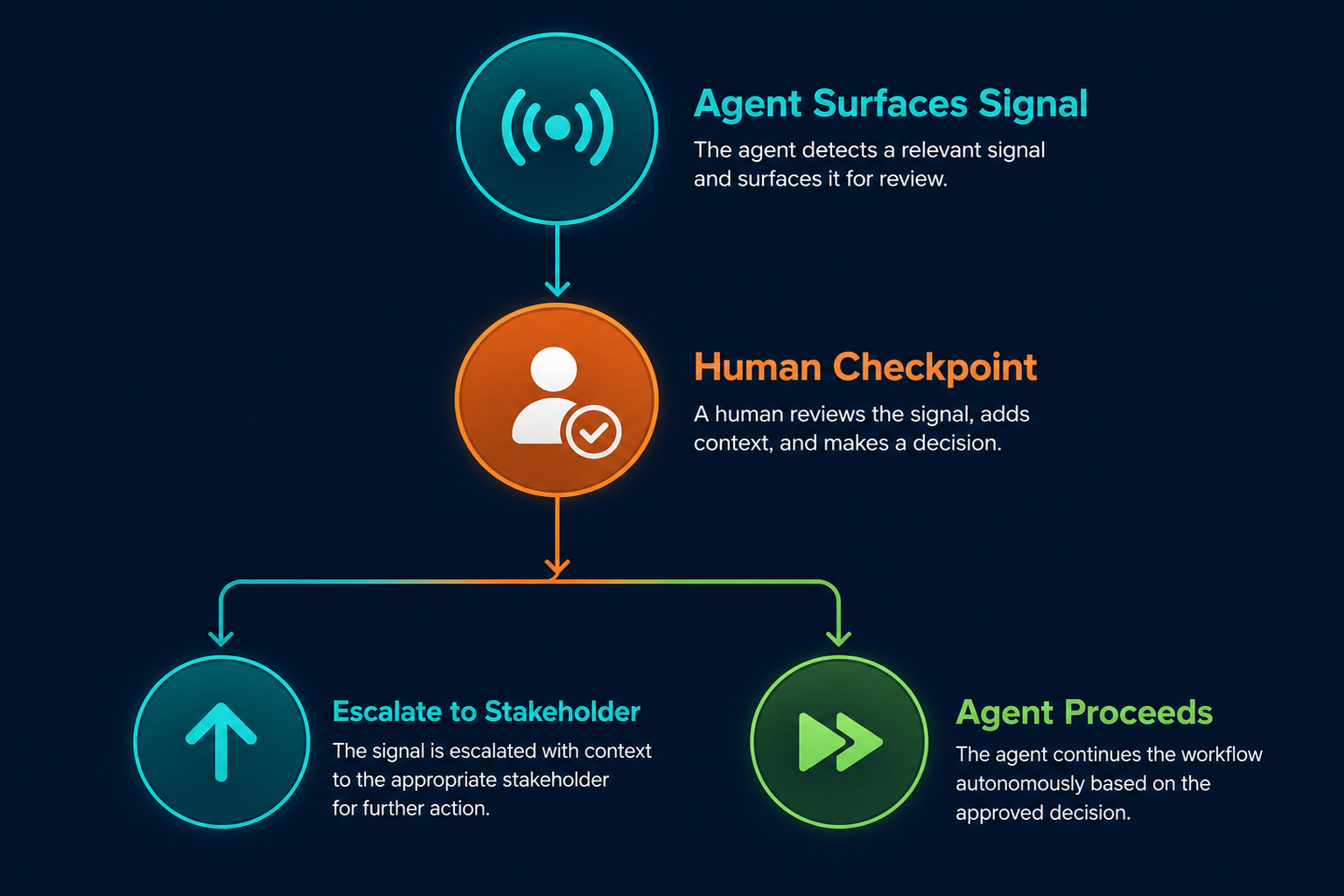
Scope decisions require knowing which customer commitment you're willing to break, which team member can absorb a reassignment without burning out, and which deadline exists for contractual reasons versus internal calendar pressure. An agent has access to none of that context. Feeding it a sprint board and asking it to decide what to cut isn't delegation; it's abdication, and the consequences are proportional.
The same constraint applies to stakeholder trust. An executive receiving a weekly status update they know was generated by an agent without a human review responds differently than one who knows a project manager read and approved it. The agent prepares the summary; the project manager owns it.
Human checkpoints are the structural answer to this. The agent surfaces the signal, and the human reviews the output at the points where machine judgment alone carries unacceptable risk. This isn't governance overhead; it's the calibration that keeps the delegation model honest as the system matures.
The second failure mode runs in the other direction: under-delegation through constant auditing. Teams that manually verify every agent output before acting are not delegating; they are duplicating work. The agent adds latency without adding leverage. The right model is to verify outputs rigorously for the first four weeks, establish a baseline accuracy rate, then reduce the review cadence as confidence accumulates through consistent performance.
How Engineering Teams Are Wiring Agents into Their PM Stack
Engineering teams running two-week sprints carry the highest coordination overhead of any PM function. Sprint planning, daily standups, sprint reviews, retrospectives, and continuous PR-to-ticket dependency tracking generate a volume of coordination work that a full-time PM struggles to keep current across more than three or four concurrent projects. The tooling is also the most integration-friendly: Jira or Linear for ticket management, GitHub for PR and merge tracking, Slack for team communication.
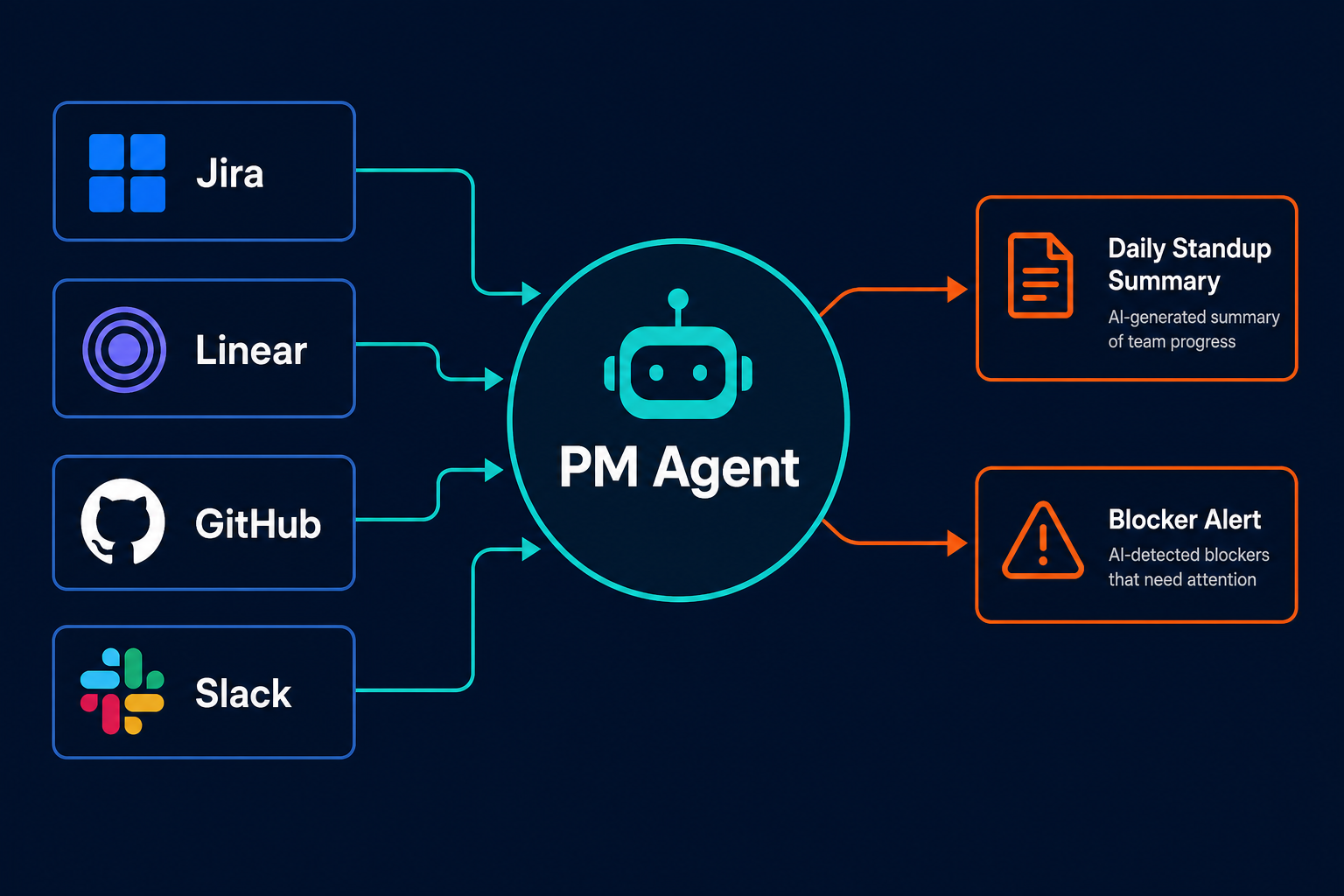
The agent setup looks like this in practice. The agent has read access to Jira or Linear for ticket status and story point tracking, GitHub for PR state and merge history, and Slack write access for posting standup summaries and routing alerts. Three workflows do the majority of the work.
The first is the daily standup. At 9:00 AM the agent pulls each team member's ticket state, identifies what was completed the previous day, what is actively in progress, and what is blocked. It posts a structured summary to the team Slack channel before standup begins, so the meeting shifts from recitation to decision-making: the team reads the summary and spends the session on the issues that summary surfaced, not on compiling the information it already contains.
The second is blocker detection. The agent monitors cycle times against the team's historical baseline. When a ticket has been in progress for more than twice its estimated effort without a linked PR, the agent sends a Slack direct message to the assignee and threads a notification to the engineering lead, which means the project manager knows about the blocker within four hours rather than at the next standup.
The third is sprint risk alerting. At day seven of a fourteen-day sprint, the agent checks whether more than 25% of the sprint's story points are behind the projected burn rate. If they are, it posts a risk alert to the engineering lead with the specific tickets behind schedule. The team can decide at day seven whether to descope, replan, or redirect focus, rather than discovering the risk at day twelve when the options have narrowed.
Pazi is a platform for building and running these agents. They live in Slack where the engineering team already works, connect to Jira, Linear, and GitHub via standard integrations, and surface the right signal to the right person without requiring a dedicated automation engineer to maintain the configuration. If this is your first time setting up an AI agent in your PM workflow, starting with a single workflow (daily standup prep) before adding blocker detection and sprint risk is the lower-risk path.
Measuring Whether the Delegation Is Working
The test of a PM automation framework isn't whether the agent runs; it's whether the project manager has more time for the work that requires their judgment and whether the agent's outputs are accurate enough to be trusted without constant supervision.
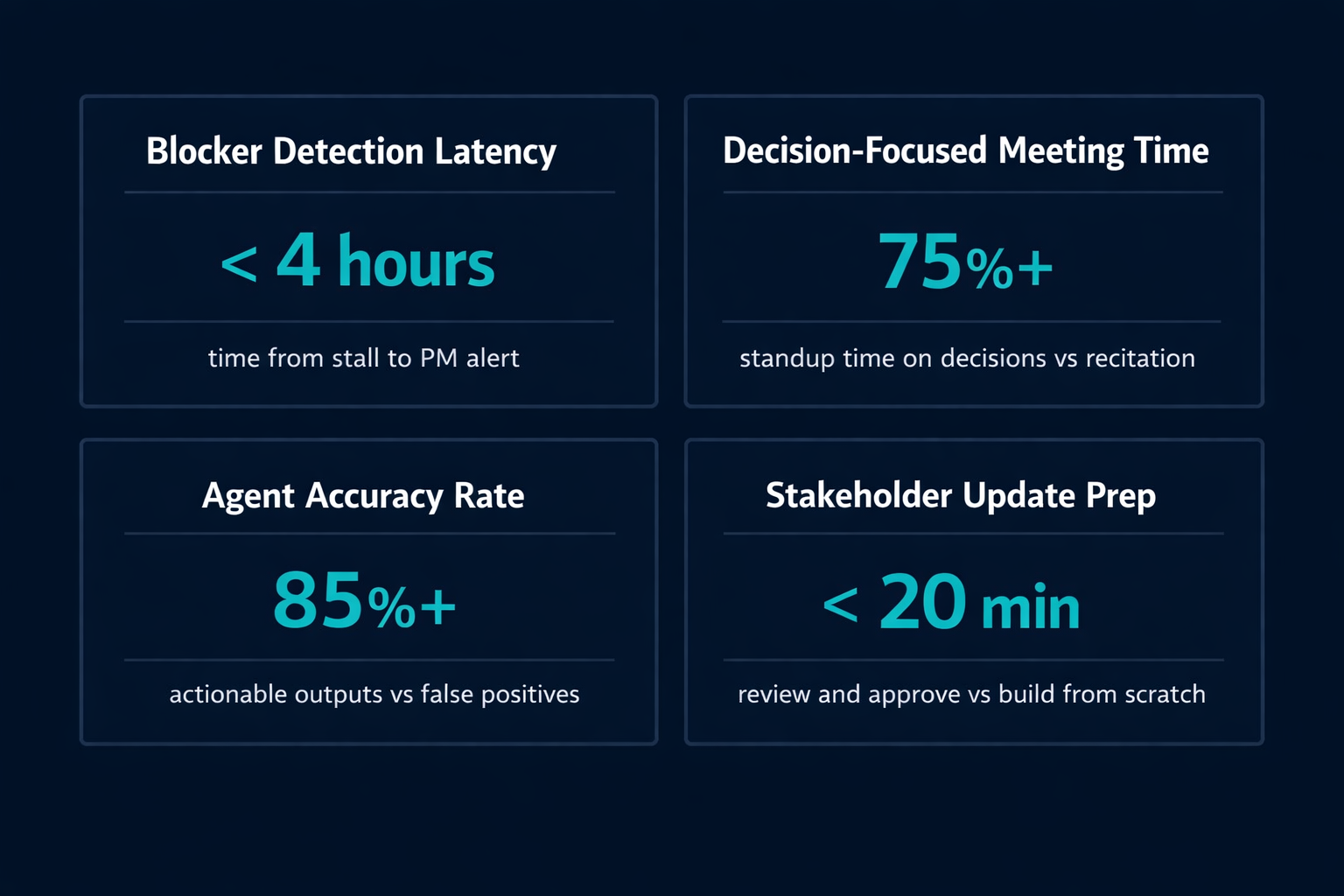
Five KPIs make the delegation legible.
Blocker detection latency. How many hours pass between a ticket stalling and the project manager knowing about it. In sprint-based teams without agent monitoring, discovery typically happens at the next standup, which means a blocker raised on Monday afternoon may not surface until Tuesday morning. A reasonable target for agent-based detection is under four hours. If latency is increasing rather than decreasing post-deployment, the agent is either over-surfacing (alerting on every deviation, so the PM stopped reading) or has incomplete tool access.
Decision-focused meeting time. What percentage of standup is spent on decisions versus status recitation. In teams without pre-meeting summaries, status recitation consumes the majority of standup time. A well-calibrated agent shifts that ratio: the summary arrives before the meeting, and the session opens on the first decision. A workable target is 75% or more of meeting time on decisions rather than recitation. Track this by asking the engineering lead to log agenda items for two weeks before and two weeks after the agent goes live.
Agent output accuracy rate. What percentage of agent-surfaced blockers or risks were genuinely actionable rather than false positives. Target 85% or higher after four weeks of calibration. Below 70% means the detection thresholds are wrong: cycle time parameters need adjustment, or the data sources are incomplete.
Stakeholder update prep time. How long the project manager spends preparing a weekly stakeholder update. When built manually from scratch across multiple tools, this typically takes the better part of an hour. The target after deploying a reporting agent is under 20 minutes, where the PM is reviewing and approving an agent-generated draft rather than assembling it.
PM time on coordination. Total weekly hours spent on status compilation, report generation, and manual data pulls across tools. Establish a two-week self-report baseline before deploying the agent, then review at four-week and eight-week marks. A 40% reduction from the baseline is a reasonable deployment target; the actual number will depend on how much of the PM's current coordination work overlaps with what the agent covers. If the reduction isn't there, the agent's data access or output routing has a gap that needs diagnosing.
The calibration loop matters as much as the metrics themselves. Review agent outputs weekly for the first month; the edge cases your detection rules missed will surface in the first four weeks. After month one, move to monthly calibration reviews. The agent doesn't improve automatically; it improves when the project manager adjusts thresholds and data access in response to what the metrics reveal. Monitoring your agent outputs is what keeps the system accurate over time.
Related Reading
- AI Agents vs. Automation Tools: Which Does Your Business Actually Need?
- Human-in-the-Loop AI Automation: Designing Oversight Without Killing Throughput
- How to Get Started with AI Agents Without a Developer
- How to Onboard AI Agents
Pazi is a platform where you can build the agents that absorb your PM coordination layer: monitoring Jira, Linear, GitHub, and Slack simultaneously and surfacing the right signal to the right person in the channels your team already uses. Connect your PM stack and the coordination overhead moves out of your week.



