
74% of consumers now expect 24/7 customer service availability, a standard AI created that most support teams are still building toward. The teams that have closed the gap changed how their tickets move. Their agents own the full resolution loop, checking order history, applying business rules, escalating on defined signals, and closing the ticket without a person in the middle. Platforms like Pazi make it possible to wire that loop without rebuilding the support stack.
TL;DR
- AI agents handle ticket triage, first response, and order lookups; no human required for routine cases
- Automate triage and frequently asked questions (FAQ) deflection first, then escalation routing and post-resolution follow-up
- Measure deflection rate and customer satisfaction (CSAT) together; deflection without a CSAT baseline is a vanity metric
Table of Contents
- AI agents handle the work that drains your support team
- Five customer service workflows worth automating first
- How to set up your first customer service agent
- What a full-ticket workflow looks like in practice
- What to measure to know your agents are working
AI agents handle the work that drains your support team
Customer service automation has been stuck at the wrong level for years. Script-based chatbots handled the surface layer, meaning keyword recognition, canned responses, and category routing, and failed whenever the customer stepped off-script. Agent platforms connect directly to your help desk, customer relationship management (CRM) system, and order systems, so agents act on real data rather than scripted fallbacks. This post focuses on customer service (reactive, ticket resolution); for proactive customer success work with AI agents, that is a different scope.
Why your chatbot kept failing your team
Most chatbots fail for a structural reason rather than a configuration problem; they are decision trees disguised as conversations. When a customer asks about their order, the bot checks whether "order" appears in the message, fires back a template, and presents a menu. If the customer's actual problem is a delayed shipment caught in a weather event, the bot has no path for that. It times out, asks whether the customer needs more help, and eventually surfaces a contact link. Customers recognize the wall and escalate anyway; you have not saved the contact, just delayed the human.
Scripted paths break on edge cases by design. The bot cannot read order history, cannot check CRM data, and cannot pull the prior ticket from last week. The expectation gap only widens as AI raises the bar on what customers think is possible. Zendesk's 2026 CX Trends survey found that 74% of consumers say AI has raised their expectation for 24/7 customer service availability. A scripted bot running business-hours-only response paths is already behind that expectation, and adding more scripts does not close the gap.
What AI agents do differently
AI agents read context before they respond. Order history, CRM data, and prior ticket history, all pulled live rather than pre-cached in a script, changes what they can actually do in a given conversation. That context-awareness is precisely what actually makes an AI agent autonomous, as the agent reasons from live data and acts rather than matching a keyword and firing a response template. A context-aware agent can look up the order, check the carrier application programming interface (API), draft a response with the actual delay reason and a revised estimated time of arrival (ETA), and send it without a human touching the ticket. When the case turns, when sentiment escalates, the customer mentions a hard deadline, or the issue requires a billing adjustment, the agent escalates with everything it already knows, pre-loaded for the human who picks it up.
The business case for getting this right is direct. According to Zendesk CX Trends 2026, 85% of customer experience (CX) leaders say customers will drop brands over unresolved issues, including on the first contact. One unresolved ticket is a retention event, not just a support metric. That changes how you think about what is worth automating and how well it needs to work.
"Most chatbot failures share the same root cause. The bot has no context, meaning no order history, no account status, no memory of what the customer tried before. An AI agent connects to those systems and uses what it finds."
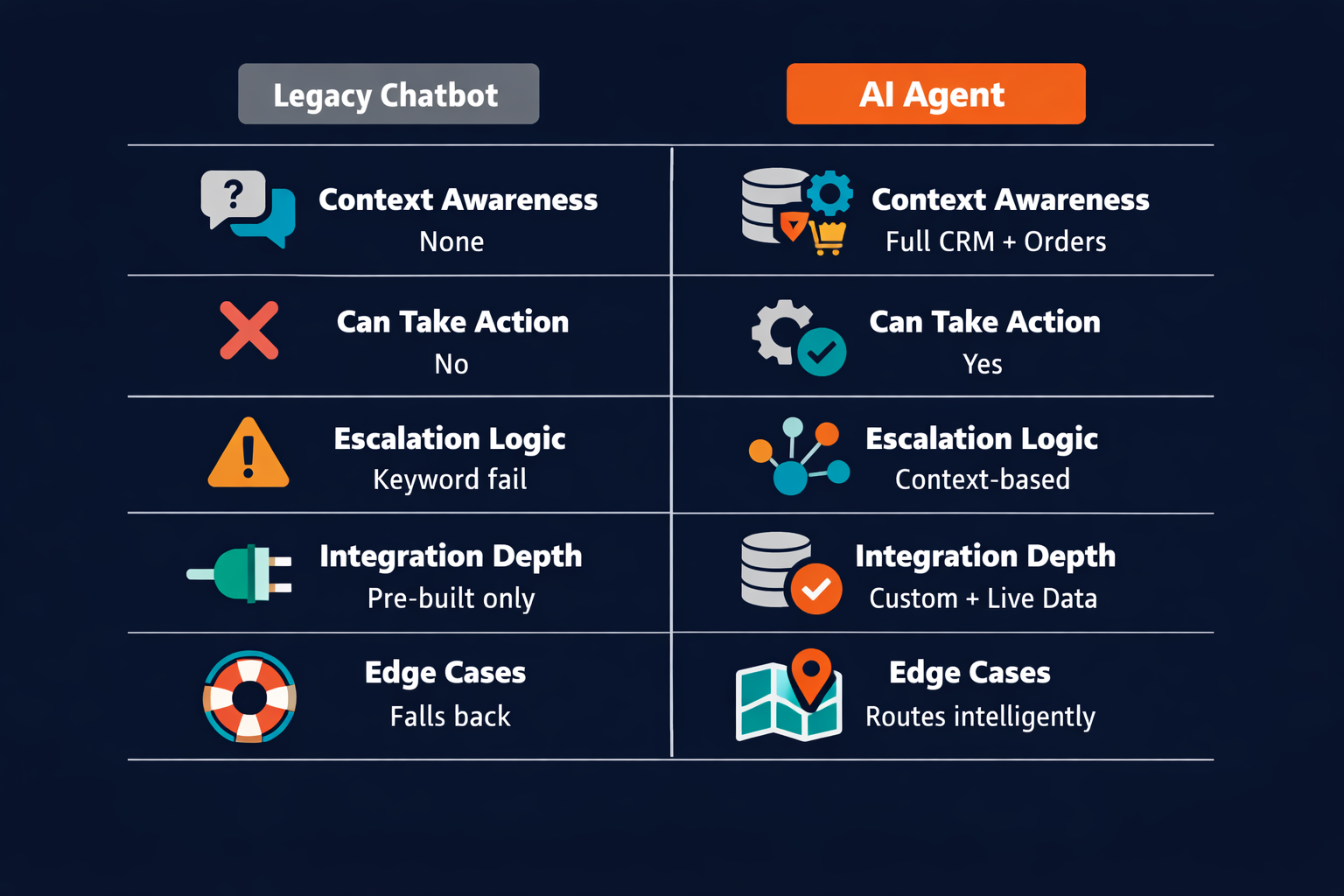
| Legacy Chatbot | AI Agent | |
|---|---|---|
| Context awareness | None (scripted paths only) | Full (reads CRM, orders, ticket history) |
| Can it take action? | No | Yes (update records, API lookups, send emails) |
| Escalation logic | Timeout or keyword fail | Context-based (recognizes when it is out of depth) |
| Integration depth | Limited pre-built connectors | Deep (custom integrations, live data) |
| Handles edge cases | Falls back to keyword script | Recognizes, classifies, routes |
The gap between those columns is architectural. One system has live context and acts on it; the other pattern-matches against a script and runs out of options the moment reality diverges from the decision tree.
Five customer service workflows worth automating first
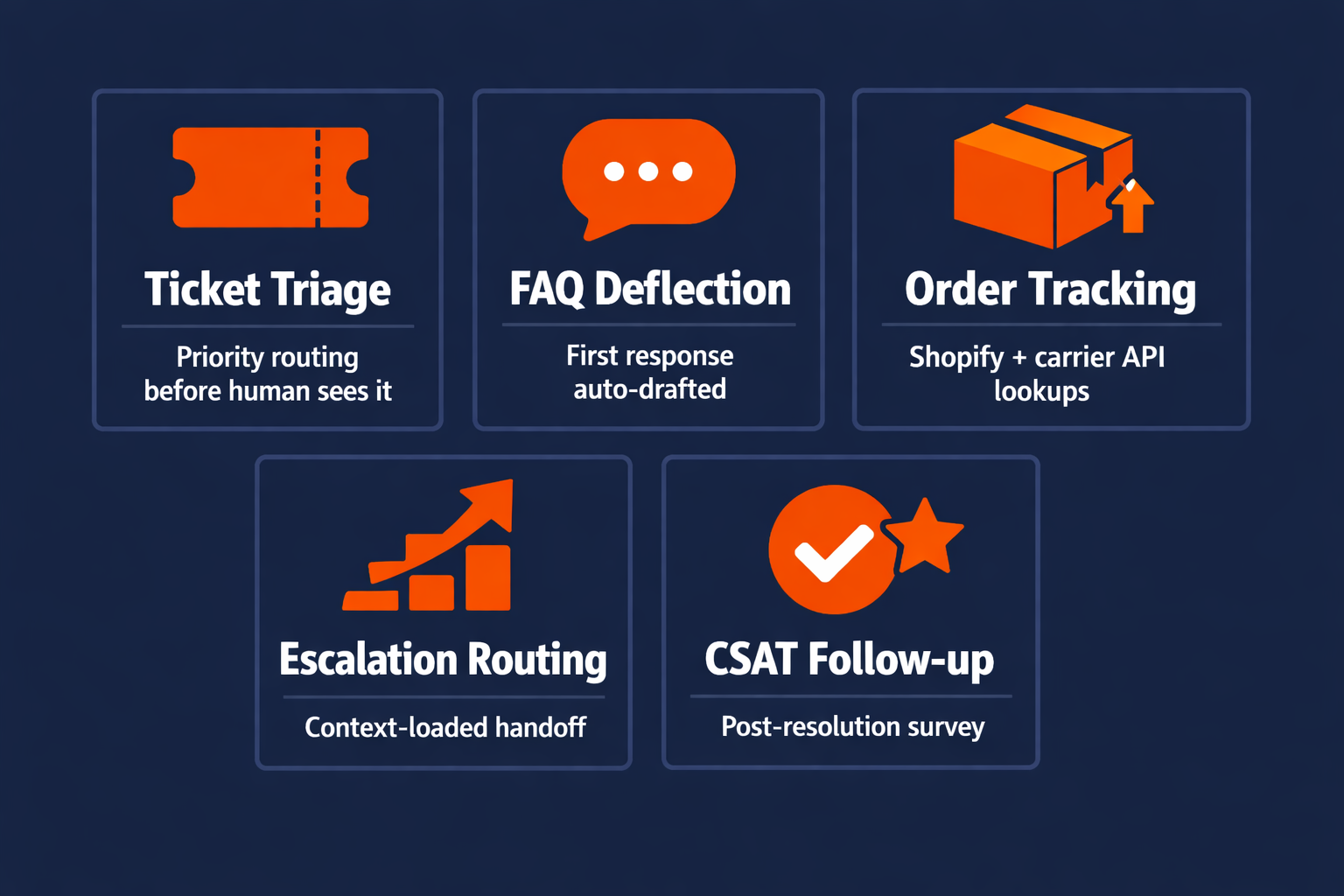
High-volume, low-judgment tickets are the right first target; the agent replaces the consistent decision, not the judgment call.
1. Ticket triage and priority routing
Every ticket that hits your queue gets classified and routed before a human sees it. The agent reads topic, sentiment, account tier, and service level agreement (SLA) window, then outputs a priority tag and assigns to the right queue or agent group. Routing latency drops from hours to seconds. High-priority tickets stop getting buried under order status requests because the agent processes everything in parallel rather than in sequence. This workflow alone changes how your team starts each shift; instead of sorting, they are responding.
2. First-response drafting and FAQ deflection
For known FAQ categories, meaning policy questions, how-tos, and subscription changes, the agent drafts and sends the first response without human involvement. For borderline cases, it drafts a response and flags it for human approval before sending. The deflection layer absorbs the cases customers could have found in documentation but did not, or needed direct confirmation on. According to Zendesk, 70% of CX leaders believe AI chatbots are becoming skilled architects of highly personalized customer journeys. The opportunity is visible; the execution gap has always been integration depth and context access, not model capability.
3. Order tracking and status lookups
Order status is the highest-volume, lowest-judgment ticket type for most e-commerce and software-as-a-service (SaaS) teams. The agent connects to the order system API, returns real-time status, tracking number, and estimated delivery, and closes the ticket without a human touching it. The proactive version works even better. If the carrier API shows a delay on an in-transit shipment, the agent flags the affected orders and drafts apology outreach before the customer writes in, shifting the interaction from complaint response to proactive communication.
4. Escalation detection and intelligent handoff
Escalation detection is where the agent earns its value on hard cases. The agent watches for compound signals, including escalating sentiment across multiple messages, repeated contacts within 24 hours, SLA breach risk, and topics outside its defined scope. When signals cross the threshold, it escalates with full context pre-loaded, meaning order data, conversation history, and reason for escalation, and fires a Slack notification to the right channel. The human picks up where the agent stopped, not from zero.
5. Post-resolution follow-up and CSAT capture
After resolution, the agent sends a follow-up two to four hours later with a customer satisfaction (CSAT) survey and monitors passively for reopens. Customers who are quietly dissatisfied after a close often do not escalate; they simply churn. The follow-up catches that signal before it becomes a retention problem and creates a feedback loop that tells you whether the automated resolutions are actually satisfying customers or just technically closing tickets.
Automating all five workflows does not replace your support team; it means your support team spends their hours on the cases that actually require them.
How to set up your first customer service agent
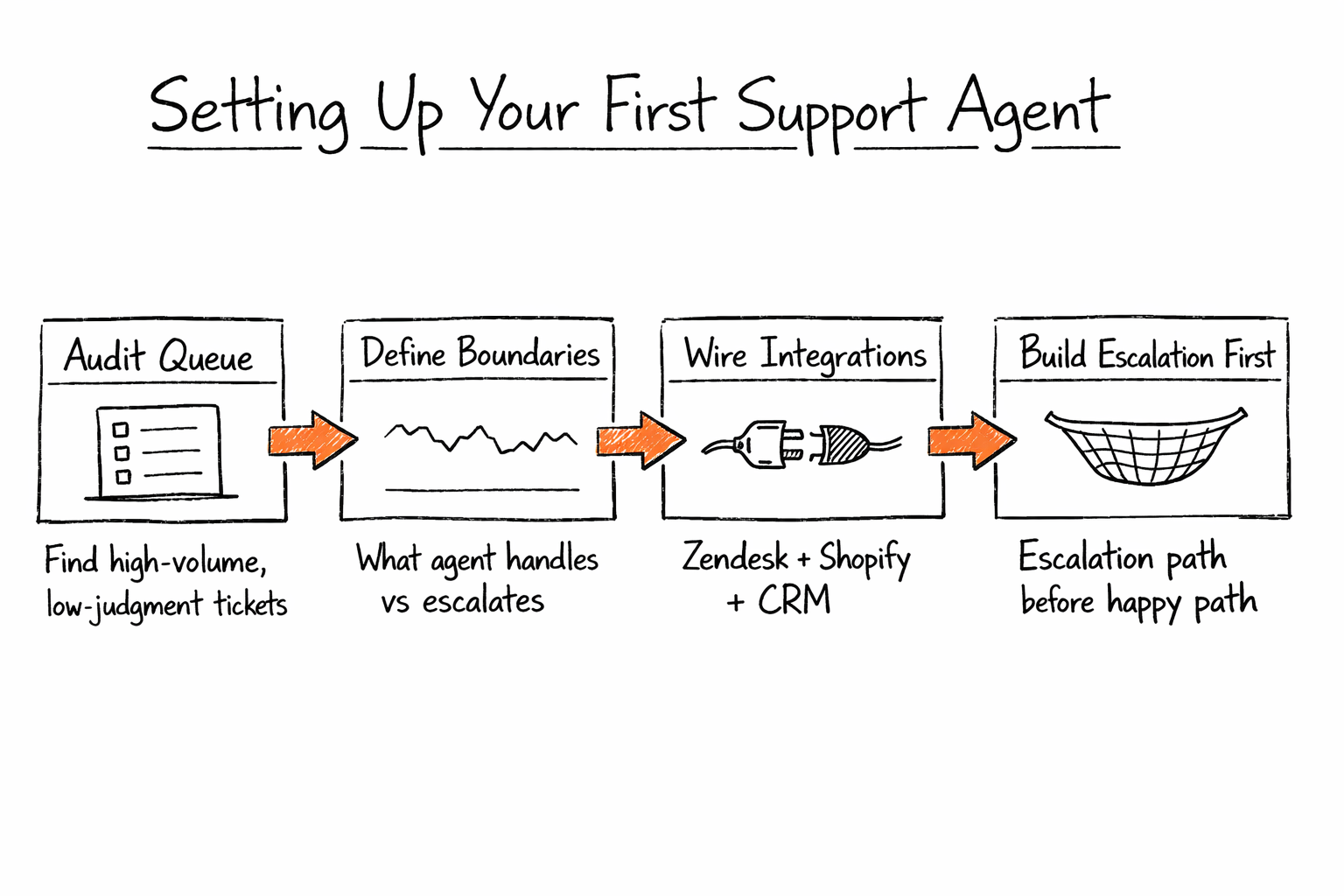
The right first deployment is narrow; start with one workflow, one integration, and the escalation path established before any automation runs. Teams that try to automate everything simultaneously end up with an agent that handles nothing reliably and erodes team trust before the system has a chance to earn it.
Step 1: Audit your ticket queue for automation candidates
Your ticket queue already tells you where to start. Export the last 90 days and tag each category as repetitive (same resolution path every time) or judgment-required (needs human context, policy calls, or relationship management). Target any category with more than 15% of total volume and fewer than three resolution steps. Common candidates include order status, password reset, FAQ responses, subscription changes, and shipping inquiries. Most teams find that 40 to 60% of their tickets meet this threshold on the first pass. If fewer than 20% qualify, the taxonomy is probably too coarse; break down the general inquiry category before you proceed.
Step 2: Define the boundary between what the agent handles and what it escalates
Write the escalation rules before you write the happy path. Escalation triggers worth defining up front include sentiment escalation over multiple turns, account tier thresholds (premium accounts may route directly to humans regardless of topic), topic boundaries (legal questions, billing disputes, account termination), and repeated contact within 24 hours on the same issue. Document the full list, because this is the agent's operating contract and it needs to exist before any automation does. A boundary you have not documented is a boundary you will discover by accident under real load.
Step 3: Wire your integrations
The minimum viable integration stack is a help desk API with read and write access, plus one customer data source (CRM or order system). A common starting configuration is the Zendesk API, Shopify Orders API, and Salesforce or HubSpot for CRM context. Agents need read access to pull customer history and write access to update ticket status, resolve, and reassign. Pazi exposes these integration surfaces as pre-built connectors, so wiring Zendesk to Shopify is configuration, not code.
Step 4: Build the escalation path first, automation second
Test the escalation before you test the happy path; if escalation fails, tickets land nowhere and customers experience the worst possible version of automation. Set up the escalation route first, including a Slack notification to the right channel, ticket assignment, and priority HIGH. Run edge case tests specifically against the escalation flow, and only after escalation is confirmed solid do you test the resolution path end to end.
"Build the escalation path before the happy path. The escalation is the safety net, and you will need it sooner than you think."
Getting the sequence right also shapes how your team adopts the agent. Starting with escalation means the team trusts the handoff from day one, rather than discovering failure modes under real production load.
What a full-ticket workflow looks like in practice
Abstract descriptions of agent capabilities rarely land the same way a concrete scenario does. Here is one complete customer service ticket, handled end to end across Zendesk, the Shopify Orders API, the FedEx API, and Slack.
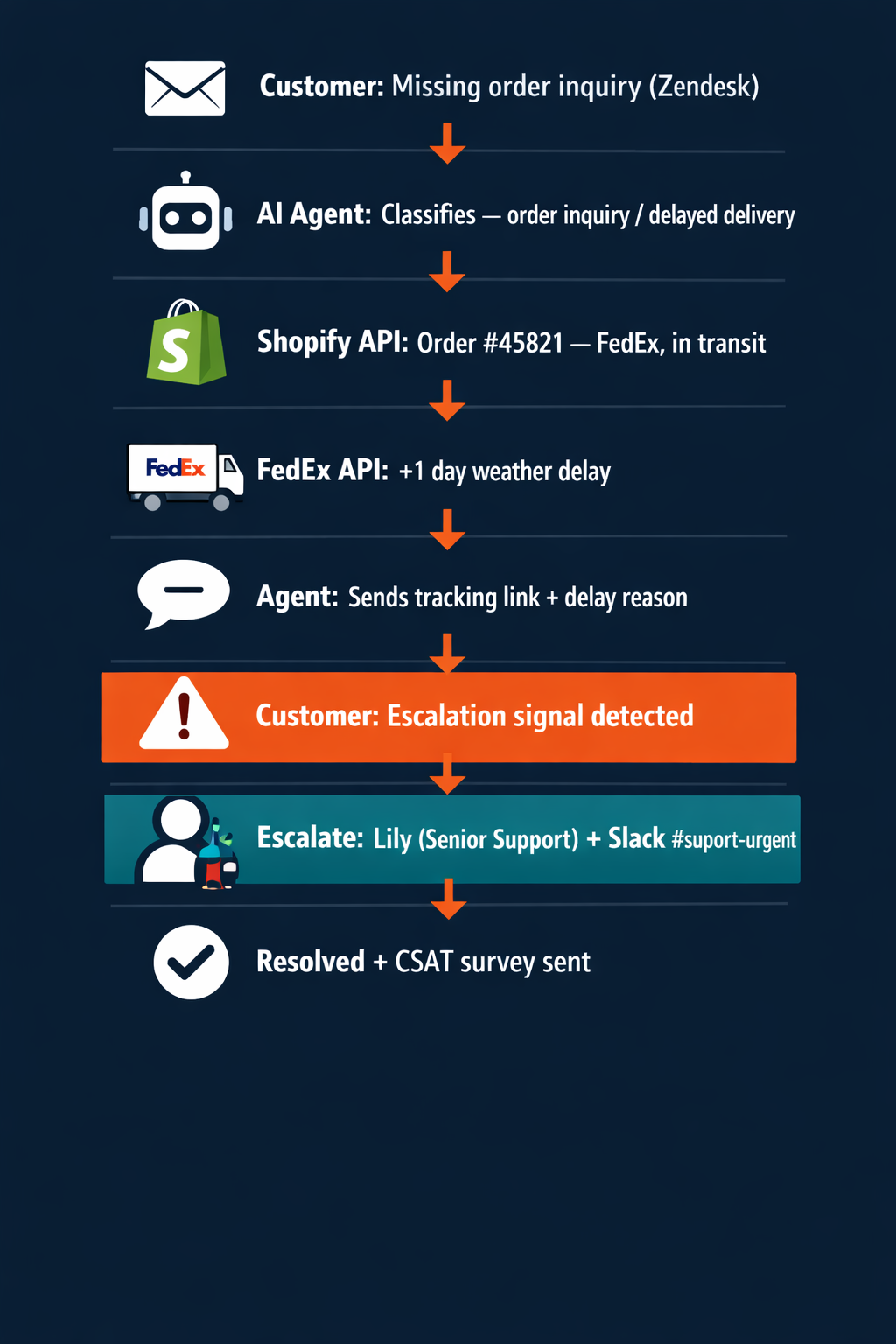
A customer emails Zendesk about an order that has not arrived and was supposed to be there the previous day. The agent receives the ticket and classifies it as an order inquiry with a delayed delivery flag and mild frustration as the initial sentiment. It queries the Shopify Orders API by customer email and returns Order #45821 (shipped four days ago, carrier FedEx, tracking number provided). It pings the FedEx API and receives a status update showing the shipment is in transit with a weather delay of one day.
The agent drafts and sends a response with the tracking link, the delay reason, the revised estimated delivery date, and an apology. No human has touched the ticket yet.
The customer writes back that the order was needed for a specific event the next day and the delay is unacceptable. The agent detects the shift in three simultaneous signals, including an urgency keyword, a hard delivery constraint, and a negative sentiment spike. It escalates. The Zendesk ticket gets assigned to the senior support agent at priority HIGH. A Slack notification fires to the support-urgent channel with the complete context pre-loaded, meaning the order summary, the full prior exchange, and the specific escalation reason.
The human agent opens the ticket with everything already in front of her and does not re-read from the beginning. She offers an expedited replacement or a discount, closes the ticket, and two hours later the agent sends the CSAT survey automatically.
The agent owned the first eight steps without any human involvement, and the human owned the last two, the part that required actual judgment.
According to Accenture, 93% of executives say their generative AI (gen AI) investments are outperforming investments in other strategic areas. Customer service is where that performance becomes measurable fastest; ticket resolution is high-volume and the outcome, resolved or not, is direct.
What makes this workflow hold together is context continuity, with the agent handing off a full situation brief including the reasoning already done, not just a ticket reference number.
What to measure to know your agents are working
Deflection rate gets the headline, but it answers the wrong question on its own. The full picture is deflection with satisfaction, meaning tickets resolved automatically that customers actually rated as resolved.
Deflection rate
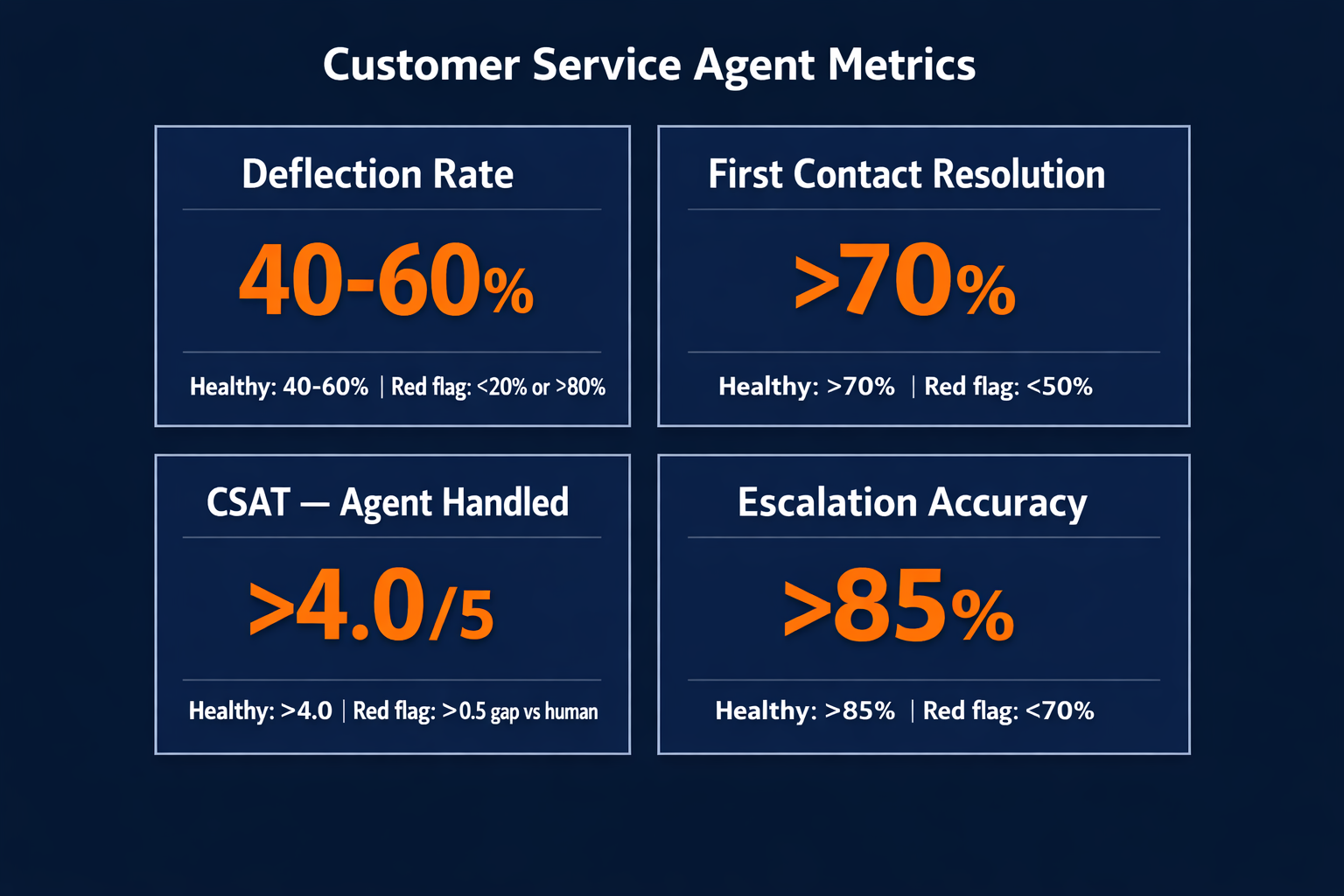
Deflection rate is the percentage of tickets resolved without human involvement, with a target range of 40 to 60%. Under 20% means the agent is taking too narrow a scope, usually because the automation candidates were not identified correctly in the audit. Over 80% typically signals the escalation threshold is set too high and the agent is handling cases that genuinely need humans. Both failure modes are recoverable, but only if you are tracking the number.
First contact resolution
First contact resolution (FCR) measures the percentage of cases resolved in one contact, without the customer writing back, reopening the ticket, or re-escalating. Target above 70%. Under 50% is a signal the agent is closing tickets that are not actually resolved, often because the response was technically accurate but did not address the underlying issue. When FCR drops, the right diagnostic is to look at what categories are reopening, not just the aggregate rate.
CSAT on agent-handled tickets
Track CSAT on agent-handled tickets separately from human-handled tickets, aiming to keep the two numbers within 0.5 points of each other. A gap larger than 0.5 points indicates a workflow design issue, where the agent is resolving cases in ways customers do not find satisfying even when the technical resolution is correct. This usually means the response template needs work, the escalation threshold is wrong, or the agent is closing prematurely.
Escalation accuracy
Escalation accuracy measures the percentage of escalated tickets where the receiving human actually needed to act on something the agent could not handle. Target above 85%. Under 70% means the agent is over-escalating, handing off cases it should have resolved. Over-escalation defeats the purpose because it shifts the noise problem from the ticket queue directly to your senior support staff.
"Deflection rate without CSAT is the wrong number. You want deflection with satisfaction: automated cases that customers actually rated as resolved."
| Metric | What it measures | Healthy range | Red flag |
|---|---|---|---|
| Deflection rate | Percentage of tickets resolved without human | 40 to 60% | Under 20% (under-scope) or above 80% (over-deflecting) |
| First contact resolution | Issues resolved in one contact | Above 70% | Under 50% means tickets reopen or re-escalate |
| CSAT on agent-handled tickets | Customer satisfaction on automated cases | Above 4.0 out of 5 | Gap over 0.5 versus human-handled means a design issue |
| Escalation accuracy | Percentage of escalations where human action was needed | Above 85% | Under 70% means over-escalation |
The four metrics, read together, give you a complete picture of whether the agent is handling the right cases, at the right scale, to customers' actual satisfaction, and escalating accurately when it matters.
Start with one workflow, not a full rebuild
Getting a customer service AI agent live does not require replacing your support platform or restructuring your team. It requires starting with one workflow that combines high volume with a clear resolution path and defined escalation rules. Run that loop until the metrics hold, then expand.
Pazi is a platform for support teams that need agents to own the full customer service resolution loop, not just the triage layer. It connects to your help desk, CRM, and order systems, handles escalations with full context intact, and runs inside Slack where your support team already works, making it one of the strongest applications of AI agents across business operations. Start a 1-week free trial at pazi.ai.



