
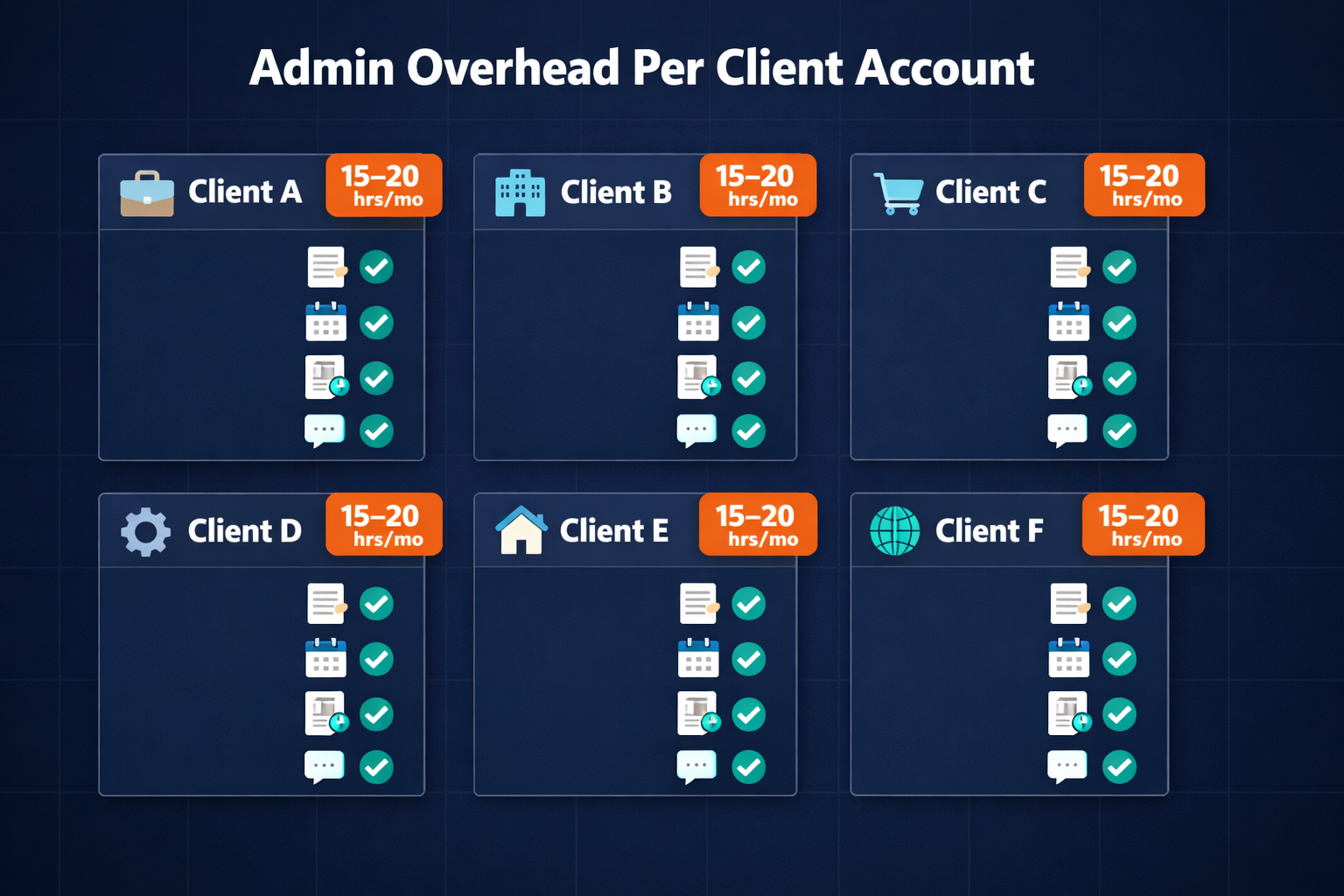
Agency account managers spend 15 to 20 hours per client per month on administrative work that has nothing to do with the actual deliverables: pulling analytics, writing status updates, chasing unpaid invoices, sending meeting notes, and running onboarding sequences. In a 10-client shop, that overhead compounds into most of the working week, and it arrives on the same cadence for every client, every month. AI agent platforms like Pazi can own that entire administrative layer; they run on schedule, across all client accounts simultaneously, without reminders or manual handoffs.
TL;DR
- AI agents handle the recurring admin that eats agency hours across every client account.
- The highest-ROI targets are high-volume, templated workflows that repeat identically per client.
- Human judgment stays for strategy, creative direction, and relationship-critical conversations.
Table of Contents
- The admin layer costing your agency billable hours
- AI agents generate and send client reports without anyone touching a spreadsheet
- AI agents run new client onboarding from kickoff checklist to first deliverable
- AI agents handle meeting notes, action items, and follow-up distribution
- AI agents send status updates and track deliverables across all client accounts
- AI agents follow up on invoices so your team does not have to make the call
- What stays human in agency client relationships
- How to get started deploying AI agents at your agency
The admin layer costing your agency billable hours {#the-admin-layer}
Every agency carries this overhead, but few measure it at the workflow level. The admin cost is diffuse: a few hours to compile a client report, 45 minutes to run the same 12-step onboarding you have completed 60 times before, 20 minutes chasing an invoice that has been outstanding for 18 days. None of those tasks require creative judgment; all of them consume time that should go toward client work.
McKinsey's research on the economic potential of generative AI identifies recurring, structured information tasks as the category with the highest automation potential, and agency client admin fits that description almost entirely. Anthropic's guidance on building effective agents makes the architectural case: agents perform best on tasks with clear goals, structured outputs, and predictable triggers, which describes client reporting, onboarding sequences, and invoice follow-up precisely.
The operations workflows AI agents handle most reliably are the ones your team runs on autopilot: not because they require no skill to design, but because once they are designed correctly, they do not require human intervention to execute.
"The right question is not whether to automate agency admin. It is which workflows are ready to run without a human in the loop, and which still need one."
AI agents generate and send client reports without anyone touching a spreadsheet {#client-reports}
Client reporting is the most time-consuming recurring task in most agencies. A monthly performance report for a single client takes three to five hours: pulling data from analytics and ad platforms, writing commentary, formatting the document, QA-ing the numbers. Across 10 clients, that is a reporting sprint every month consuming a full week of team capacity.
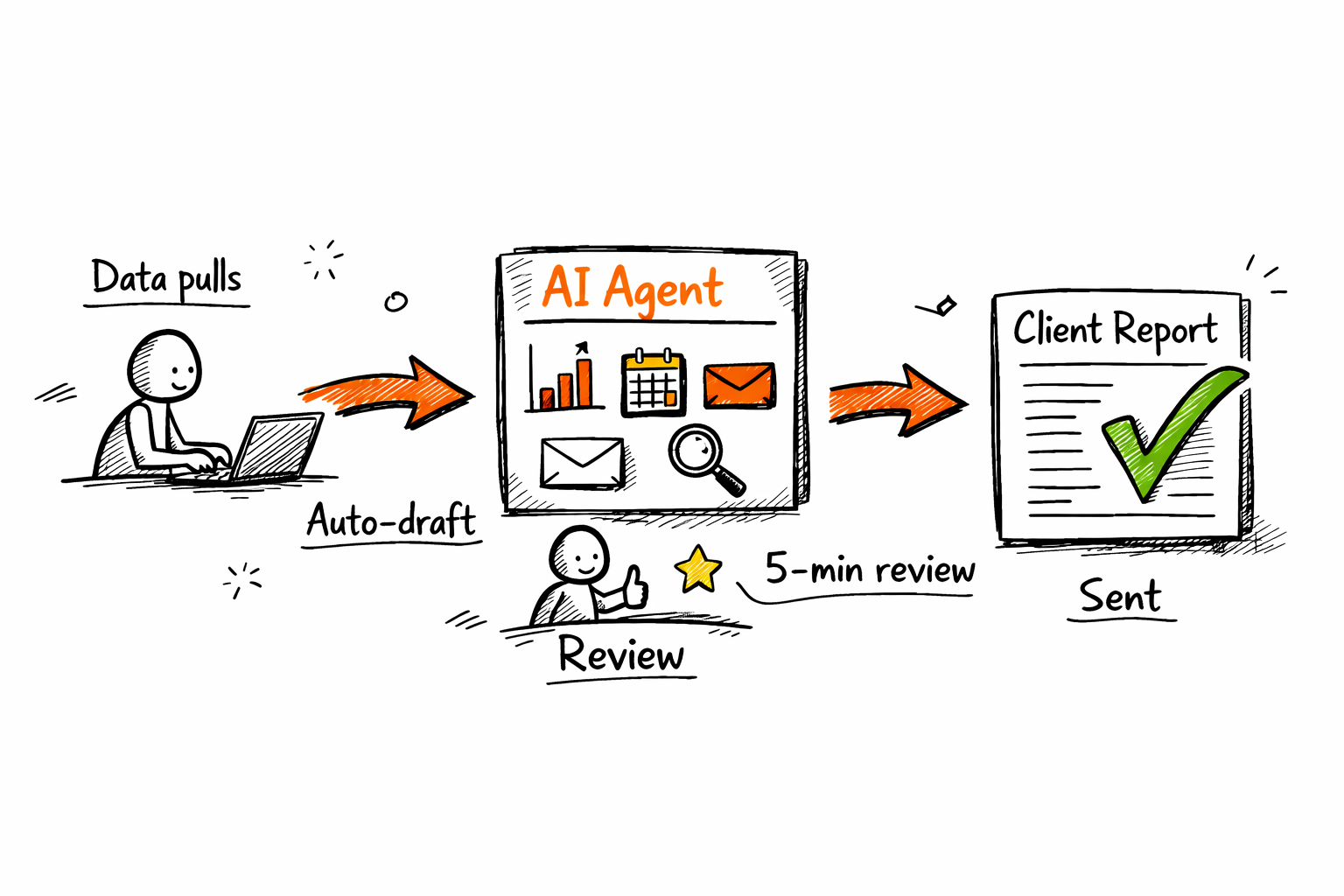
An AI agent changes this by owning the end-to-end reporting workflow. The agent connects to the data sources your agency already uses (Google Analytics, Meta Ads Manager, HubSpot, SEMrush), pulls the prior period's performance data on schedule, generates commentary using a template locked for that client, and delivers the report in the format that client expects.
What the reporting workflow actually looks like
The trigger is a calendar schedule. On the last business day of the month, the agent:
- Pulls metrics from all connected platforms for the specified date range
- Compares against the prior period and flags material changes
- Populates the report template approved for that client's format preferences
- Drafts narrative commentary for any metrics outside expected ranges
- Routes the draft to the account manager for a 5-minute review before it sends
That final review step is intentional. This is the human-in-the-loop workflows model: the agent handles the labor-intensive data-to-draft conversion; the human handles the final judgment call on tone and relationship context before the report goes to the client.
Time per report drops from three to five hours to under 15 minutes.
AI agents run new client onboarding from kickoff checklist to first deliverable {#client-onboarding}
New client onboarding is a high-stakes, repeatable process that agencies consistently under-resource. The onboarding checklist for a new retainer client covers 10 to 15 distinct steps: account access requests, brand guidelines intake, strategy brief completion, tool integration setup, kickoff call scheduling, shared workspace configuration. Most of those steps can be triggered and tracked automatically.
An AI agent owns the onboarding sequence from the moment a contract is signed. It sends the welcome message, distributes intake forms, sets access request deadlines, follows up when steps are overdue, and notifies the account team when all prerequisites are complete and the client is ready for kickoff.
Per-client onboarding without per-client overhead
The primary benefit for agencies is not speed; it is consistency. Every client gets the same complete onboarding experience regardless of which account manager is covering them. No steps fall through because someone was out of office during the intake window, and no access request goes unsent because the project brief was still being finalized.
IBM's research on AI adoption in team operations identifies process consistency as one of the primary drivers of AI deployment in service delivery: the ability to guarantee that a defined workflow runs the same way, every time, without variance. For agencies running client onboarding, that consistency compounds. A client who completes a smooth, thorough onboarding reaches first value faster, which reduces churn risk in the first 90 days.
AI agents handle meeting notes, action items, and follow-up distribution {#meeting-notes}
Every client meeting produces the same set of outputs: a summary, a list of action items with owners and due dates, and a follow-up message. Those outputs take 30 to 45 minutes to produce per meeting. Across weekly calls for 10 accounts, that is five to seven hours a week spent on notes and distribution.
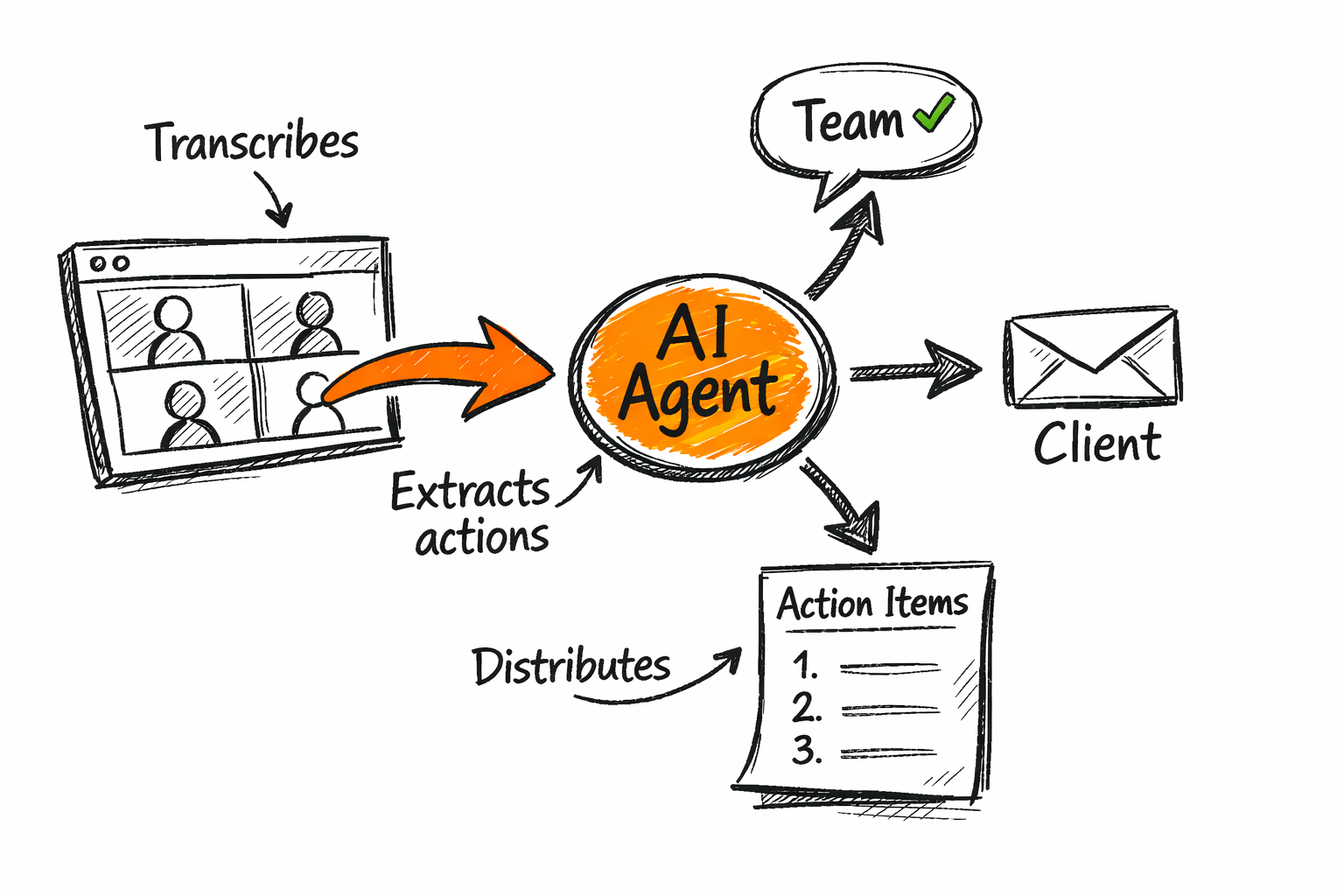
An AI agent connected to your meeting platform (Google Meet, Zoom, Microsoft Teams) transcribes the call, extracts action items, identifies owners, drafts the follow-up summary, and routes it for review before it goes to the client. The account manager reviews in two minutes and sends, or approves and the agent sends directly, depending on how much human review is appropriate for that client relationship.
The distribution timing matters as much as the capture. Action items distributed within an hour of the meeting have meaningfully higher completion rates than items sent the following morning. An agent that distributes immediately, without the account manager needing to carve out post-call time, changes the completion dynamic across your whole client base without changing the amount of effort your team puts in.
AI agents send status updates and track deliverables across all client accounts {#status-updates}
Weekly status updates covering completions, in-flight work, and pending client inputs are a standard agency deliverable that almost no one has automated. They are short, they follow a template, and they go out on the same schedule every week. They are also the first thing that gets deprioritized when the team is deep in delivery.
An agent owns the full status update workflow. It pulls the week's completed tasks from your project management tool (Linear, Asana, ClickUp, Monday.com), identifies what is currently in flight, flags any blockers or pending client inputs, and drafts the status message in the format that client prefers. The account manager reviews and sends, or the agent delivers to the client's Slack channel directly if that level of automation fits the relationship.
Deliverable tracking and scope creep detection
The same agent managing status updates can monitor deliverable timelines and surface scope creep before clients raise it. If a deliverable has been in flight longer than its allocated timeline, or if the number of revision rounds has exceeded the contracted scope, the agent flags it internally to the account manager and project lead before it becomes a billing conversation.
To automate account management effectively at this level, the agent needs your scope rules as parameters: how many revisions are included per deliverable type, what timeline triggers a flag, which client inputs have been outstanding longest. Those parameters are set once and applied automatically across every account.
AI agents follow up on invoices so your team does not have to make the call {#invoice-followup}
Invoice follow-up is the task most agency account managers dislike most and delay longest. The awkwardness of chasing a client for payment, especially one with an ongoing relationship, leads to delayed reminders, inconsistent messaging, and cash flow variability that compounds across a 10-client book.
An AI agent handles invoice follow-up systematically. When an invoice hits its due date without payment, the agent sends a standard reminder with a payment link. If the invoice is still outstanding at seven days, it sends a second reminder. At 14 days, it routes an internal alert to the finance lead and account manager for a human decision on escalation.
"The agent removes the awkwardness entirely: the first two reminders are automatic, neutral, and on schedule. The human conversation happens only when it actually needs to."
This is the right division of labor: routine follow-up is automatable because it is timing-based, templated, and requires no relationship judgment. Escalation is human: it requires knowing the client's payment history, the relationship stakes, and the right approach. The agent handles the first; the account manager handles the second.
What stays human in agency client relationships {#stays-human}
Not everything in agency client management should be automated; the agent owns the administrative layer and the human owns the relationship layer.
What stays with the account manager:
- Strategy recommendations and campaign adjustments when results shift
- Creative direction and quality judgment on deliverables
- Escalation conversations when something has gone wrong
- Renewal and upsell conversations
- Client relationships where trust is still being built
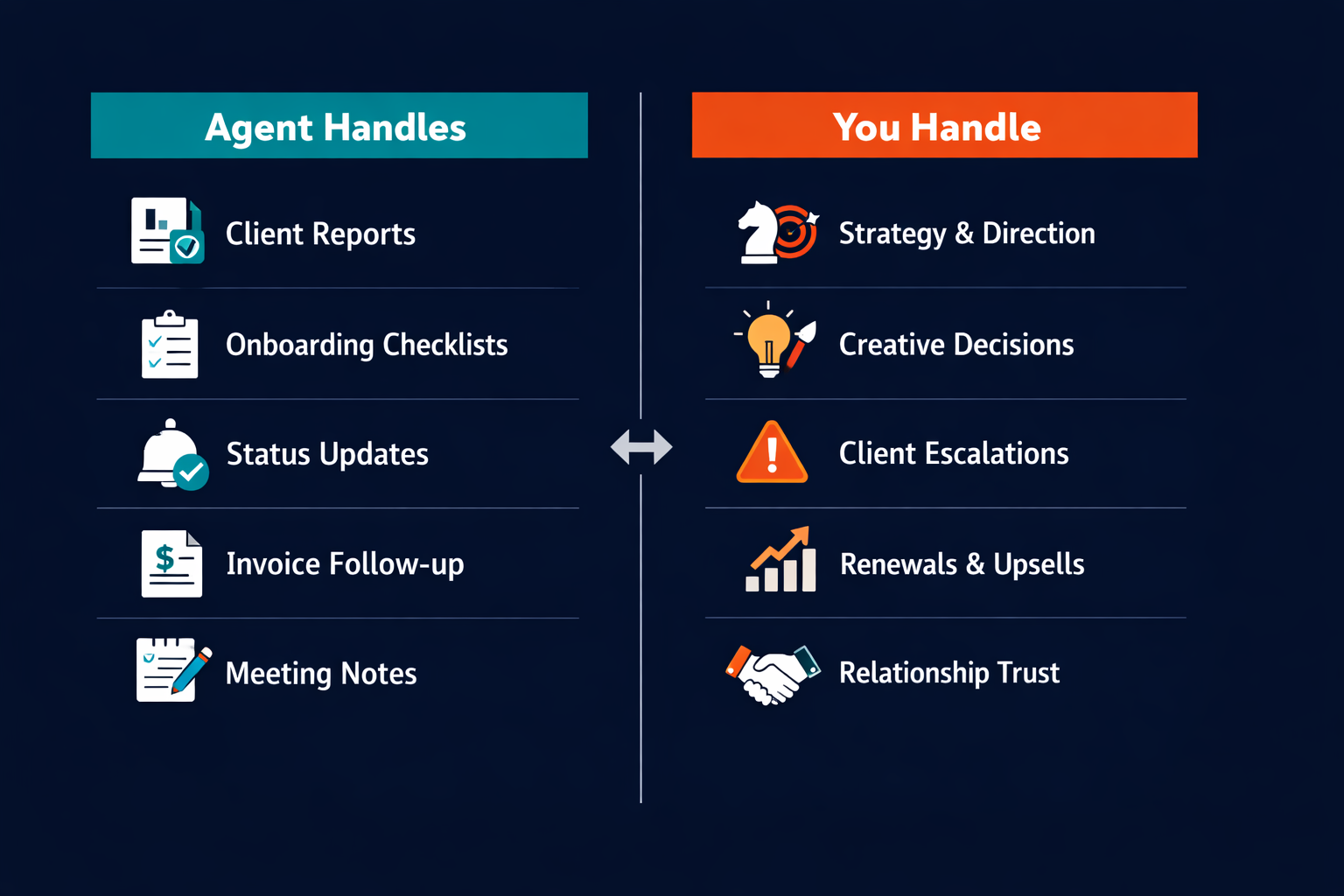
The useful frame is human-in-the-loop automation: the agent runs the process and the human approves or intervenes at the decision points that require judgment. For most agencies, that means account managers shift from doing admin to reviewing agent outputs: a 15-minute review pass replacing a three-hour production task.
The division is not about capability; it is about where human judgment creates the most value. Reporting accuracy, onboarding completeness, and invoice timing are deterministic; strategy, creativity, and relationship repair require human judgment.
How to get started deploying AI agents at your agency {#get-started}
The highest-ROI starting point for most agencies is client reporting. It is the most time-consuming recurring workflow, the most templated, and the most immediately measurable: you know exactly how long a report used to take, and you will see the time saving within the first month.
Start with one client and build the reporting workflow for that client's specific data sources and format preferences; run it for two months before scaling to the rest of your accounts. By the time you are deploying across all 10 clients, you will have a workflow tested in production rather than configured in theory.
From reporting, the natural next step is meeting follow-up (the agent is already structured for recurring output distribution), then onboarding, then status updates. Each subsequent workflow costs less setup time because the agent infrastructure is already in place.
To get started with AI agents at your agency, the first technical step is connecting the platforms your clients' data lives in: the analytics tools, the project management tools, the communication channels. Those integrations determine what the agent can access, and that determines which workflows it can own.
Pazi is built for exactly this deployment pattern: persistent agents that own recurring operations, running across multiple client accounts simultaneously, with human approval gates where the workflow requires judgment. You configure the workflow once; the agent runs it for every client that matches the template.
If your agency is spending more than two hours per week per client on administrative tasks that follow the same pattern every time, the infrastructure to stop doing that manually exists now. The playbook is straightforward; the only remaining step is deploying it.



