Most advice on LinkedIn data scraping gets the problem wrong. It treats LinkedIn like a static website and scraping like a parser exercise. That mindset is why so many projects work for a day, then burn accounts, trip CAPTCHAs, and turn into a maintenance burden nobody wants to own.
The hard part isn't writing a script that can read HTML. The hard part is building a process that survives rate controls, browser fingerprinting, account restrictions, legal review, and the constant temptation to push volume past what the system will tolerate. LinkedIn holds data that sales teams, recruiters, analysts, and market researchers all want. That demand is real. The costs of collecting it directly are real too.
Table of Contents
- Why LinkedIn Data Scraping is Harder Than It Looks
- Choosing Your Path Official APIs vs Direct Scraping
- The Core Scraping Workflow A Technical Deep Dive
- Staying Undetected Managing Proxies CAPTCHAs and Rate Limits
- The Legal and Ethical Tightrope of LinkedIn Scraping
- Smarter Alternatives and Scaling Your Data Strategy
Why LinkedIn Data Scraping is Harder Than It Looks
LinkedIn data scraping fails for operational reasons long before it fails for lack of code. A basic script can fetch a profile page. Keeping that workflow alive across changing page layouts, tightening defenses, unstable sessions, and shifting legal review is the harder job.
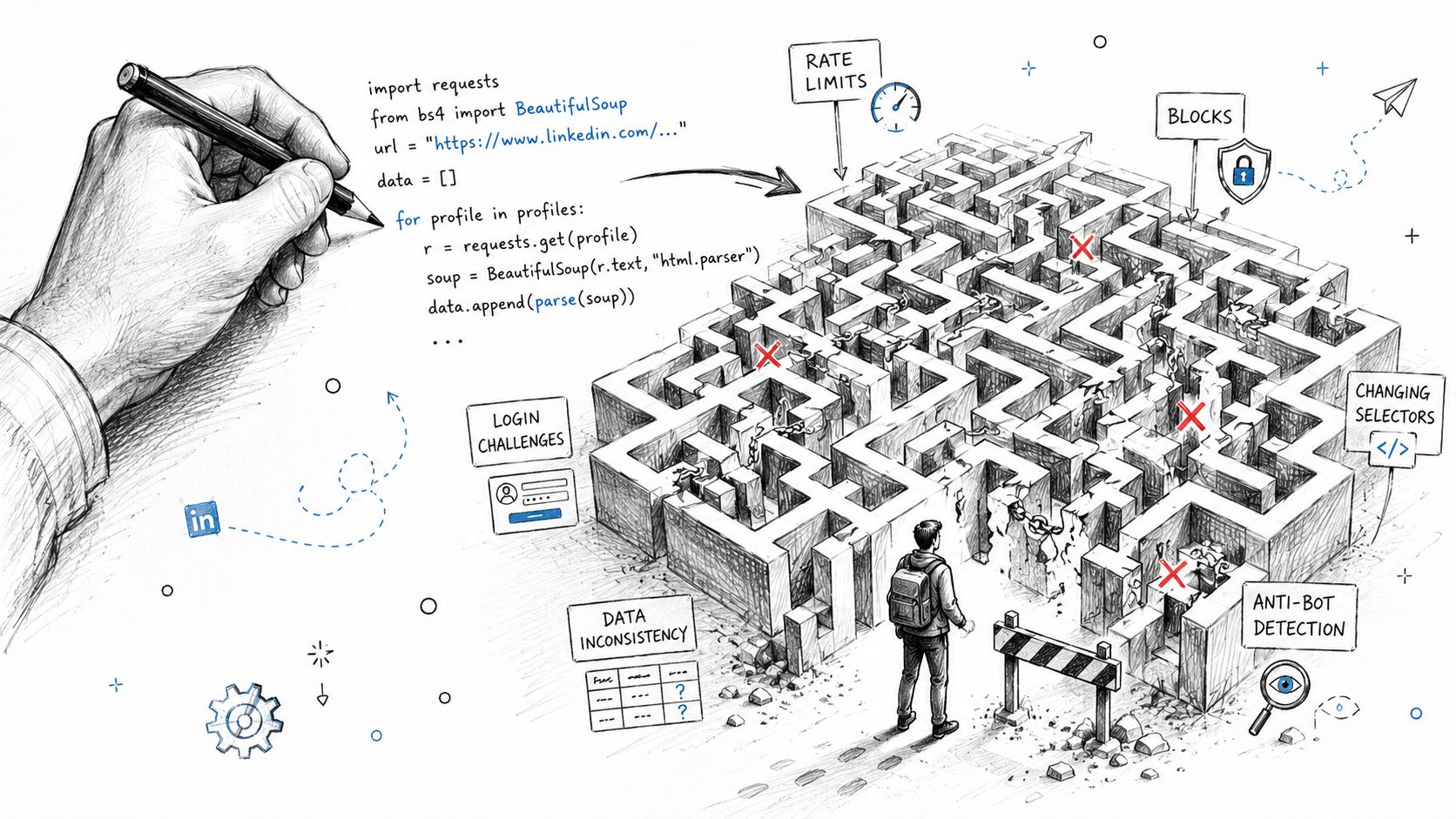
In practice, new teams often choose the wrong success metric. They celebrate the first successful scrape of a profile or search result, then discover the system falls apart after a few days of repeated runs. The standard worth tracking is much stricter: can the pipeline keep collecting usable data next week, with acceptable block rates, limited manual intervention, and no constant account resets?
That changes how the work should be scoped. LinkedIn scraping is less a script and more an operating system for controlled extraction. You need request pacing, session management, parser versioning, retries, storage discipline, monitoring, and clear stop conditions when defenses start reacting. Without those controls, output quality drops fast and the maintenance burden shifts from engineering to human babysitting.
I have seen teams burn weeks optimizing selectors while ignoring the actual failure points. The parser was fine. The sessions were dirty, the proxy pool was low quality, and the collection targets were too broad for the infrastructure budget.
A workable setup also needs a reason to exist. If the data is only mildly useful, the engineering and compliance overhead usually outweigh the value.
Common motivations are valid:
- Sales teams need account lists, company context, and hiring signals.
- Recruiting teams want structured profile histories and talent mapping.
- Research teams want public professional data in a format they can query.
- Market intelligence teams want company, role, and growth signals over time.
The failure modes are just as predictable:
- Selectors drift when page components or class names change.
- Session trust varies across accounts, even under similar behavior.
- Low-cost proxies create noise because blocked traffic looks like capacity until the run quality is inspected.
- Scope expands subtly from public pages into authenticated surfaces, which changes both technical risk and legal review.
Practical rule: If the plan assumes high-volume extraction from day one, the plan needs to be narrowed before it is built.
Strong LinkedIn scraping projects start with constraints. Define the fields that matter, the acceptable failure rate, the review process for blocked accounts, and the point where buying data is cheaper than running your own collection stack. The useful question is not whether a page can be scraped once. It is whether the workflow can survive repeated use without creating more operational and legal risk than the data is worth.
Choosing Your Path Official APIs vs Direct Scraping
The first decision isn't technical. It's strategic. Teams need to decide whether they want sanctioned access with narrower data and clearer compliance boundaries, or direct scraping with broader data access and much higher operational responsibility.
What the official path actually gives
LinkedIn's official APIs are far more limited than commonly anticipated. According to Cotera's breakdown of LinkedIn data access methods, the Marketing API covers ad analytics and company page stats, the Talent Solutions API is restricted to customers and is described as starting around $8,000 per year per seat, and consumer APIs expose only basic authenticated-user fields. That means bulk profile data isn't available through compliant native endpoints.
For a team that needs ad reporting or sanctioned company metrics, the API route can be enough. For a team that wants broad profile histories, search result harvesting, or structured prospecting data, it usually won't be.
| Attribute | Official LinkedIn APIs | Direct Scraping |
|---|---|---|
| Access model | Sanctioned and permissioned | Unofficial and operator-managed |
| Typical data scope | Ad analytics, company page stats, basic authenticated-user fields | Publicly rendered profile, company, and search data when accessible |
| Compliance posture | Clearer | Ambiguous and risk-sensitive |
| Engineering burden | Lower data collection burden | High collection and maintenance burden |
| Scale constraints | Product and access dependent | Detection and account safety dependent |
| Best fit | Approved integrations, reporting, internal apps | Research, prospecting, monitoring, custom data pipelines |
What scraping gives that APIs don't
Direct scraping exists because the official path leaves gaps. A scraper can target public pages, extract visibly rendered fields, and build datasets around profiles, company pages, jobs, or search results. That flexibility is exactly why teams keep choosing it.
But flexibility has a price. Direct scraping means owning:
- Session management
- Proxy rotation
- Fingerprint control
- Parser maintenance
- Block detection
- Data quality cleanup
- Escalation when legal or platform risk changes
The API path is a product decision. The scraping path is an operations commitment.
A practical decision framework is simple.
Choose official APIs when:
- Compliance matters more than dataset breadth
- The use case fits ad, company, or authenticated-user data
- The team doesn't want to run scraping infrastructure
Choose direct scraping when:
- The required fields aren't exposed officially
- The business value justifies ongoing maintenance
- The team is prepared to own reliability and risk
The mistake is trying to treat scraping as a cheap substitute for a proper integration. It isn't. It's a separate system with its own costs, failure modes, and review burden.
The Core Scraping Workflow A Technical Deep Dive
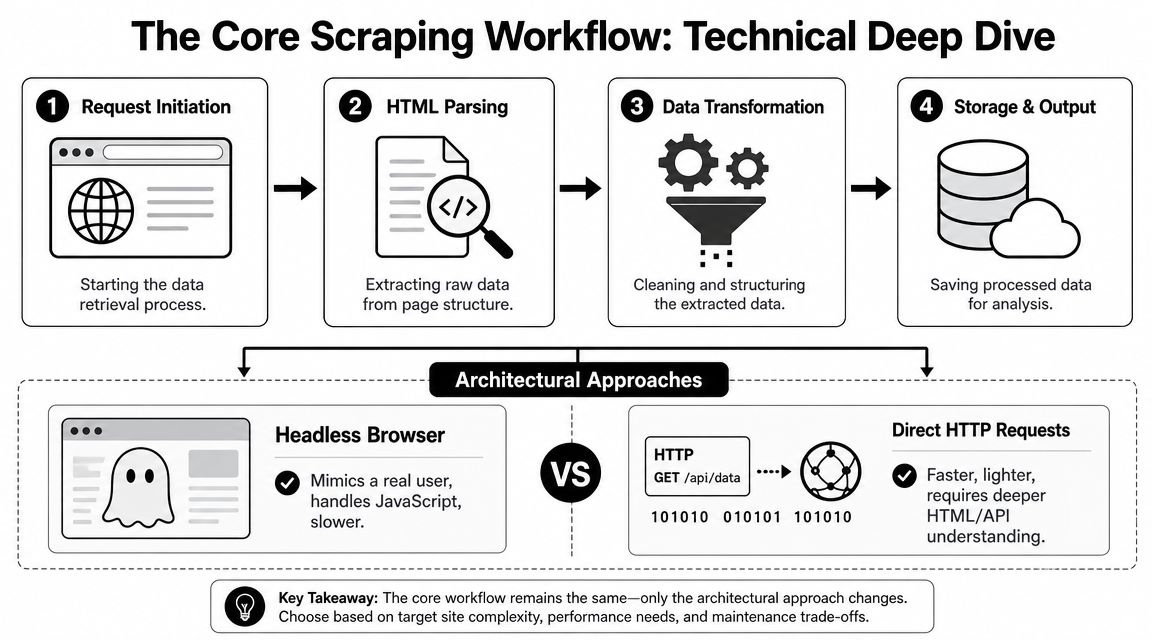
A workable LinkedIn data scraping system has two architectural paths. One uses a headless browser such as Playwright or Puppeteer to mimic real user behavior. The other uses direct HTTP requests with cookies, headers, and parser logic. Both can work. Neither is magic.
Browser automation versus direct requests
Headless browsers are slower and more expensive, but they're usually the better fit for JavaScript-heavy pages and flows that depend on real rendering. They also make it easier to reproduce human-like navigation, scroll behavior, and click paths.
Direct HTTP requests are lighter, faster, and easier to scale on paper. They also break faster when request signatures drift or when the target flow depends on front-end behavior that the scraper isn't reproducing. On LinkedIn, that trade-off matters. A fast pipeline that gets flagged quickly isn't efficient.
A sane engineering approach is to use browser automation for collection and reserve lightweight HTTP components for support functions such as queue management, storage, or post-processing. That keeps the riskiest part of the stack closer to actual user behavior.
A maintainable scraper shape
A production-minded workflow usually has separate components instead of one giant script.
Target selection
The system starts with a bounded list of public pages, search result URLs, or company pages. Good operators limit scope early.Session preparation
The runner loads a browser profile or authenticated session state, then attaches proxy, user-agent, and timing controls.Navigation and rendering
The scraper opens the target page, waits for meaningful content, and checks for warning states such as interstitials or anti-bot prompts.Extraction
The parser collects only fields visibly rendered on the page. According to NodeMaven's practical guidance on LinkedIn scraping, a workable approach is to target public pages, collect visible fields, and throttle aggressively using rotating residential proxies, randomized user agents, and human-like delays because LinkedIn's anti-bot systems are sensitive to repetitive request patterns.Normalization
Raw fields are transformed into a stable schema. Job titles, company names, date strings, and location labels need cleanup before they're useful.Storage and audit trail
Save parsed output, source URL, extraction timestamp, parser version, and any warning flag that explains whether the page looked healthy.
That separation matters because LinkedIn pages change. When selectors drift, teams should be able to patch the extraction layer without rewriting navigation, session logic, or downstream storage.
A scraper becomes maintainable when navigation, extraction, and normalization fail independently.
Fields worth collecting
The common failure in LinkedIn scraping is over-collection. Teams grab everything because they can, then spend weeks cleaning unusable data. Better systems collect the minimum set that directly supports the use case.
For profile-oriented workflows, useful fields often include:
- Identity basics such as name, headline, and location
- Current role context such as title and company
- Experience history where publicly rendered
- Skills or summary fields when the page shows them
- Source metadata including URL and collection time
For company or market research workflows, the target shifts:
- Company name
- Page description
- Industry labeling
- Job listings
- Public hiring signals
A final point matters more than code style. Build parser tests against saved HTML fixtures. LinkedIn page changes aren't hypothetical. They're expected. Teams that don't version parsers and test field extraction end up debugging production failures with no baseline.
Staying Undetected Managing Proxies CAPTCHAs and Rate Limits
The hard part of LinkedIn scraping is not getting the first record. It is keeping a system alive for weeks without burning accounts, poisoning proxy pools, or creating a review queue full of broken sessions.
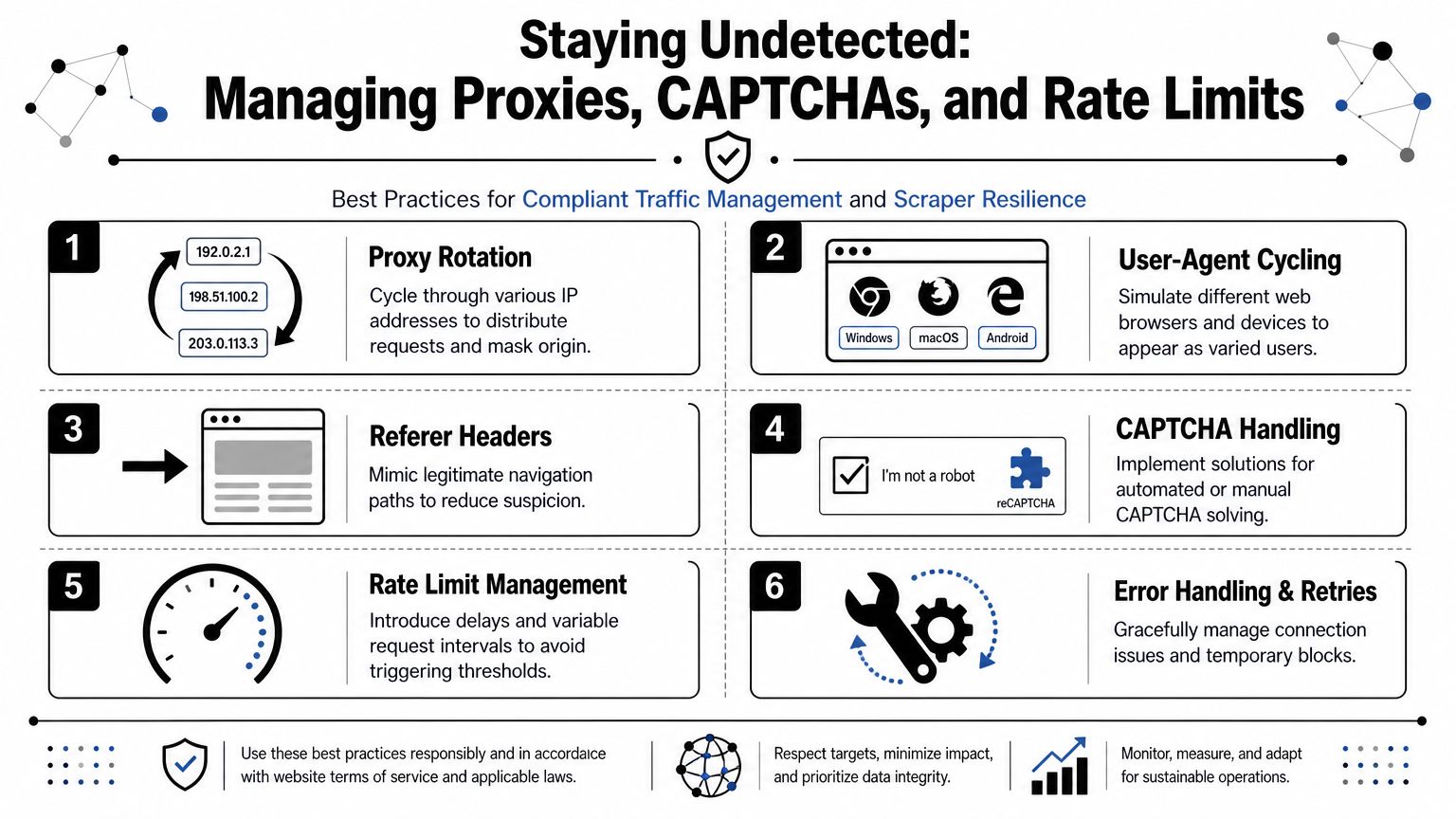
Detection pressure shows up before a full ban. Request latency rises. Logged-in pages start returning partial content. Search depth shrinks. CAPTCHA frequency increases. Teams that ignore those early signals usually mistake temporary success for a stable setup.
Proxy quality decides whether the run survives
Proxy selection controls far more than IP rotation. It affects login stability, session age, challenge frequency, and how often LinkedIn decides a browser needs extra verification.
Cheap shared proxies create predictable failure modes. They often carry prior abuse history, unstable geolocation, and inconsistent uptime. That leads to more checkpoints and more account recovery work. Residential pools usually last longer because the traffic pattern looks closer to normal consumer use, but they cost more and they are still easy to burn with bad pacing.
Proxy management works better when tied to accounts and sessions, not treated as a request-level randomizer:
- Rotate by session so one browsing flow does not hop countries every few seconds
- Use sticky sessions for authenticated activity that depends on stable cookies
- Score proxy health based on challenge rate, login success, and page completeness
- Quarantine bad exits quickly instead of letting them degrade the whole pool
A large proxy pool without reputation tracking is just a larger source of noise.
Rate Limits Are the Primary Constraint
Throughput planning usually fails here. LinkedIn tolerates some browsing behavior and flags behavior that looks industrial. The practical ceiling depends on account age, subscription level, session history, query type, and how repetitive the path looks from the platform side.
Earlier in the article, I referenced guidance showing that newer accounts tolerate much less daily activity than older, better-established ones, and that search actions hit friction before simple page loads do. The useful lesson is not the exact numbers. The useful lesson is that thread count is rarely the bottleneck. Account trust is.
Good schedulers treat volume like a budget:
- Spread work across the day instead of compressing activity into short bursts
- Separate fresh accounts from seasoned ones and assign lighter workloads to the former
- Stop on warning signals such as login prompts, soft blocks, or unusual page templates
- Leave unused headroom so normal variance does not push sessions into review territory
This feels slow. It is also how systems keep running.
If the business case requires aggressive extraction at a pace that burns identities, reconsider the data source or the go-to-market plan. That is one reason many teams end up evaluating tools and providers outside the classic scrape-at-all-costs model. See Salesmotion's take on B2B alternatives for a practical view of that trade-off.
CAPTCHAs are a signal, not just a hurdle
A CAPTCHA is an operational warning. It means the current combination of IP reputation, browser fingerprint, session history, and request pattern looks wrong.
Teams often make this worse by plugging in a solver and continuing at the same speed. That clears the immediate screen but preserves the behavior that triggered scrutiny in the first place. The result is more friction, more account lockouts, and shorter session life.
A better response looks like this:
| Signal | Likely meaning | Better response |
|---|---|---|
| CAPTCHA appears early | Session or proxy looks suspicious | Retire the proxy and cool the account |
| Repeated login friction | Browser fingerprint or cookie state is weak | Rebuild the session with cleaner state |
| Sudden page failures | Pattern repetition is too obvious | Slow request cadence and vary navigation paths |
Avoidance works better than solving. Use consistent browser identities, realistic click paths, bounded concurrency, and pauses that match normal usage. Keep session state intact. Do not mix one account across several unstable IPs in a short window.
The operators who keep LinkedIn scraping running for longer periods do not chase peak throughput. They optimize for traffic that looks ordinary, boring, and easy to ignore.
The Legal and Ethical Tightrope of LinkedIn Scraping
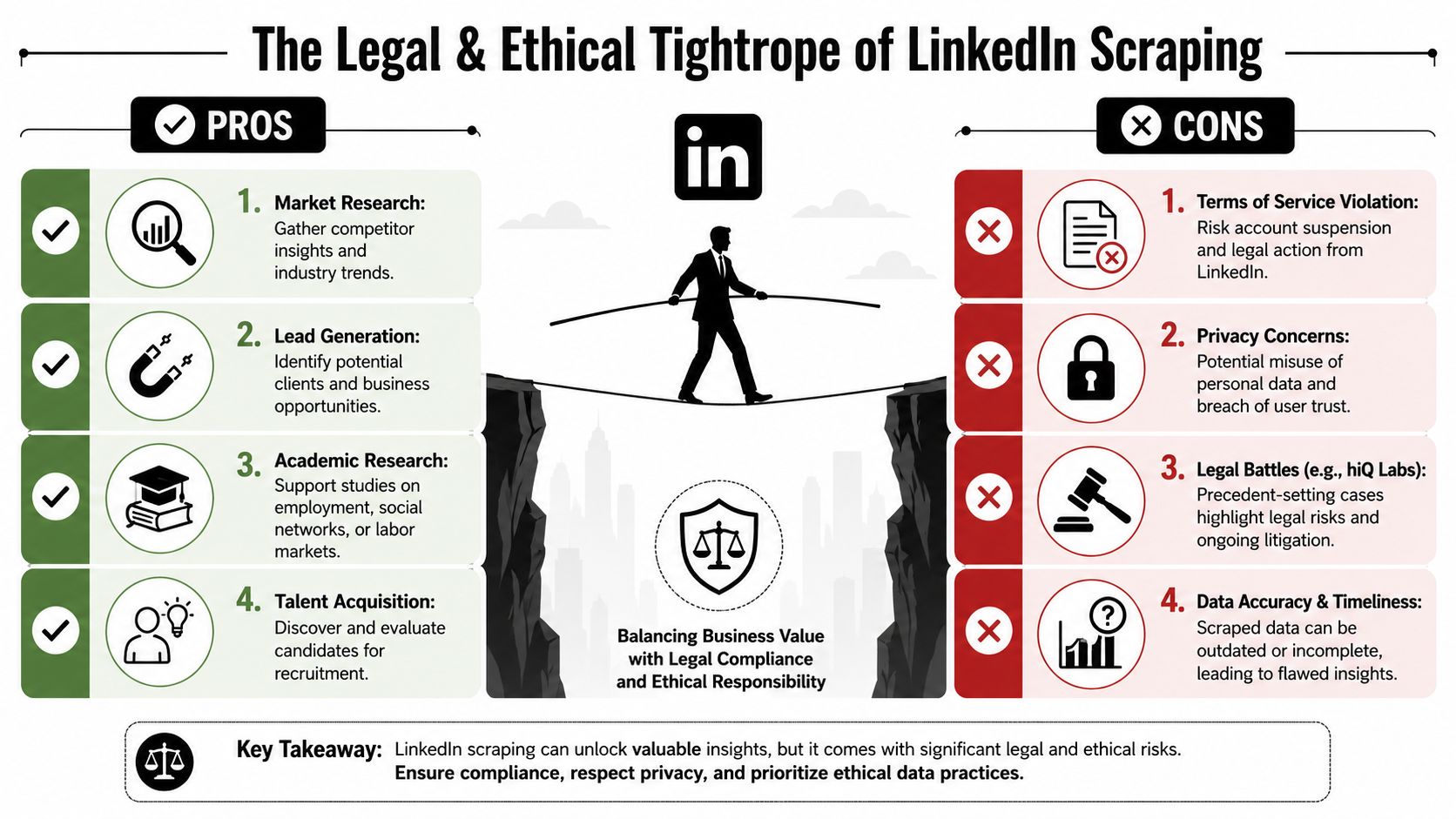
The legal question around LinkedIn scraping doesn't have a clean universal answer. Anyone claiming it does is oversimplifying. The actual boundary sits between public accessibility, access controls, anti-bot measures, contractual restrictions, and jurisdiction-specific enforcement.
What hiQ clarifies and what it doesn't
The most cited case is hiQ v. LinkedIn, but it gets summarized too loosely. The Ninth Circuit's rulings emphasized that data on a public website that is available to anyone with a web browser isn't automatically protected by the CFAA in the same way as restricted systems. The same analysis also leaves important gray areas in place, especially once authorization, credentials, or active access barriers enter the picture, as discussed in the IAPP analysis of the latest LinkedIn hiQ court ruling.
That means “public page” isn't the same as “zero risk.” It means CFAA liability isn't automatic in every public-data scenario. That's narrower than many scraping guides imply.
A practical legal reading looks like this:
- Publicly visible data may sit in a different legal category than gated data.
- Credential requirements can change the analysis.
- Active anti-bot measures can change the analysis.
- Terms of service can still create contractual or enforcement risk.
- Jurisdiction matters because precedent and interpretation vary.
Operational risk is part of legal risk
Engineering teams often separate legal review from implementation details. That's a mistake. The way a scraper operates affects the risk profile. If a workflow relies on authenticated sessions, bypass tactics, or persistent evasion, counsel may assess it differently than a restrained process that reads only public pages.
Ethics matter too. Public visibility doesn't erase user expectations. Teams still need a reasoned policy for collection, retention, use, and deletion. If the business can't explain why each field is necessary, the collection scope is probably too broad.
For commercial teams evaluating whether LinkedIn should remain a core dependency, Salesmotion's take on B2B alternatives is useful because it reframes the problem. Sometimes the smartest move isn't scraping harder. It's reducing reliance on a single channel that can change terms, access, or enforcement posture at any time.
Legal safety in scraping isn't a switch. It's a moving boundary shaped by facts, conduct, and jurisdiction.
Smarter Alternatives and Scaling Your Data Strategy
Not every data need justifies a custom LinkedIn scraping operation. In many organizations, the better answer is to step back and separate the actual objective from the method. If the goal is lead generation, recruiting support, or market intelligence, scraping is only one path.
Buy, build, or use a managed layer
The LinkedIn scraping ecosystem has matured because enough teams decided the raw build-it-yourself route was too fragile. According to PhantomBuster's overview of the LinkedIn scraping market, the space includes specialized tools such as Evaboot, PhantomBuster, and Bright Data, which are built around rate limits, account safety, and workflow-oriented extraction rather than ad hoc scripts.
That maturity changes the build-versus-buy decision. A team now has three broad options:
| Option | Best when | Main trade-off |
|---|---|---|
| Build internally | The schema and workflow are unique | Highest maintenance and risk ownership |
| Use a managed scraping tool | The team wants speed without owning every moving part | Less control over internals |
| Use a data partner or enrichment layer | The goal is downstream usage, not collection itself | Vendor dependence |
There's also a smaller category of need that doesn't require scraping at all. If the task is to collect account-level contact information that users already control, practical guides like LinkedIn contact export techniques can solve a narrower workflow with much less operational exposure.
Choose based on the job not the tactic
A good data strategy starts with the workflow that needs to be powered.
If a sales team needs fresh prospecting input every day, a managed provider may be easier to budget and govern than a homegrown stealth stack. If a research team needs a one-time public dataset from a narrow slice of profiles or companies, a carefully bounded internal scraper may be enough. If legal or security leadership already dislikes the risk posture, that should end the debate early.
Useful decision criteria include:
- Data specificity. Does the team need fields only available on rendered pages?
- Refresh cadence. Is this a one-time pull or an always-on pipeline?
- Risk tolerance. Can the company accept account bans or enforcement action?
- Maintenance capacity. Who owns breakage when LinkedIn changes behavior?
- Governance. Can the business justify collection, retention, and usage?
The strongest teams don't romanticize LinkedIn data scraping. They treat it as one instrument in a broader acquisition strategy. That mindset usually leads to better architecture, better controls, and fewer expensive surprises.
Pazi helps teams operationalize complex, ongoing work with AI agents that can monitor systems, coordinate in Slack, and act across tools like GitHub, Linear, Sentry, and PostHog. For companies that want automation without turning every workflow into a brittle in-house project, Pazi offers a practical way to run repeatable operational tasks with oversight built in.