A week of social content should not mean a week of switching between apps. Yet for many small business owners, even a simple launch becomes a chain of unfinished tasks: find an idea, write a caption, make the image, adapt it for each channel, check the link, and remember to publish.
Automating social media connects those steps. Pazi helps turn your business strategy into channel-specific posts and visuals, organize them in a content calendar, and schedule and publish across connected accounts. You can review and refine the work inside Pazi, with publishing permissions set for each account.
This guide explains how to build that workflow without losing your brand's voice or handing over decisions that still need you.
What social media automation should do
A scheduler handles delivery. A useful social-media workflow also connects the decisions that come before it: who you want to reach, what you want to say, which channels make sense, and what should happen after someone sees a post.
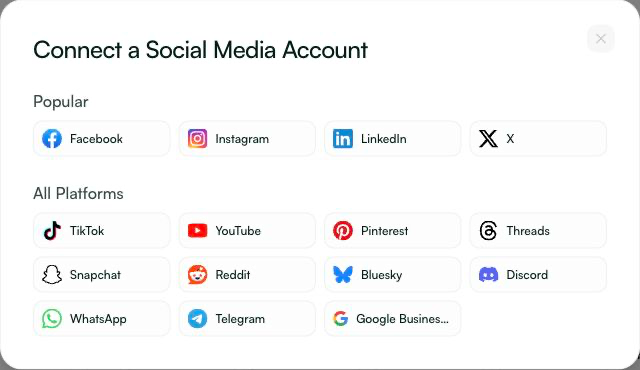
In Pazi, the Social Media Manager works from your business context to plan a calendar, create copy and imagery, and manage connected social accounts. Pazi supports more than 10 social channels in one place. Available formats and actions vary by network, so connecting an account does not mean every platform offers identical features.
The point is not to publish everywhere at once. It is to make the channels you choose easier to run consistently.
Define your goal, audience and channel roles
Automation should begin with a business decision. Do you want the next campaign to introduce a product, bring visitors to a collection page, generate enquiries, or help existing customers use what they bought?
Choose one primary outcome, then give each channel a role. An Instagram post might introduce a collection visually; a Pinterest post might help someone discover a piece while planning a gift. Neither needs to be a copy of the other.
Consider a small jewelry business preparing a new collection. The owner has product photographs, material details, prices, delivery information and a collection page. Before asking for posts, they need a clear brief: who the collection is for, what makes it distinctive, and which claims are supported by the product information. This is an illustrative example, not a customer case study or a promise of results.
Build a usable audience canvas
A profile that only lists age or industry will not tell an AI assistant how to write. Capture the practical context:
| Field | Practical question |
|---|---|
| Audience need | What is this person trying to find or decide? |
| Preferred channel | Where do they discover products, compare options or ask questions? |
| Language | How do customers describe the product and its benefits? |
| Brand voice | Should the copy sound understated, playful, technical or reassuring? |
| Desired action | Should someone explore a collection, enquire or buy? |
| Boundaries | Which claims, topics, offers and images are approved? |
In Pazi, the approved Business Profile and strategy inform the social calendar. Brand Voice guides the copy, while Visual Identity guides image creation. Getting those foundations right is more useful than generating a large batch of posts from a vague prompt.
If you cannot explain why a post exists, pause before automating its distribution.
Turn the brief into channel-ready posts
AI is already part of many social-media workflows. In Metricool's 2026 survey of more than 700 social-media professionals, 95% of respondents said they used AI for their work. That is evidence of adoption among the people surveyed, not evidence that every AI-generated post performs well.
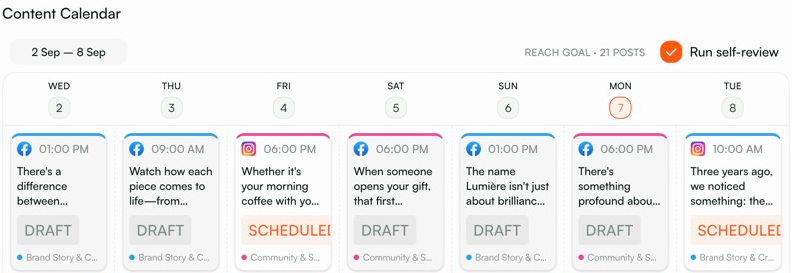
The useful question is what your workflow does with the business context. In Pazi, calendar planning establishes a visible seven-day plan. Copy is generated for individual posts using the approved profile and Brand Voice, and images are created using the calendar's Visual Identity. You can inspect the work, request edits and regenerate assets.
For the jewelry business, one collection can support several distinct stories: a close look at a necklace's design, a styling idea for a pair of earrings, and a gift-focused introduction to the collection. Each post should have its own reason to exist, rather than repeating the same caption with a different platform logo.
Review the output, not just the idea
Open a post and check the creative alongside the copy. Does the image represent the actual product? Are materials and dimensions accurate? Is the offer still available? Does the link lead to the right page?
Generated imagery deserves particular care for physical products. A polished image is not useful if it changes a clasp, invents a stone, or makes the finish look different from the item a customer will receive. Supply accurate references and review the result before using it.
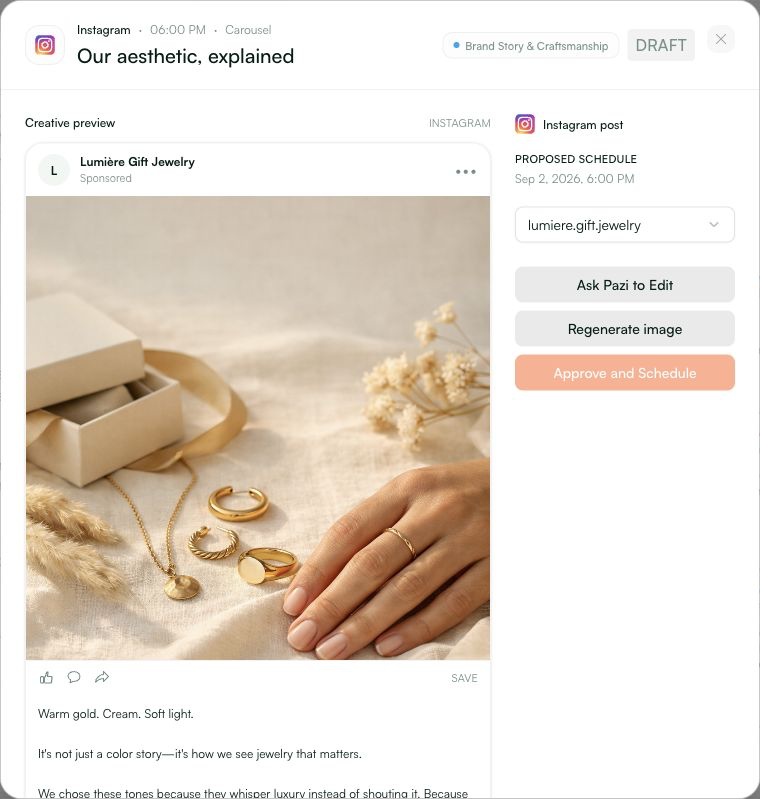
Pazi's content review checks areas such as Brand Voice, copy safety, calls to action, hook variety and visual fit. Issues can appear as actionable flags on individual posts. Those checks support review; they are not a guarantee that every claim is true or every post meets every applicable rule.
Connect your channels, schedule and confirm delivery
Pazi brings social planning and channel operations into the same business workspace. You do not need to build a Slack approval system or maintain a separate content database to follow this workflow.
Start with the networks that fit your audience. Connect the relevant accounts through Pazi and check their publishing permissions. Social account connection and outbound social actions require an eligible paid or trialing Pazi plan.
Before scheduling, confirm the channel, final copy, creative, destination link, date, time and timezone. A visible calendar slot is a plan; it is not evidence that a platform has accepted the post.
Pazi distinguishes three delivery states:
- Draft: the post has not been approved for delivery.
- Scheduled: Pazi has successfully created a scheduled action for a connected account.
- Published: a confirmed delivery result shows that publication happened.
If an action fails, investigate it before treating the post as delivered. Check connection status, permissions, platform requirements and the action result. Do not assume a post went live because its planned time has passed.
Test timing with your own audience
There is no universal posting time that can replace learning from your audience. Compare similar content across a few sensible time windows, using the same definition of success each time.
Hootsuite's small Instagram experiment compared native and scheduled posts on one business account, with five feed posts per method. It was a vendor-run test, not an independent study or a guarantee that scheduling improves reach. Use it as a reason to test assumptions, not as a forecast for your own account.
Handle messages with clear boundaries
Publishing a planned post and replying to a customer are different responsibilities. A reply may depend on order details, consent, refund rules or information that is not in the campaign brief.
Pazi supports inbox and direct-message actions on supported networks, with capabilities varying by platform. A connected social account does not automatically provide every type of inbox access or permission to start new conversations. Check the available action and the account's DM approval policy before automating a response.
For the jewelry business, a question about a necklace's length can be answered from verified product information. A request for a refund, a complaint about a damaged item, or a question involving private order details needs the appropriate owner and context. Make those boundaries explicit.
Customer questions can also improve the next content plan. If people repeatedly ask about sizing or care, add a useful explainer. Use those recurring questions to make the next week's posts more useful.
Keep control of publishing and brand safety
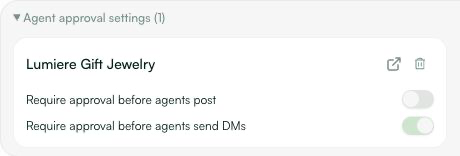
Each connected social account in Pazi has approval controls for posting and scheduling, and for outgoing DMs where supported. These default to requiring approval. A business owner or admin can change the policies; when approval is required, the owner or admin approves through Pazi's in-app approval card. The agent cannot approve its own action.
Before allowing more autonomous publishing, define what the business permits:
- Claims: use verified product facts, prices and offers. Do not invent testimonials, results or endorsements.
- Assets: use imagery, music and other material you have the right to publish.
- Customer interactions: keep sensitive, uncertain or high-impact responses with an appropriate person.
- Platform rules: check the requirements for the specific format and action, including relevant disclosure and consent requirements.
For example, X's automation rules place conditions on automated replies and DMs, including recipient consent and opt-outs. AI reply bots require X's prior written, explicit approval. Connecting an account is not permission to send unsolicited automated messages.
Paid campaigns are a separate workflow from organic posting. If you also run ads, review the applicable advertising policies, including Meta's advertising standards, rather than assuming an organic-content review covers them.
Automation can prepare and execute work within agreed boundaries. Your business remains responsible for what customers see and receive.
Your first week of social automation
Begin with one manageable campaign. For the jewelry business, that could be a week introducing the new collection—not a complete reinvention of every channel.
- Agree on the brief. Confirm the audience, objective, offer, product facts, Brand Voice and Visual Identity.
- Review the weekly plan. Give each post a clear purpose and choose channels that fit the audience.
- Connect the accounts you need. Check access, plan eligibility and approval settings.
- Refine the posts. Review copy, creative, links and flagged issues before delivery.
- Schedule and verify. Check dates and timezones, complete required approvals, and distinguish scheduled work from confirmed publication.
- Learn from the results. Review the metrics available for each channel alongside website visits, enquiries or purchases where you can measure them. Change one meaningful variable at a time.
Keep reach, engagement, clicks and business outcomes distinct. A post can attract attention without generating product interest; a smaller audience can still produce useful enquiries. Judge the work against the goal you set at the beginning.
Pazi helps you run more than 10 social channels for your business in one place, connecting strategy, post creation, calendar management and publishing with the level of oversight you choose. Start with a clear brief, review the first week, and expand the workflow as you learn what works for your business.
Explore Pazi's social-media features and see how they fit into the rest of your business.