
New in Pazi: workspace redesign, multiple workspaces, skill sharing, bigger uploads
Four updates are live in Pazi today: a redesigned workspace, support for multiple workspaces per account, one-click skill sharing across every agent in a workspace, and a 50MB chat upload limit.
The old dashboard had been accumulating friction. Workspace switching and agent navigation lived in separate menus, the chat rail was a panel you had to keep chasing, and sharing a skill meant remembering to pick the right scope at creation time, which nobody ever got right. Chat uploads topped out at 10MB and threw a useless "Failed to fetch" error the moment you tried to send anything real. All four are fixed.
A redesigned workspace
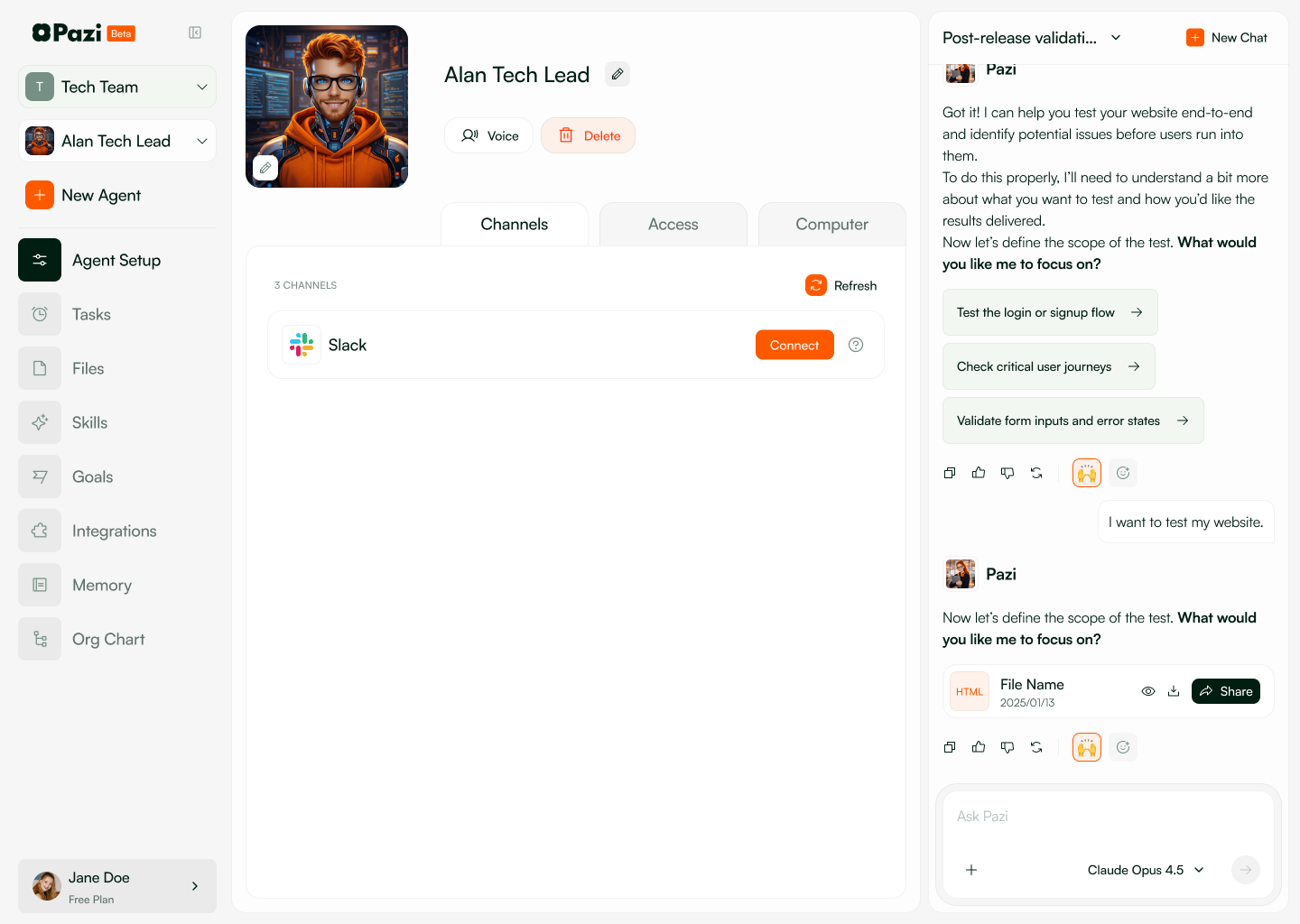
The dashboard now has a single left sidebar that covers everything you navigate between (logo, workspace switcher, agents, and per-agent section nav), and the right-side chat rail stays docked while you work, so whichever Pazi team member you're talking to is visible from Agent Setup, Integrations, Memory, or anywhere else you land.
Agent Setup has been rebuilt as three folder tabs (Channels, Access, Computer) under a header that holds the agent's avatar, name, voice picker, and delete button. Integrations and Memory are now standalone routes rather than per-agent pages, since neither is agent-specific, and old URLs redirect to the new ones while preserving query strings.
Multiple workspaces per account
Every Pazi account can now run more than one workspace—free accounts are capped at one, paid accounts at three. Each workspace is its own independent environment with its own agents, files, and skills, which lets you keep a personal playground separate from a team setup, or a client's workspace separate from your own, without any of the agents or context bleeding between them.
Create a new workspace from the switcher in the left sidebar. Switching between them reloads your agent list and chat context while the URL stays the same, so existing bookmarks keep working.
One-click skill sharing
Every skill you build starts agent-local. To push one out to the rest of your workspace, click Share on the skill in the skill list, confirm in the dialog, and it's available to every agent in the workspace the next time they load their skills.
This replaces the old "Available to all agents" toggle that was buried inside the Add Skill and Edit Skill modals. Scope used to be a choice you made before you knew whether the skill even worked. Now you write it, see it work on the agent you built it for, and then decide whether to share it.
Chat uploads up to 50MB
Chat uploads now accept files up to 50MB (up from 10MB), and anything larger returns a clean HTTP 413 with the message Each file must be less than 50MB instead of the browser dropping the connection mid-upload and showing a generic fetch error.
This matters for the people we've watched try to hand their agent a real design file, a log bundle, or a data export. The cap was low—and the error was worse than the cap.
Try the new workspace, spin up a second one, share a skill across your agents, and drop a bigger file into chat at pazi.ai.



