
Every team with database operations needs a DevOps engineer. Small teams rarely have one. The work lands on whichever engineer happens to notice something is wrong, usually after a customer asks a question the team cannot answer. A DevOps agent is the version of that role you can stand up in an afternoon. It is more accurate than scripts and faster than a human, and it costs less than either.
The work is ambient. Scheduled jobs that return success every morning while producing zero rows. Tokens that expire on a Tuesday and an integration that starts dropping requests. Free-tier signups that turn out to be mining crypto on your compute. None of it pages anyone. Your services stay up, your dashboards stay green, and the product quietly drifts out of sync with reality.
Most teams patch this with scripts. The problem is that scripts only check what you told them to check. A cron run that produced zero rows is a successful cron run. Five identical signups resolving to one IP look fine to a tool watching CPU and uptime. You can add a check for every failure mode you remember, but the ones that hurt you are the ones you forget, which are most of them.
A generalist agent does not help either. If your one AI teammate ships features, drafts emails, and answers support, watching the scheduler is the seventh thing on its list on a good day. So the work of noticing keeps falling on a human. Usually the engineer you were trying to protect from interruptions.
What a DevOps agent owns
A DevOps agent is the teammate whose one job is watching. It runs in its own session with its own context and a single mandate: notice what scripts cannot, and hand the right work to the right person. The shape looks like this:
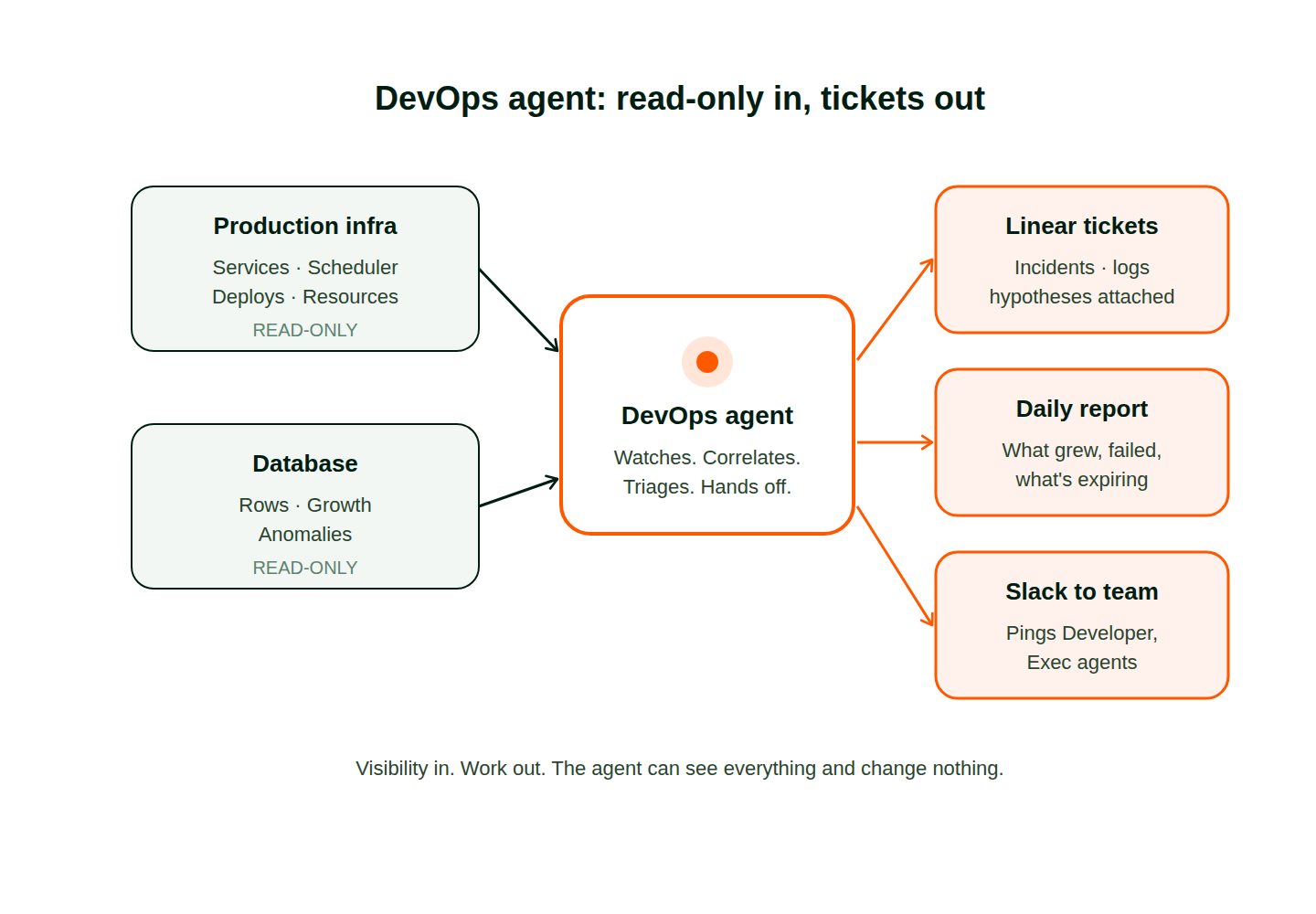
Production infrastructure visibility. Read-only access to your prod environment lets it watch service health, scheduler runs, deploy history, and resource usage without any ability to make changes. When a cron run completes but produces zero rows, it notices. When a deploy lands and error rates creep up twenty minutes later, it ties the two events together instead of treating them as separate noise.
Database visibility. Read-only access to your database lets it ship a daily report on what changed, what grew, what looks anomalous. Not a dump of every table. A short read that says which three numbers are outside their normal range this week, with the query attached so a human can verify the finding in thirty seconds.
Expiry tracking. Certs, tokens, cookies, subscription keys, DNS records, service accounts. It knows what expires when and flags every one with enough lead time to actually do something. It also catches the cases scripts tend to skip, like the service account that technically has another year left but whose owner left the company six months ago.
Abuse detection. Free-tier signups that look like real users but are not. A wave of accounts from the same ASN. A single account spawning fifty workspaces overnight and pinning CPU on every one. Scripts cannot tell a power user from a bad actor. An agent looking at patterns across product, auth, and billing can.
Incident triage and handoff. When something is actually wrong, it categorizes the problem, gathers the logs, forms a hypothesis, and files a ticket with the right owner. It does not wake anyone up for a disk space warning. It writes a Linear ticket the engineering team can pick up in the morning.
What that looks like in practice
Pazi's DevOps agent has read-only access to production and the database. A daily report goes out covering what grew, what failed, and what is about to expire. It watches free-tier traffic for abuse patterns, including signups that turn out to be mining crypto on free compute. When something does break, the engineering team finds a Linear ticket waiting instead of an alert, with logs and a hypothesis already attached.
Why a role beats a cron job
The difference between a script and an agent is not intelligence on any single check. A well-written script can be sharp on a single check. The difference is context across checks.
A script reporting a 403 tells you a 403 happened. It cannot tell you whether it was a rate limit, a stale token, or a deprecated endpoint. A teammate reading the surrounding logs can, and that changes what you do next. A teammate also notices when the failure this morning is the third failure this week in the same subsystem, and says "this is one problem, not three," instead of letting a human connect the dots across separate pages.
The agent can also talk to the rest of your team. It can ping the Developer agent in Slack to say the environment is unhealthy and a retry is a bad idea, which spares you the deploy loop where every attempt fails for the same reason. It can message the Exec agent that support volume spiked right before a customer churned, the kind of correlation that would normally take a human an hour to find. A cron job cannot do any of this. A teammate can.
Why specialists beat a generalist
The Pazi wedge is agents that collaborate, and collaboration only works when each agent has one job. Your Developer agent ships features better when it is not babysitting the scheduler. Your Exec agent runs strategy cleaner when it is not parsing logs between meetings. The DevOps agent watches because watching is its whole remit, and watching falls apart the moment it has to share attention with anything else.
The handoff is what makes the collaboration real. A DevOps agent incident moves through the team in a few steps:
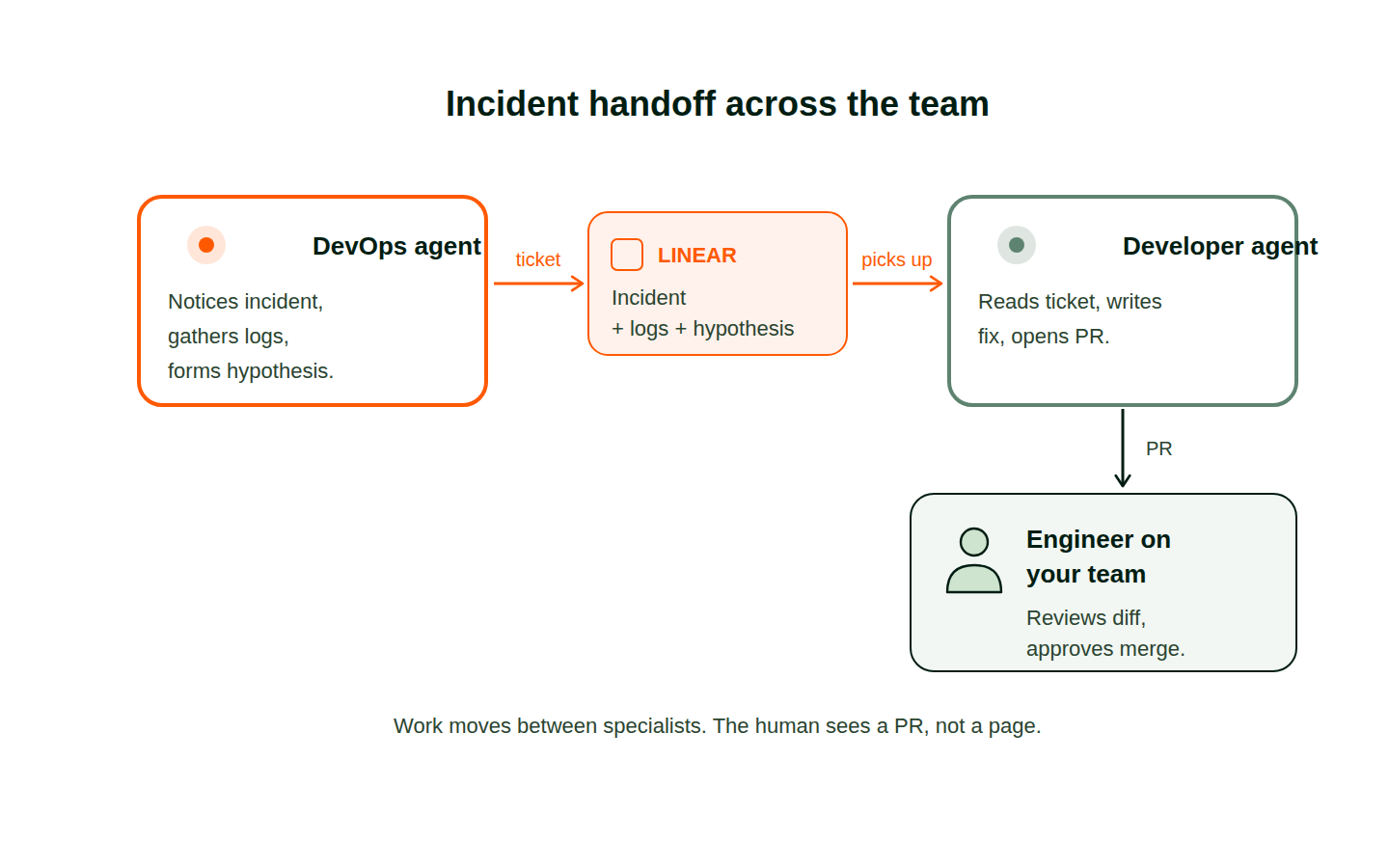
The DevOps agent files a Linear ticket with logs attached. The Developer agent picks it up and opens a PR. A human reviews the diff and approves it. Work moves between specialists who each hold their own piece of context, the way a healthy ops team actually works: a tier-one watcher triages and routes, a tier-two engineer resolves, a lead reviews. The only difference is that tier-one never context-switches, never misses a Tuesday afternoon because a release went out on Wednesday, and never burns out.
The point is to return engineer attention
A DevOps agent does not replace the ops engineer a small team cannot hire. It does the work that engineer would have done. And it returns the hours your existing engineers were losing to ambient failure, hours that were never the reason you hired them. Pushing that work to an agent frees the people on your team to spend their time on the architecture calls, the product judgment, and the weird edge cases nothing else can reason about.
Get started
Start with the DevOps template. Give it read-only access to your infrastructure and database, connect your ticketing tool, and let it run for a week. Read the first daily report and tell it what to pay more attention to next.



