
Pazi is a managed business-operator product built on the OpenClaw runtime. For most teams, Pazi is the path that lets you ship; OpenClaw self-host is the path you take when you have a specific reason to.
OpenClaw is the open-source personal AI assistant runtime, MIT licensed, with around 370,000 GitHub stars and frequent releases. It installs with npm install -g openclaw@latest and runs on your own device. Pazi is a managed business-operator product built on that runtime, with a free tier at zero dollars and paid plans from $25 a month. If you arrived from the OpenClaw README and you are looking at Pazi for the first time, the short answer is this: Pazi is what most teams should run; the gateway is managed, the channels work out of the box, and a free tier gets you live in minutes. OpenClaw self-host is what you run when you have a hard data-residency requirement, when you are already DevOps-fluent and running gateways for other things, or when you want to learn the runtime by holding it in your hands. Most operators reading this should start with Pazi.
The shape of this comparison is the same one operators recognize from infrastructure they already use. Next.js works when self-hosting; deploying to Vercel is zero-configuration with additional enhancements. Apache Kafka is the industry standard, and Confluent is the managed surface on top. Supabase self-hosting is a good fit when you need full control over your data. Pazi sits in the same relationship to OpenClaw. The runtime is open source and you can run it yourself; Pazi is what we ship for teams who do not want to. The Vercel-to-Next.js relationship is instructive: the managed product is where most teams run; the open-source runtime is where you go when you have a specific reason to self-host. Pazi sits in the same position for OpenClaw.
| Dimension | OpenClaw (self-host) | Pazi |
|---|---|---|
| What it is | Open-source personal AI assistant runtime | Managed business-operator product on the OpenClaw runtime |
| License | MIT, free | Proprietary product running an open-source runtime |
| Setup | npm install -g openclaw@latest, 15-30 minutes for a DevOps-fluent operator |
Sign up at pazi.ai, agent live in single-digit minutes |
| Who runs the gateway | You, on your device or VPS | Pazi, as managed infrastructure |
| LLM bills | Yours, you provide API keys | Per-plan message quota, or connect ChatGPT Plus or Pro via OAuth |
| Channels | 22+ (Slack, Discord, WhatsApp, Telegram, iMessage, Signal, Teams, and others) | Same runtime, same channels, with Slack and Discord foregrounded |
| Pricing | Free, plus your infra and LLM costs | Free, $25, $75, $250 per month (pazi.ai/pricing) |
| Best for | DevOps-fluent operators, data-residency teams, hobbyists | Teams who want to run a business, not infra |
What is the fundamental difference between Pazi and OpenClaw?
The difference is the abstraction layer, not a feature ladder. OpenClaw describes itself in its README as "a personal AI assistant you run on your own devices. It answers you on the channels you already use." That is the runtime. It ships as a Node package, opens a Gateway daemon on your machine, and routes channels and models through it. We describe Pazi on our homepage as "Operations aren't for humans anymore. Run your company autonomously." That is the product framing one layer up. Same runtime. The framing and the operator are what differ.
We ship Pazi on the OpenClaw runtime. We have said publicly that everything you can build on Pazi can be built on OpenClaw self-hosted, because Pazi and OpenClaw run the same runtime. Pazi is not a fork. The code under the hood is the same OpenClaw code that ships from the openclaw/openclaw repository (v2026.5.7 as of this writing). What we add is the managed surface around it: an account, a hosted gateway, billing, the chat-channel onboarding flow, and the business-operator framing that puts the operator at the company level instead of the individual.
The pattern is recognizable from other categories. Vercel does not replace Next.js, it deploys it. Confluent does not replace Kafka, it runs it. We do not replace OpenClaw, we run it for you. In all of those pairs, the managed product is where most teams run, and the open-source runtime is where you go when you have a specific reason to self-host. The same is true for Pazi and OpenClaw.
How long does it actually take to get started with each?
The setup gap is real, and it tracks the operator profile. OpenClaw is shipped as a runtime; Pazi is shipped as a product.
For OpenClaw, the README prescribes two commands:
npm install -g openclaw@latest
openclaw onboard --install-daemon
A DevOps-fluent operator with Node 22.16+ already installed lands at a running Gateway in fifteen to thirty minutes. For an operator who has never run a Node daemon, the same setup is a multi-hour evening, including LLM provider keys, the OS-level daemon, and the first node pairing. None of this is hard, it is real work.
For Pazi, the path is: sign up at pazi.ai with a Google or email account, connect Slack or Discord, and the first agent is in the channel. We hedge to single-digit minutes from sign-up to live agent rather than the under-a-minute claim that is technically possible on a Pazi free account with a clean browser session; in real-world conditions the first OAuth handshake and the channel invite add a few minutes either way.
| OpenClaw (self-host) | Pazi | |
|---|---|---|
| Setup time | 15-30 minutes for a DevOps-fluent operator | Single-digit minutes from sign-up |
| LLM provider config | You configure, you provide keys | Per-plan quota, or connect your ChatGPT subscription |
| Domain or hosting needed | Your device or a VPS | None |
The OpenClaw path is fast for the operator who already speaks Node and slow for everyone else. The Pazi path collapses that variance into one number for everyone. For most operators reading this, the Pazi path is the one that gets you live today; the OpenClaw path is the one you take when running Node daemons is already part of your job.
How do Pazi and OpenClaw handle channels, models, and the Gateway?
This is the highest-leverage section for the reader who arrived from the OpenClaw README, because the runtime layer is where the relationship is most concrete.
At the runtime layer, we inherit everything OpenClaw does. The Gateway is the same control plane: a long-lived daemon on port 18789 by default, WebSocket-based, one Gateway per host, nodes connecting as devices with role-based capabilities. The OpenClaw architecture docs describe the model verbatim, and that document is the source of truth for Pazi too. The channels are the same. The OpenClaw README lists more than twenty: Slack, Discord, WhatsApp, Telegram, iMessage, Signal, IRC, Microsoft Teams, Matrix, and others, plus the macOS menu-bar app and the iOS and Android nodes. Whatever channel works on OpenClaw works on Pazi. Slack and Discord are foregrounded on the Pazi onboarding flow because that is where most teams live.
The model layer is the same too. OpenClaw is provider-agnostic with allowlist and failover. We run the same provider layer, plus one connect path that is more visible on the managed surface: OAuth Codex / ChatGPT Plus connect, so an operator who already pays for ChatGPT can run Pazi agents on their own OpenAI quota instead of Pazi credits.
It is the same runtime in both products. The Gateway and the channels are not a differentiator; who runs them is what separates the two products. On self-hosted OpenClaw, the Gateway is on your machine and the LLM bills are on your credit card. On Pazi, the Gateway is ours and the LLM is on a per-plan quota you can override by connecting your own provider. For most operators that distinction is the whole game.
Which costs less to run in 2026?
Cost on the OpenClaw side has shape; on the Pazi side it has a number. The honest comparison includes the parts most managed-vs-OSS comparisons skip.
| Cost pillar | OpenClaw (self-host) | Pazi |
|---|---|---|
| Software | $0 (MIT, open source) | $0 free / $25 / $75 / $250 per month (pazi.ai/pricing) |
| Infrastructure | $5-20 per month for a small VPS, or $0 if it runs on a machine you already pay for | Included |
| LLM API | Your API spend at provider list prices | Per-plan message quota, or your own ChatGPT subscription |
| Operator time | Patches, upgrades, incidents, SSL, channel reconnects | Your time on actual product work |
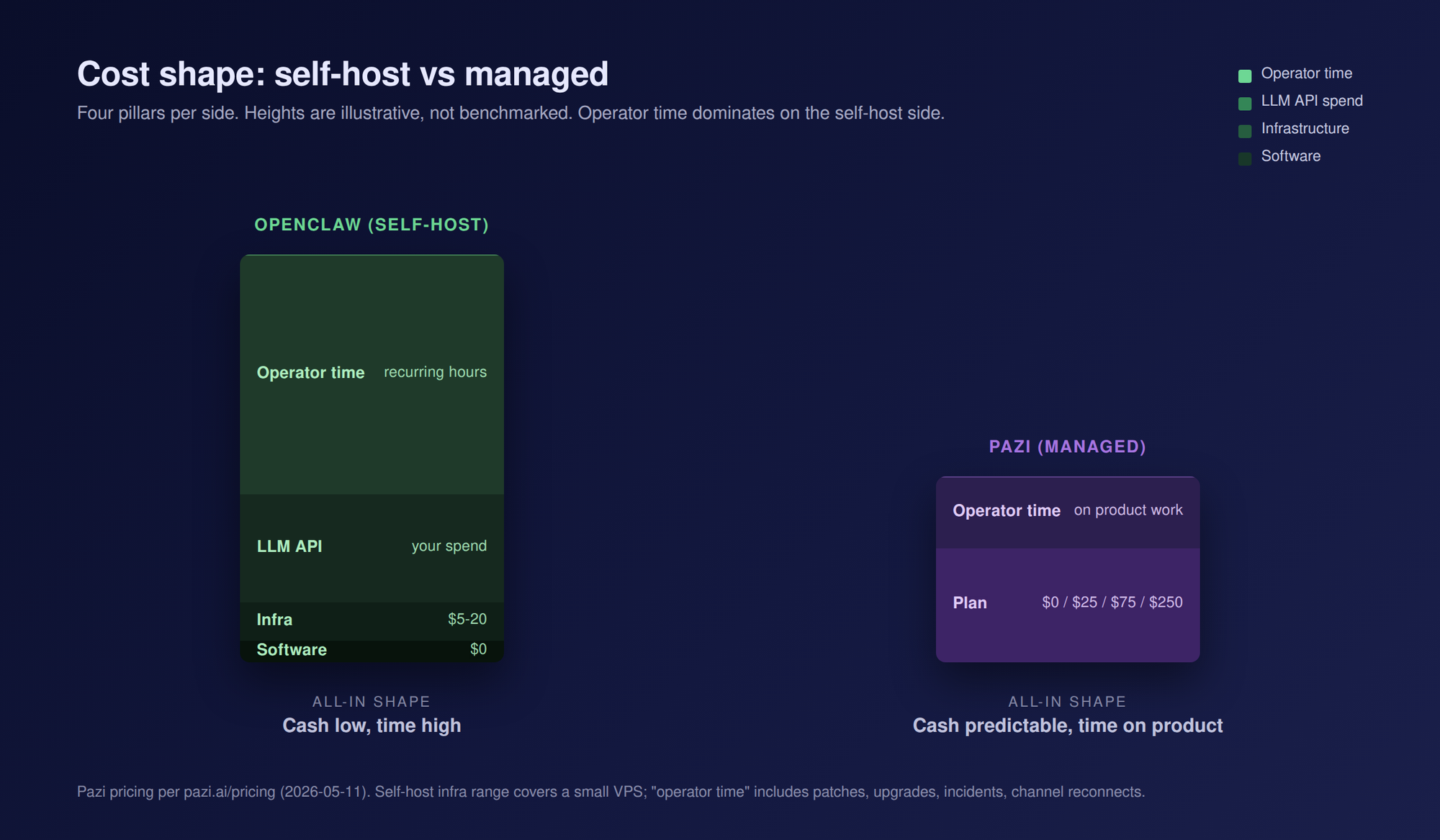
The Pazi plans at the time of this writing are Free ($0, 50 messages per month, 1 agent), Starter ($25, 250 messages, 3 agents), Advanced ($75, 1,000 messages, 10 agents), and Pro ($250, 5,000 messages, unlimited agents). Pazi's free tier asks for no credit card. Self-hosted OpenClaw is free at the software layer and you pay every other pillar in cash or in time.
The breakeven sentence reads roughly like this. Pazi pays for itself when an hour of your time is worth more than the spread between the plan price and the sum of your infrastructure, LLM spend, and recurring maintenance hours. For most teams who would consider Pazi, that breakeven sits well below an entry-level consulting rate, which is why the managed path is the default for operators who are not paid to run gateways. The self-host path wins when you already run gateways, or when the marginal cost of one more daemon on your machine is close to zero.
When should you choose OpenClaw instead of Pazi?
There are real cases where OpenClaw self-host is the better fit. None of them apply to most operators reading this post, but if any of them describe you, run OpenClaw self-host instead of Pazi.
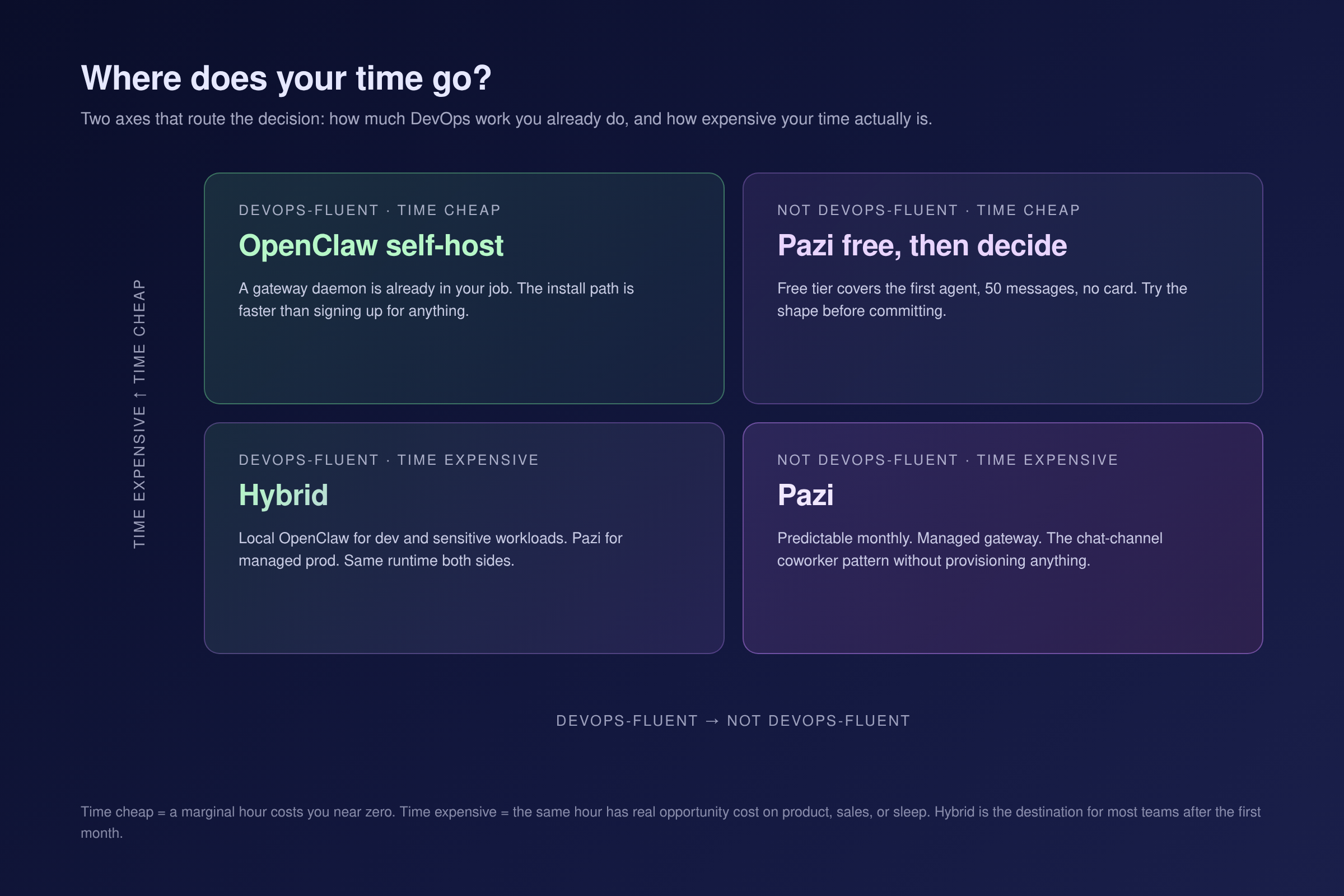
- Running a gateway is already in your job. If you are a DevOps-fluent operator and a long-lived daemon on a host you already manage costs you no marginal labor, the install path is faster than signing up for anything.
- Data residency is non-negotiable. On-prem, air-gapped, or regulated environments where the runtime cannot live on someone else's infrastructure. OpenClaw self-host puts the data on your machine by definition.
- You want to learn how the runtime works. OpenClaw is open source, MIT-licensed, and the code is readable. Contributing PRs, reading the Gateway, or building custom node types is only possible on self-host.
- You have niche hardware or a specific local-model requirement. A Raspberry Pi node, a local Ollama with an LM Studio backend, an on-prem GPU. Self-hosting routes the workload through hardware you already own.
- Your monthly Pazi cost would exceed your real infrastructure plus LLM spend, and your time is genuinely cheap. The breakeven math inverts.
- You want the personal-AI-assistant framing, not the business-operator framing. OpenClaw is positioned at the individual operator. We position Pazi at the team and the company.
When should you choose Pazi instead of OpenClaw?
Most operators reading this post are here. Pazi is the path for teams who want to ship rather than maintain. Here is what you are picking when you sign up.
- You want to run your business, not your infrastructure. The job is operations, not DevOps. The gateway becomes someone else's problem.
- You are a non-technical founder or operator. The chat-app coworker pattern lands without you provisioning a VPS or learning what a Node daemon is.
- Your time is worth more than the plan price. The breakeven inverts in our direction. For teams who would consider Pazi, that is most of them.
- You want predictable monthly cost. No surprise LLM bill, no unplanned ops work when the Gateway hiccups.
- You want the business-operator framing. Our homepage frames at the company. OpenClaw frames at the individual. Pick the framing that matches who you are running this for.
- You want the Slack or Discord coworker pattern without a VPS. You sign up, connect a workspace, and the agent is in your channel within minutes.
How do Pazi and OpenClaw compare feature-by-feature?
| Feature | OpenClaw (self-host) | Pazi |
|---|---|---|
| Type | Open-source personal AI assistant runtime | Managed business-operator product on the runtime |
| License | MIT | Proprietary product on the OSS runtime |
| Install path | npm install -g openclaw@latest |
Sign up at pazi.ai |
| Setup time | 15-30 minutes for a DevOps-fluent operator | Single-digit minutes |
| Free tier | Yes (the software is free by definition) | Yes, 50 messages, 1 agent, no credit card |
| Paid plans | None at the software layer | $25 / $75 / $250 per month |
| Gateway hosting | Your device or VPS | Managed |
| Channels | 22+ (Slack, Discord, WhatsApp, Telegram, iMessage, Signal, Teams, others) | Same runtime, same channels, Slack and Discord foregrounded |
| Model providers | Provider-agnostic, allowlist, you provide keys | Same runtime, plus ChatGPT subscription OAuth |
| Observability | Local, your choice of tooling | Managed, in-product UI |
| Multi-tenancy | Not built in | Yes |
| Billing | None at the runtime layer | Per-plan |
| Support | Community, GitHub Issues, Discord | Paid-plan support tiers |
| Data residency | Your machine | Pazi-managed infrastructure |
| Best for | DevOps-fluent operators, hobbyists, data-residency teams | Operators who want to run a business, not infrastructure |
Frequently asked questions
What is the difference between Pazi and OpenClaw?
OpenClaw is the open-source personal AI assistant runtime. Pazi is a managed business-operator product built on that runtime. For most teams, Pazi is the path that lets you ship without owning the gateway. OpenClaw self-host is the path you take when you have a specific reason to.
Is Pazi built on OpenClaw?
Yes. The runtime under Pazi is OpenClaw, the same code that ships from the openclaw/openclaw repository. We did not write a parallel runtime; we built a managed product on top of an open-source one.
Is Pazi a fork of OpenClaw?
No. We run the same runtime that ships from the OpenClaw repository, not a modified copy of it. The architecture (Gateway, nodes, channels, model providers) is the OpenClaw architecture verbatim.
Can I use OpenClaw without Pazi?
Yes. OpenClaw is MIT-licensed and runs without any Pazi account. The full runtime is on GitHub and the docs cover self-hosted setup end to end.
How much does Pazi cost compared to running OpenClaw myself?
OpenClaw at the software layer is free; you pay for your VPS (or a machine you already own), your LLM API spend, and your time on patches and incidents. Pazi is $0 / $25 / $75 / $250 per month with included message quotas and a managed gateway. Pazi pays for itself when an hour of your time is worth more than the difference between the plan price and your true self-host total, which, for most teams who would consider Pazi, it does.
Why would I use Pazi if OpenClaw is free?
OpenClaw is free at the software layer, and that time still gets paid somewhere, usually in operator hours on the Gateway, the LLM bills, and the hosting. We charge for Pazi so that those hours come back to you. If your time is worth more than the difference between a Pazi plan and your real self-host total, Pazi is the cheaper one to run. For most teams reading this, that is the case.
If you are not actively running gateways for other things, and you do not have a data-residency requirement, Pazi is the path. The free tier gets you live in minutes and OpenClaw self-host stays MIT-licensed and free if you ever want it. For the runtime depth that informs how we operate on top of it, see our notes on production AI agent failure modes and on running workspace agents on your ChatGPT subscription.



