A business plan AI generator can save time, but it does not magically turn a draft into something a lender, investor, or founder should trust. The most common advice in this category gets the order backward, it celebrates speed first and judgment second. That's the wrong sequence, because a fast plan can still hide weak assumptions, mismatched numbers, and unsupported market claims.
The comparison below separates draft quality, financial depth, customization, integrations, launch readiness, and the review work required before anyone treats generated content as reliable. That matters even more now that business AI use is spreading across firms, with overall business AI usage hovering between 17% and 20% from December 2025 to May 2026 in U.S. Census Bureau data cited in 2026, and about 10% of firms saying they used AI to produce goods or services in late 2025, up from roughly 5% in mid-2024, according to the Federal Reserve Bank of Minneapolis Census business AI use data. A tool can draft faster than a person, but the owner still has to approve every assumption, source, and forecast.
Table of Contents
- 1. Pazi
- 2. LivePlan
- 3. Upmetrics
- 4. Enloop
- 5. IdeaBuddy
- 6. Bizplan
- 7. GoSmallBiz Business Plan Software
- 8. Venturus AI
- 9. Businessplan.ai
- 10. ProAI
- Business Plan AI Generators, Top 10 Comparison
- Approve the Assumptions Before You Act
1. Pazi
Pazi is the strongest fit for founders who want a business plan AI generator to do more than write paragraphs. It runs as an AI workspace, so the plan sits next to research, website setup, checkout, ads, and analytics instead of floating as a static document. That matters because the business plan stops being a one-time file and becomes part of an owner-controlled operating system.
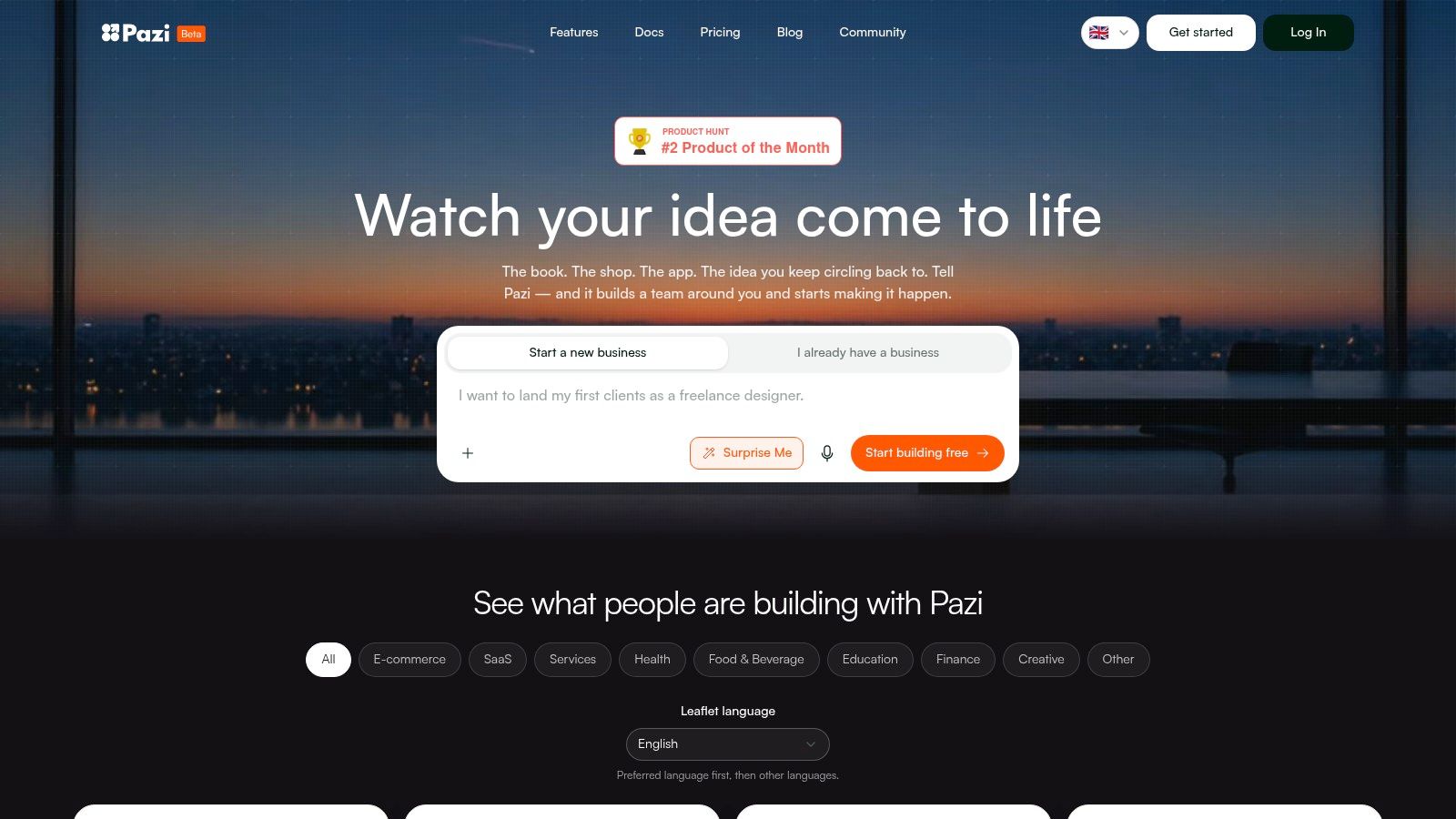
The practical difference is coordination. Pazi uses specialist agents rather than a single general model, so market research, positioning, site copy, store setup, and ad creation can stay aligned through shared briefs and a live Business Pulse view. Its product flow also supports the idea-to-workspace transition, which fits the fact that planning and execution are now converging in AI tooling, especially as AI agents are being positioned most aggressively for software development, customer service, marketing, and sales Anthropic AI agents report.
Where Pazi stands out
Pazi is especially useful when the plan needs to become action fast. It can connect market research, website and store creation, Stripe identity and payout setup, Meta campaign work, and analytics in one place, which is exactly where most standalone plan writers fall short. That also makes it more suitable for founders who need a launch sequence, not just a document.
Practical rule: use Pazi when the goal is to move from concept to live workflow, not when the only need is a pretty PDF.
There's a real trade-off, though. The site describes monthly agent funding and optional top-ups, but public line-item pricing isn't clearly laid out, so buyers need to check the current setup before relying on it. It also still depends on human approval and third-party systems like Stripe and Meta, which is a strength for control and a limitation for autonomy.
Pros
- Orchestrated specialist agents keep research, copy, design, and campaigns moving in the same direction.
- End-to-end commerce and launch stack covers websites, stores, checkout, Stripe identity, and payouts.
- Unified Business Pulse and analytics connect tasks, projects, channel activity, and session recordings.
- Human-in-the-loop controls reduce the risk of spending or launching on bad assumptions.
- Multi-business support helps owners run several projects under one roof.
Cons
- Pricing transparency is limited, so buyers have to verify the current funding model.
- Platform dependence is real, because Stripe and Meta still shape what can be launched and how.
- Oversight is still required, since the owner remains responsible for the numbers and the launch logic.
2. LivePlan
LivePlan is the safer choice when the financial model matters more than the first draft. It serves founders who need a plan that can stand up to lender questions, not just look polished on screen. The workflow is guided, the writing support is solid, and the accounting integrations give it more credibility than many writing-first tools.
The product also fits a more disciplined planning habit. LivePlan supports forecasting across P&L, cash flow, and balance sheet, and it can track plan vs. actuals through QuickBooks and Xero integration. That matters for businesses that expect the plan to stay active after launch, since it gives owners a way to compare assumptions with real results instead of filing the document away.
What matters in practice
LivePlan's strength is structure. It leads users through a clear process, which helps keep the plan coherent from executive summary to forecast. Pitch deck generation and export options also reduce rework when the same story needs to be shared with investors or partners.
The trade-off is friction. Deeper forecasting and scenario work take time, and the learning curve is part of the product. For experienced operators, that is a fair exchange for more control. For a founder who only wants a quick narrative, it can feel heavier than necessary.
A lender does not care that a plan was written quickly. The lender cares whether the assumptions tie out.
Pros
- Mature financial modeling with accounting integrations.
- Guided planning flow helps first-time founders stay organized.
- Plan-vs-actual tracking supports use after launch.
- Pitch deck and export tools reduce rework.
Cons
- Subscription pricing means there is no one-time buyout.
- Advanced forecasting takes time to learn.
- Less launch automation than an AI workspace built around execution.
3. Upmetrics
Upmetrics sits between quick drafting and owner-controlled planning. It can turn a business profile into a full draft, then add forecasting, collaboration, and pitch-deck work. That makes it useful for teams that want AI help without giving up editable structure.
The true value lies in the workflow, not the initial draft alone. You can start with generated copy, then revise the numbers, adjust the narrative, and prepare versions for different reviewers. Agencies, educators, and consultants will usually find that more useful than a tool that only produces a static outline.
Where it helps in practice
Upmetrics works best when the business model is already clear and the team needs a cleaner document fast. It is less useful when the founder expects the software to resolve strategy on its own. The research still needs checking, the assumptions still need owner input, and anything meant for investors still needs human review.
That trade-off matters. The platform uses AI credit limits on some plans, and consulting-style help is sold as an add-on. Teams that want predictable scope can work with that, but founders who want every cost visible up front may find it harder to budget.
A useful test is simple, does the forecast still make sense after you change one assumption? If the answer is no, the draft is not ready yet.
Pros
- Fast AI draft generation with editable structure.
- Long-range forecasting supports planning beyond the first year.
- Collaboration and white-label options suit agencies and advisors.
- Integration support helps connect planning work to external systems.
Cons
- AI credits are limited on some plans.
- Extra services cost more, which can raise the effective price.
- The user still owns the numbers, so the output needs review before it is treated as reliable.
4. Enloop
Enloop is built for founders who want the numbers checked before they trust the draft. It auto-generates plan text that stays tied to the forecast, then adds financial ratio diagnostics, benchmarking, and a performance score. That makes it more useful as a control layer than as a polished presentation tool.
The practical benefit shows up during revisions. Change an input, and the narrative updates with it, so the plan is less likely to drift away from the model. That matters when an owner is checking whether the story and the spreadsheet still agree, or whether a lender will spot a weak assumption right away.
The trade-off is clear. Enloop gives more weight to consistency and financial read-through than to visual polish or launch collateral. The interface reflects that priority. It feels utilitarian, which works for users who care about ratios and readiness checks, but not for teams looking for a branded pitch experience.
A quick test is usually enough to judge fit. If the diagnostics help you catch weak assumptions early, the tool earns its place in the workflow. If you need stronger presentation features or more launch support, you will need another platform beside it.
The free trial is also easy to evaluate because it does not require a credit card. That lowers the risk of trying the system before deciding whether the automated checks are useful.
Pros
- Draft text stays linked to forecasts, which reduces mismatch.
- Financial ratio diagnostics provide an early warning system.
- No-credit-card free trial makes it easy to evaluate.
- Shared user support works for small teams.
Cons
- The interface is utilitarian, not design-forward.
- Go-to-market tooling is limited, so launch execution happens elsewhere.
- Pitch collateral is thinner than in more presentation-focused platforms.
5. IdeaBuddy
IdeaBuddy is built for the stage before a founder should be writing a polished plan. It turns a rough idea into something more structured with a guide, a business model canvas, validation scoring, and a plan editor. For early-stage founders, that is useful because it keeps the work focused on the idea itself before pushing into dense forecasting.
Its value is in how it controls the workflow. The tool slows the process where founders usually skip important checks, then moves them toward a draft once the concept has been tested. That fits owners who need to clarify the model before investing time in deeper planning software.
Best use case and limitation
IdeaBuddy works well for a simple question: should this business exist yet, and what shape should it take? The free AI generator and export options help with first drafts, but the stronger part is the early-stage structure. Users can collaborate, share links with mentors, and move from concept to draft without being pushed into heavy software too soon.
The trade-off shows up once the plan needs more weight. If the goal is investor collateral or detailed financial modeling, IdeaBuddy can feel light. It is a practical bridge from idea to plan, but it is not the place to stop if the business already needs lender-grade depth.
The workflow works best when the founder treats generated content as a draft, not a finished answer. Check the assumptions, review the export for gaps, and make sure the canvas, narrative, and numbers still match before using it with anyone outside the team.
Pros
- Strong idea validation structure with guide and canvas support.
- Free AI generator lowers the entry barrier.
- Common export formats make offline editing simple.
- Sharing tools help bring in mentors or advisors.
Cons
- Pricing details vary by tier, so buyers need to verify inclusions.
- Advanced pitch materials may require another tool.
- Not the deepest choice for lender-grade forecasting.
6. Bizplan
Bizplan suits founders who want structure without having to build the plan from scratch. It sits inside the Startups.com ecosystem, so the experience is closer to guided planning and team review than to fast AI drafting. That trade-off matters. If you want a tool that forces the work into a clear sequence, Bizplan does that well.
The platform focuses on step-by-step plan building, financial modeling, collaboration, and investor-facing presentation work. In practice, that makes it useful for teams that need one place to shape the narrative, check the numbers, and keep everyone aligned on revisions. The pricing approach is also straightforward, with a lifetime option that may appeal to owners who do not want another recurring subscription.
Where Bizplan fits
Bizplan makes the most sense for founders who value guidance and context as much as the document itself. The Startups.com material can help newer operators understand what belongs in a business plan and why each section exists. That is useful before the team starts polishing language or sharing drafts with investors.
The limits show up in the workflow. Bizplan feels more like guided editing than AI-led generation, and its financial layer is lighter than what specialized forecasting tools provide. It can support a disciplined draft, but it is not the strongest choice if the plan depends on detailed modeling or rapid automation.
One practical takeaway: use Bizplan to organize the story, then verify the assumptions, revenue logic, and expense inputs before treating the output as decision-ready.
Pros
- Transparent pricing with a lifetime option.
- Educational content and community add context.
- Collaboration support works well for teams.
- Clear structure helps first-time planners stay on track.
Cons
- Less AI generation, so users do more manual work.
- Simpler financial tools than specialized forecasting platforms.
- More planning tool than launch system.
7. GoSmallBiz Business Plan Software
GoSmallBiz works for founders who want a lower-cost way to build a traditional plan with projections attached. It is not trying to outdo the more AI-heavy tools in this list. Its value is practical, it helps owners assemble a conventional plan without paying for features they may never use.
The workflow is template-led, with narrative fields and projection wizards doing most of the heavy lifting. That can suit local businesses that need a bank-ready document and prefer structure over experimentation. It also sits inside a broader small-business suite, so users who need help with compliance or marketing can keep related tasks in one place.
Owners should still check what the software produces. Template-based planning can keep the draft organized, but it does not replace review of revenue logic, expense timing, or assumptions that may change once the business starts operating. For founders seeking capital, early stage funding connections can sit alongside the planning work when the goal is to move from draft to outreach.
The main trade-off is clear. GoSmallBiz is manual-first, so it asks for more user input than newer AI generators. In return, it gives a guided path that can be enough for straightforward businesses. It is less useful if the founder wants the software to coordinate launch tasks or support a more complex operating model.
Pros
- Lower monthly cost for unlimited plans.
- Wizarded setup keeps the process easy to follow.
- Useful for local businesses that need standard documents.
- Broader small-business suite adds optional services.
Cons
- Not AI-first, so more writing stays manual.
- Basic design and collaboration compared with SaaS tools.
- Less useful for rapid launch execution.
8. Venturus AI
Venturus AI works best as a fast first-pass tool. Founders can use the chat interface to shape an early draft, then revise the output without rebuilding the whole plan. That makes it practical for concept testing and for turning rough notes into something that can be shown in a meeting.
The trade-off shows up in the planning workflow. It is easy to get a presentable narrative or pitch-deck style report, but the output still needs an owner who can check the assumptions, tighten the numbers, and decide what is usable. For simple positioning work, that is manageable. For a plan that has to support funding or operating decisions, it is only a starting point.
Where it runs out of road
Venturus AI does not handle deep financial work well. The model may produce a clean draft, but owners still need to verify revenue logic, expense timing, and any assumptions that change once the business starts operating. Speed is the benefit. Depth is the cost.
Tier-based limits also shape how useful it feels in practice. Users need to watch allowances and export rules before they build a long draft around the tool. It is helpful for getting ideas on the page, but the final plan still belongs to the founder, not the generator.
Pros
- Fast draft generation for early ideation.
- AI chat iteration makes revisions easy.
- Pitch-deck output suits lightweight presentation needs.
- Free tier makes testing simple.
Cons
- Financial depth is limited, so owners must refine assumptions.
- Tier caps and character limits can interrupt longer work.
- Better for ideation than funding-grade planning.
9. Businessplan.ai
Businessplan.ai fits founders who want a polished plan they can export and own outright, without another monthly bill. Its branded covers, charts, infographics, and editable output make it more suited to presentation-heavy use than bare-bones drafting.
That pricing model matters in practice. If you only need a few plans, lifetime access can be easier to justify than a subscription that keeps running after launch. Word and PDF exports also make handoff to a partner, advisor, or lender simpler.
The core question is how much review the output needs before anyone treats it as reliable. Businessplan.ai can produce a clean document, but founders still need to test the assumptions behind the numbers and compare the sample output against the realities of their own industry. A slick plan is useful only if the operating logic holds up.
What buyers should verify
Check the financial depth before you rely on it for forecasting. Businessplan.ai does not offer the accounting integrations that mature platforms use for connected planning, so serious scenario work may still move into spreadsheets. For document delivery, it is solid. For live planning, it asks for more manual control.
Because the brand is newer, sample plans and claims deserve a closer look. Verify whether the structure matches your market, whether the assumptions are transparent, and whether the export format fits how you will use the plan after download.
Pros
- One-time pricing avoids ongoing subscription cost.
- Editable Word and PDF exports are easy to share.
- Visual presentation is stronger than basic text-only tools.
- Clear packaging makes the offer easy to compare.
Cons
- Newer brand, so outputs need careful review.
- No deep accounting integrations for connected forecasting.
- Advanced modeling may still require spreadsheets.
10. ProAI
ProAI fits founders who need a draft they can edit without fighting the tool. It generates a business plan and a financial model, then exports to Word, Google Docs, and Google Sheets. That matters in real workflows, because the file should move easily to a partner, advisor, or lender.
The consultancy angle is the key differentiator. A product shaped by people who have worked on funding-ready plans usually reflects the checks a founder should make before sharing the document. That does not replace review. It does mean the draft starts from a more realistic baseline than a generic template.
Where ProAI fits in practice
Use ProAI if you want a one-time purchase and editable files rather than another subscription. The optional market research and plan review add-ons can improve the output, but they also change how much support you are buying.
The trade-off is clear. Without those add-ons, market detail may be thin, and the collaboration experience is lighter than a full SaaS planning suite. It works well as a draft engine. It does not function as a full launch workspace, so execution still happens in other tools.
Before you rely on the plan, verify the assumptions behind the numbers and check whether the market section matches your industry. Also confirm that the export format fits how you will review, annotate, and share the file after download.
Pros
- Editable Word, Google Doc, and Google Sheet delivery makes handoff straightforward.
- One-time pricing avoids recurring cost.
- Consultancy background keeps the draft oriented toward funding review.
- Fast turnaround helps when you need a first pass quickly.
Cons
- Market research depth varies unless add-ons are purchased.
- In-app collaboration is lighter than fuller SaaS suites.
- No launch workspace, so operational work still sits elsewhere.
Business Plan AI Generators, Top 10 Comparison
| Product | Core capabilities | Target audience | Key differentiator (USP) | Pricing model |
|---|---|---|---|---|
| Pazi | Orchestrated specialist AI agents, Business Pulse (projects/tasks/roadmap), website/store + Stripe, Meta ads, email automation, unified analytics | Aspiring entrepreneurs, indie founders, small DTC sellers, creators | Coordinated multi‑agent workflows + end‑to‑end launch stack; run Meta campaigns without separate Ads Manager; human‑in‑the‑loop approvals | Pro with monthly agent funding + optional one‑time top‑ups; free getting‑started path; public line‑item pricing limited |
| LivePlan | AI writing + guided plan editor, lender‑grade financial forecasts, pitch decks, QuickBooks/Xero sync | Founders needing mature forecasting and investor/lender documents | Robust financial modeling and accounting integrations trusted by lenders | Per‑seat subscription |
| Upmetrics | AI plan generation from Business Profile, industry research summaries, 7–10 year forecasts, collaboration & white‑label | Teams, agencies, educators needing fast drafts + structured financials | Fast AI draft generation with editable structure and white‑label options | Competitive subscription with add‑ons; some AI credit limits |
| Enloop | Auto‑updating plan text tied to forecasts, real‑time performance score, ratio benchmarking | Users wanting quick financial diagnostics and structured drafts | Live performance score and financial ratio benchmarking for readiness checks | Free trial; subscription tiers (utilitarian UI) |
| IdeaBuddy | Idea‑to‑plan guide, business model canvas, validation scoring, AI plan generator | Very early‑stage founders & idea validators | Guided canvas + validation workflow with free AI plan tool | Free trial + tiered subscription; exports available |
| Bizplan (Startups.com) | Step‑by‑step plan creator, financial modeling, sharing, access to courses/community | Teams building multiple plans who value education & collaboration | Bundled learning resources and community; lifetime pricing option | Transparent pricing including a lifetime option |
| GoSmallBiz | Industry templates, narrative editor, financial statements wizard, tutorials | Local small businesses needing bank‑ready plans on a budget | Very low monthly cost with industry templates and optional service bundles | Budget‑friendly monthly plans |
| Venturus AI | Rapid AI plan reports, AI chat editor, pitch‑deck exports | Founders needing very fast ideation and presentation drafts | Fast draft generation, clear per‑tier/report allowances, free tier | Free tier and inexpensive Pro; per‑report caps by tier |
| Businessplan.ai | Full AI‑generated plans, visuals/infographics, branded covers, exports | Founders who want editable, polished plans with one‑time cost | One‑time lifetime pricing with unlimited edits and exportable deliverables | One‑time lifetime purchase (no subscription) |
| ProAI (Pro Business Plans) | AI plan + downloadable Word/Google Doc and Google Sheet financial model, optional expert add‑ons | Founders wanting editable downloads backed by consultancy expertise | Consultancy‑backed deliverables and optional market research/plan review add‑ons | One‑time price for deliverables; paid add‑ons for deeper services |
Approve the Assumptions Before You Act
The best way to choose a business plan AI generator is to start with the output you need. A founder who only needs a quick narrative draft should not buy a full forecasting suite. A founder who needs lender-facing numbers should not settle for polished text with weak assumptions. Matching the tool to the job saves time and reduces the chance of shipping a plan that looks confident but falls apart under review.
The right review sequence is simple, and it should be documented. Enter a written brief, inspect every market claim and source, rebuild revenue and cost assumptions from defensible inputs, test multiple scenarios, edit the plan for the intended reader, and get qualified human review when funding or compliance is involved. That discipline matters because the market has made it easier to generate plans, but not easier to make them trustworthy. The broader business plan software market was valued at $3.94 billion in 2023 and is projected to reach $8.5 billion by 2032, with an implied 8.92% CAGR from 2025 to 2032, while North America was estimated at $1.5 billion in 2024 and is expected to double to $3.0 billion by 2032 business plan software market outlook. That growth says more people are buying planning software, not that every generated plan is credible.
A working rule helps here, treat the generated document as a hypothesis, not proof of demand. The narrative can sharpen the idea, but the numbers still need evidence, and the assumptions still belong to the owner. That's especially true when the plan is meant for a lender, investor, or compliance review.
For founders who want the plan to connect directly to execution, an integrated workspace can close the gap after drafting. Pazi is built for that handoff, it brings research, approvals, launch tasks, and performance feedback into one owner-controlled system, so the business plan doesn't end at the page. Visit Pazi if a plan is only useful when it can turn into a live launch workflow.