Most advice about automated content creation is still stuck at the prompt layer. It treats the problem like better drafting, faster blogging, or cheaper social posts.
That framing is too small. Once teams move past demos, automated content creation becomes an operations system. It has inputs, triggers, quality controls, approval paths, monitoring, and failure modes. The writing model matters, but it's only one component in a larger workflow that has to connect with product data, analytics, support tools, and publishing systems.
The market shift is real. ChatGPT reached 100 million users in 2 months, 47% of marketers already use AI tools for content creation, and one industry summary projects that by 2026 as much as 90% of online content could be AI-generated according to Browsercat's industry summary of AI content growth. The practical implication isn't that every team should flood channels with machine-written text. It's that content generation is becoming infrastructure. Teams that win won't be the ones with the cleverest prompts. They'll be the ones with the cleanest systems.
Table of Contents
- Why Automated Content Is an Operations Problem
- Understanding Content Automation Architectures
- Practical Implementation Patterns for Teams
- Building a Governance Framework for AI Content
- Measuring ROI and Business Impact
- Your First Steps to Pilot and Scale
Why Automated Content Is an Operations Problem
Teams often assign automated content creation to marketing because the first visible use cases are obvious. Blog drafts, ad copy, product descriptions, and social posts are easy to imagine. But the harder and more valuable use cases usually sit elsewhere in the business.
Engineering teams need release notes generated from commits and tickets. Support teams need knowledge base updates triggered by recurring issues. DevOps teams need incident summaries built from alerts, logs, and Slack threads. Product teams need changelog entries, internal briefs, and rollout documentation. None of that is a pure writing problem. It's a workflow problem.
Content systems run on triggers and dependencies
A writing assistant waits for a prompt. An operations system watches for events.
That difference changes how teams design everything. Instead of asking, “Can the model write this?” the useful question is, “What should trigger this content, which systems provide the source data, who approves exceptions, and where does the output go next?” Once automated content creation is viewed through that lens, the job starts to look less like copywriting and more like process engineering.
Practical rule: If content depends on structured business data, it should be designed as a workflow, not as a chat session.
The failure pattern is predictable. A team gives a model a few brand instructions, gets strong early drafts, and assumes the system is production-ready. Then scale exposes the weak points. Inputs are inconsistent. Source material is missing context. Different channels need different formats. Review queues pile up. Nobody knows which version was published or why.
The real bottleneck is reliability
Reliable automated content creation needs the same things reliable software systems need. Clear interfaces. Defined ownership. Monitoring. Error handling. Version control. Auditability.
That's why the popular advice about “just add a human in the loop” usually falls apart under load. A reviewer can catch some issues in a handful of drafts. A reviewer can't act as the entire control plane for a content factory that runs every day across product, support, marketing, and operations.
The competitive edge isn't raw generation. It's the ability to turn content work into a repeatable pipeline that handles routine output automatically and routes edge cases to people who can make decisions quickly.
For technical teams, that shift is useful because it pulls automated content creation out of the hype cycle and puts it into familiar territory. Inputs, transformations, outputs, controls. That's where good systems are built.
Understanding Content Automation Architectures
The most dependable content systems don't start with a blank page. They start with structure.
Published guidance describes automated content creation systems as a template-plus-data architecture. Fixed brand elements are combined with dynamic fields from sources such as CRM systems, product databases, and analytics, then machine-learning models generate variants for different audiences or channels, according to Smartling's guide to automated content generation.
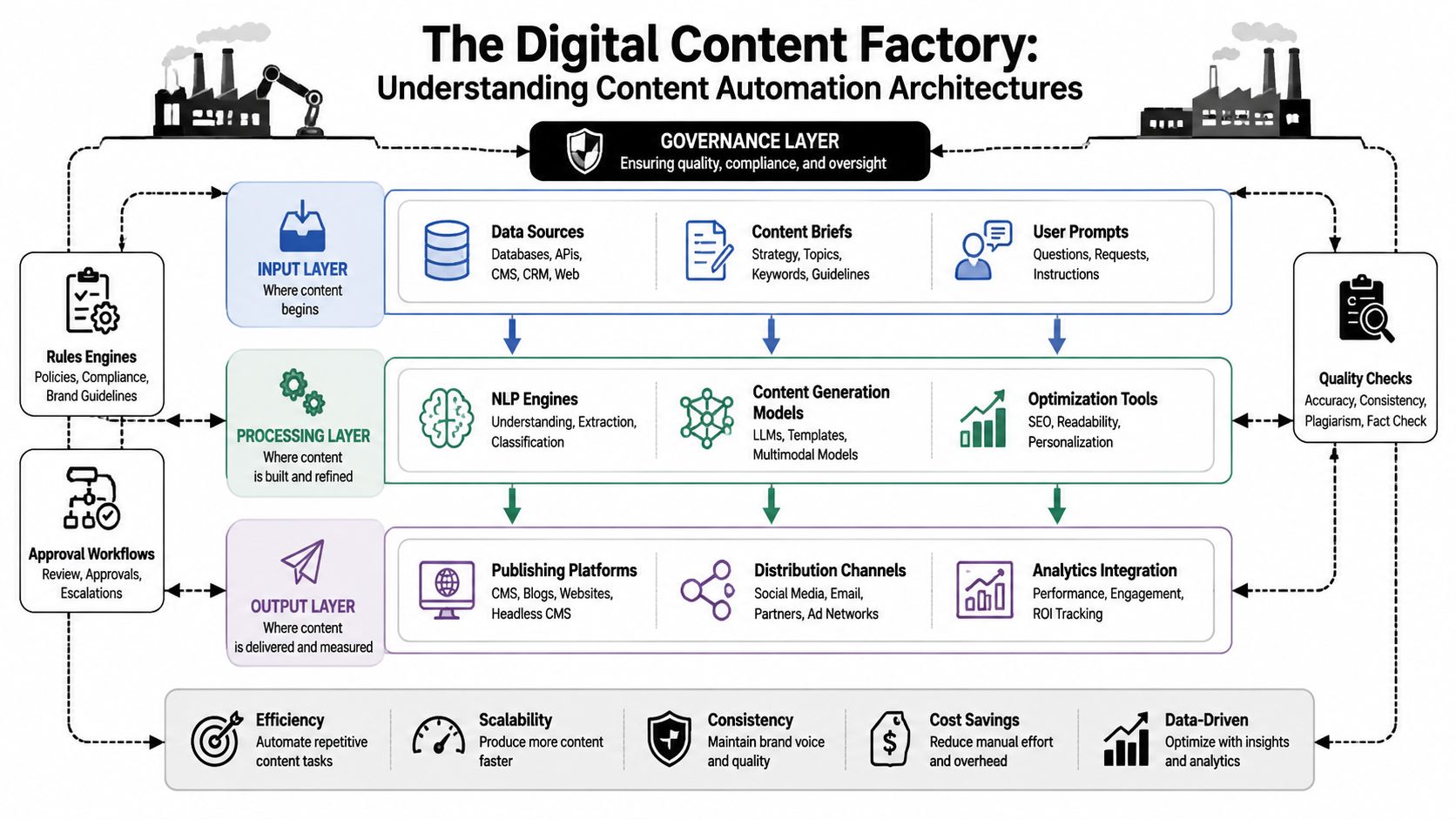
The core pattern behind reliable systems
The easiest way to think about this is as a factory line.
The template is the chassis. It defines what must stay consistent. That includes brand language, required sections, approved disclaimers, formatting rules, and channel-specific structure. A release note template, for example, might always require feature summary, affected systems, known limitations, and rollout status.
The data layer supplies the moving parts. That might include CRM fields, issue tracker metadata, analytics snapshots, product catalog records, support conversation tags, or incident timelines. The system should pull these directly from source tools where possible. Manual copy-paste is where drift starts.
The generation layer assembles those parts into readable output. Here, language models are useful, but they shouldn't invent the business logic. They should transform approved inputs into the right form for the right audience.
What the workflow actually looks like
In practice, the architecture usually has four layers:
Input layer
Triggers arrive from tools like Slack, Linear, GitHub, Sentry, Intercom, or a CMS. A new incident, shipped feature, or campaign brief starts the flow.Processing layer
The system normalizes data, enriches context, applies templates, and calls a model to generate one or more content variants.Output layer
Drafts move into a destination such as Notion, Google Docs, WordPress, a knowledge base, or a social scheduling tool.Control layer
Rules engines, required citations, approval checkpoints, and exception routing sit around the workflow.
Teams evaluating platforms should look for this system shape, whether they're using custom code, orchestration tools, or agent platforms. A good mental model comes from exploring AI workflow architectures, especially when the goal is to connect generation with operational triggers instead of isolated chat prompts.
Good automated content creation systems reduce manual assembly work. They don't remove human judgment from the parts of the process where judgment is actually needed.
One implementation detail matters more than is typically expected. Start with a single high-volume content type and define success criteria before expanding. That recommendation appears repeatedly in practical guidance because broad rollouts fail when every workflow is different. One narrow pipeline, well instrumented, teaches more than a dozen loosely managed experiments.
What doesn't work is the opposite approach. Feeding a generic model random inputs from half a dozen systems and expecting consistent output usually creates a review burden bigger than the original content work.
Practical Implementation Patterns for Teams
The strongest automated content creation deployments are tied to recurring operational pain. They remove repetitive drafting from workflows that already generate structured signals.
That means the highest-value use cases often don't start with long-form editorial content. They start where teams already have data, triggers, and a clear definition of done. For content leaders, that's useful context. For engineering and operations leaders, it's the difference between a novelty feature and a production system.
Automated content use cases by team
| Team | Use Case | Trigger | Key Integrations |
|---|---|---|---|
| DevOps | Incident post-mortem draft | New incident resolved | Sentry, Slack, Linear, BetterStack |
| QA | Test plan and user documentation draft | Ticket moves to ready for QA | Linear, GitHub, Notion, Slack |
| Growth | Competitor brief and social draft set | New market signal or weekly schedule | PostHog, CRM, web research tools, social scheduler |
A useful planning lens comes from any modern AI content framework that treats creation, optimization, and distribution as connected steps instead of separate tasks. This is where modern AI content framework thinking is useful, especially for teams trying to connect output quality with workflow design rather than prompt tweaks.
DevOps and SRE workflows
A resolved incident already contains the raw material for content. Alerts provide timestamps. Slack threads capture decisions. Error tracking shows impact patterns. Tickets track follow-up actions.
An automated flow can collect those artifacts, map them into a fixed post-mortem template, and generate a first draft that includes incident summary, timeline, likely root cause, mitigation steps, and action items. The human role shifts from writing the document to correcting edge cases and validating the final narrative.
This works well when the system has strict source boundaries. It should only summarize known evidence from Sentry, Slack, BetterStack, and the issue tracker. It should not speculate about root cause if the team hasn't confirmed it.
Where this breaks down is loose prompting. If the model gets a vague instruction like “write a full incident review,” it will smooth over uncertainty. That creates polished documents with weak operational value.
Post-mortems should optimize for traceability, not style.
For teams that want an agent-style implementation, Pazi can connect tools like Slack, Sentry, Linear, GitHub, PostHog, Intercom, and BetterStack so always-on agents can monitor operational events and draft artifacts such as tickets, reports, and documentation with review checkpoints before publication.
QA and documentation workflows
QA teams deal with another common bottleneck. A ticket moves forward, but the surrounding documentation lags behind. Test plans live in one tool, product notes in another, and support-facing guidance doesn't get updated until someone notices confusion downstream.
A cleaner workflow starts when a Linear issue changes state. The system collects acceptance criteria, linked pull requests, commit summaries, and related design notes. It then produces two outputs with different templates:
- Internal QA plan: test coverage checklist, edge conditions, regression concerns, and validation steps.
- User-facing documentation draft: feature explanation, usage steps, expected behavior, and limitations.
This split matters. One source event can generate multiple content types, but each output needs its own structure and review owner. Combining them into one draft usually creates muddled documents that nobody wants to sign off on.
Three implementation details make this pattern work:
- Define content classes: Separate internal operational documents from external user content.
- Use ticket metadata: Priority, component tags, and release labels should shape the template automatically.
- Route by exception: If the issue touches regulated language, billing, or security claims, the flow should pause for manual approval.
Growth and market intelligence workflows
Growth teams often misuse automated content creation by aiming too early at high-volume publishing. The better first move is to automate the research-to-draft loop.
A practical pattern looks like this. A scheduled workflow gathers competitor page changes, product announcements, campaign observations, and performance signals from analytics tools. The system then produces a brief for the team: what changed, which messages competitors are pushing, what topics are gaining attention, and which content angles are worth testing.
From there, the same workflow can draft channel-specific outputs. A short social post, an internal campaign memo, a landing page variant, or a test brief for paid and organic distribution. The model isn't deciding strategy on its own. It's compressing repetitive synthesis work so the team can decide faster.
This is also where teams should resist the urge to publish everything generated. Growth systems need filtering logic. Some drafts deserve testing. Others should stay internal as research support.
Building a Governance Framework for AI Content
Governance is where most automated content creation programs either mature or fail.
A recent industry and legal analysis argues that the primary gap isn't basic human review. It's the lack of operationalized controls for brand compliance, fact-checking, and bias management across workflows, according to StudioLabs' analysis of AI content benefits and challenges. That point matters because organizations now generate text, images, video, and social content across multiple tools. Reviewing each output one by one doesn't scale.
Human review is not enough
The phrase “human in the loop” sounds responsible, but it's too vague to run a real system.
Who reviews what. At which stage. Against which checklist. With what authority to approve, reject, or escalate. Those details matter more than the slogan. Without them, review becomes random and inconsistent. One editor checks tone. Another checks accuracy. A third assumes someone else verified the claims.
A governance framework should treat content quality as a control system, not a good intention.
A reviewer should never be the first place where structure, sourcing, and policy are enforced.
Three controls that scale
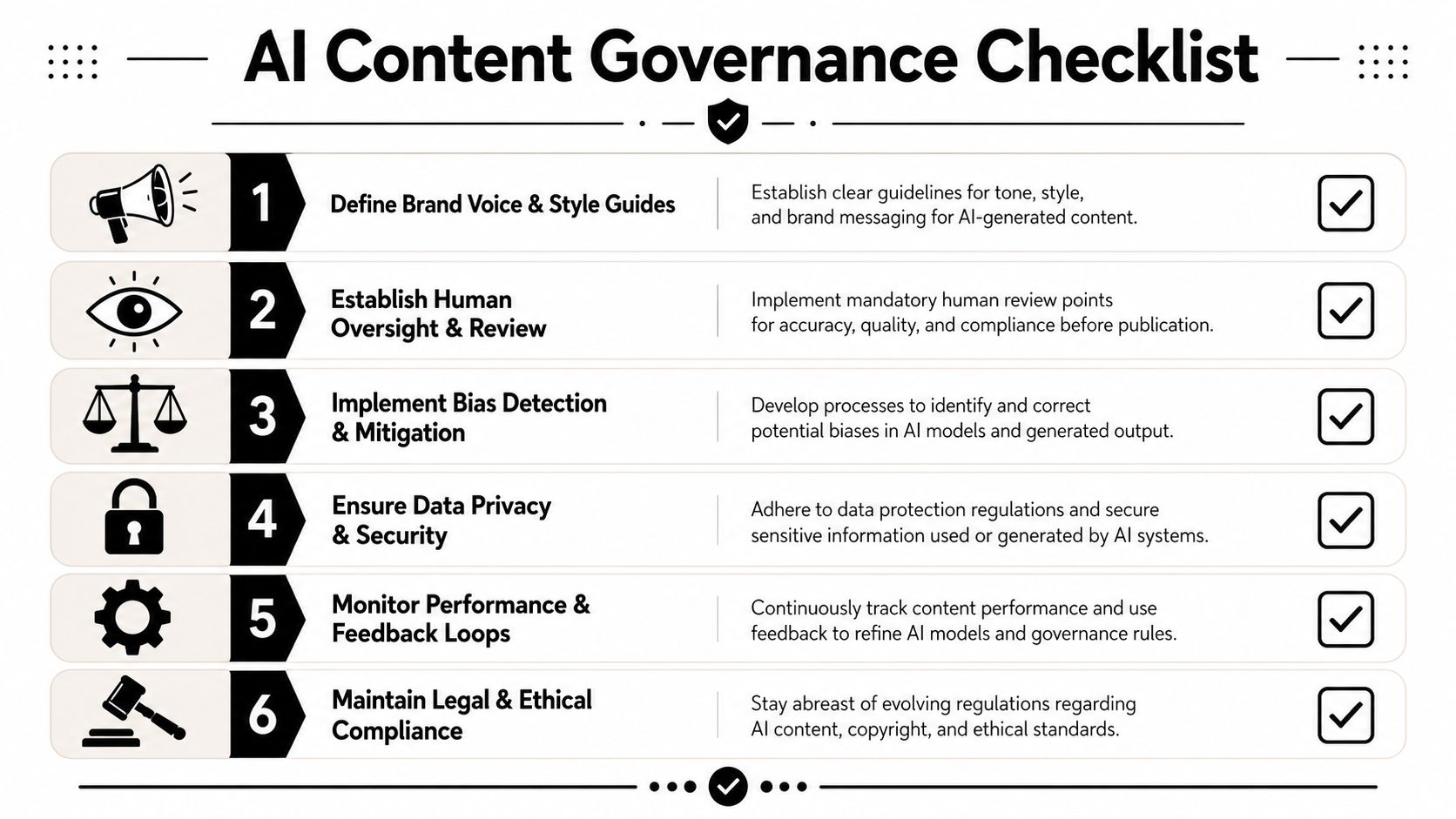
The most practical governance model has three layers.
Brand and style compliance
Templates should carry most of the burden. Required sections, approved terminology, formatting patterns, and channel rules should be embedded before generation happens.
Then add machine checks. Flag banned phrases. Detect missing disclaimers. Require product names to match an approved list. This turns voice and style into enforceable rules instead of subjective clean-up work.
Factual accuracy controls
If a workflow relies on business facts, the model should be constrained to approved inputs or required citations. For internal systems, that may mean limiting source material to ticket metadata, product records, analytics snapshots, or support logs. For external content, it often means requiring traceable source fields before publication.
Useful checks include:
- Source-bound generation: Draft only from approved systems, not open-ended model recall.
- Citation requirements: Store the underlying source records with the draft.
- Exception routing: Pause publication when the workflow detects unsupported claims or missing references.
Risk and bias mitigation
This layer is often ignored until a problem appears in production.
Prompts should include guardrails for sensitive categories, but prompts alone aren't enough. Teams also need classifiers or rule-based filters for policy breaches, bias signals, and privacy issues. If the content touches hiring, health, finance, legal claims, or customer-specific data, the workflow should branch to a stricter review path automatically.
A simple governance checklist is more useful than a long policy document. Define content classes, assign owners, set approval thresholds, log source context, and record every publish decision. The goal isn't bureaucracy. The goal is controlled scale.
Measuring ROI and Business Impact
Automated content creation should not be justified with output volume alone. More drafts don't matter if review time grows just as fast, if quality drops, or if the content doesn't improve distribution outcomes.
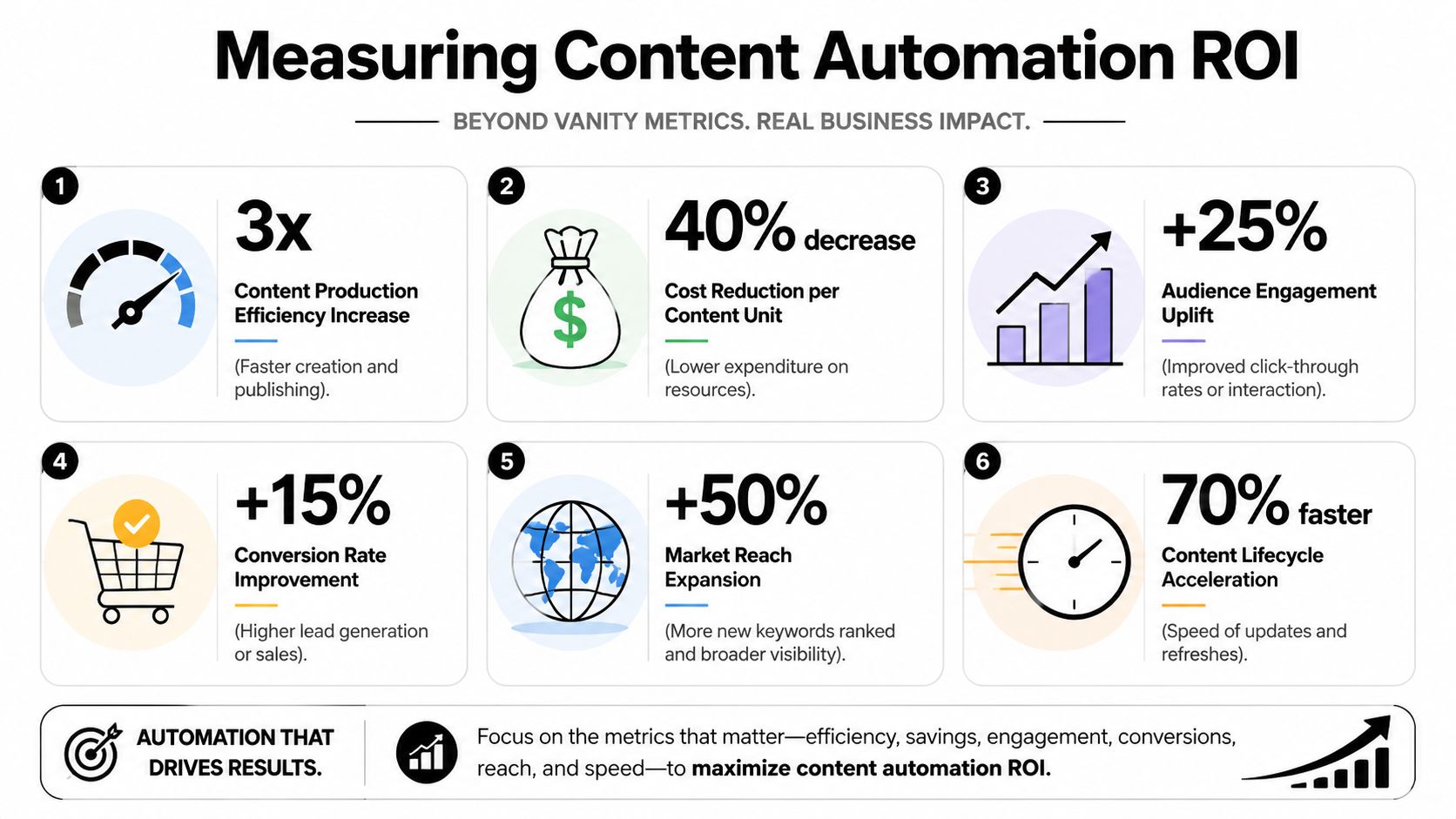
Published industry guidance reports that successful implementations can deliver 50 to 80% time savings per asset, 25 to 40% higher content production, and 15 to 30% engagement improvement within the first six months, with gains tied to reduced manual drafting, faster multi-channel distribution, and feedback loops that optimize variants over time, according to Done For You's guidance on automated content creation at scale.
The metrics that matter
Those benchmarks are useful, but only if the team measures the right layers of value.
Efficiency is the first layer. How long does it take to produce a release note, social draft set, test plan, help article, or post-mortem before and after automation? In this comparison, time savings become most apparent.
Production lift is the second layer. Can the team cover more channels, update stale assets faster, or publish more variants without adding headcount? Higher throughput matters when the extra output is targeted and governed.
Performance is the third layer. Did engagement improve. Did channel coverage improve. Did more variants create better selection decisions. At this stage, automated content creation stops being a cost-saving tool and starts becoming a decision engine.
How teams should prove impact
The strongest ROI model compares three states:
| Measurement area | Before automation | After automation | What to watch |
|---|---|---|---|
| Asset creation time | Manual drafting and editing | Structured generation plus review | Whether review time actually shrinks |
| Output coverage | Limited by staff bandwidth | More variants and channels | Whether added volume stays useful |
| Content performance | One or two static versions | Tested variants by audience or channel | Whether data changes publishing decisions |
This is also where the conversation has to move beyond “Can AI write content?” Newer guidance points toward a better question. Which variant should be published, where, and why? Predictive analytics, A/B testing, and content-opportunity analysis matter because they connect generation to distribution decisions instead of treating publication as the end of the workflow.
If a team can't explain why one variant was chosen over another, it hasn't built an ROI system. It has built a draft generator.
For operators, that distinction is important. The budget case for automated content creation gets stronger when the workflow reduces effort and improves publishing decisions at the same time.
Your First Steps to Pilot and Scale
Many teams should start smaller than they want to.
The right pilot is narrow, repetitive, and easy to measure. Release notes from GitHub and Linear. Incident summaries from Sentry and Slack. Test plans from QA tickets. Help center draft updates from tagged support conversations. These workflows have clear source systems, frequent triggers, and obvious reviewers.
A practical rollout sequence
A workable rollout usually follows this order:
Choose one high-volume workflow
Pick a content type that already happens often and already follows a recognizable structure. Avoid broad editorial programs at the pilot stage.Lock the inputs
Decide which systems count as source truth. If the workflow can pull from anywhere, it will produce inconsistent drafts and endless review cycles.Define success before building
Measure cycle time, review effort, output volume, and downstream performance using the framework above. If success isn't defined first, the pilot will drift into subjective opinions.Add controls early
Templates, approval checkpoints, source requirements, and exception routing should be part of version one. Governance added later is usually more painful and less effective.Expand by adjacency
After one workflow is stable, move to a neighboring content type that uses similar source systems or review owners.
The teams that scale automated content creation well usually treat it like internal platform work. They standardize patterns, not just outputs. Trigger in, structured context collected, template applied, model generates, controls evaluate, reviewer handles exceptions, final asset publishes, metrics feed back into the next run.
That's the practical path beyond demos. Not more prompting. Better systems.
Teams that want to operationalize automated content creation inside engineering, QA, support, and growth workflows can evaluate Pazi as one option for connecting agents to Slack, Linear, GitHub, Sentry, PostHog, Intercom, and other tools so content-related work can run through review checkpoints instead of living in isolated prompts.